Instrukcja obsługi ATen CS22D
ATen przełącznik CS22D
Przeczytaj poniżej 📖 instrukcję obsługi w języku polskim dla ATen CS22D (3 stron) w kategorii przełącznik. Ta instrukcja była pomocna dla 15 osób i została oceniona przez 6 użytkowników na średnio 4.0 gwiazdek
Strona 1/3
CS22D 2-Port USB DVI KVM Switch Quick Start GuideConmutador KVM de 2 puertos para USB con DVI CS22D - Guía rápida
Guide de démarrage rapide du commutateur KVM DVI USB à 2 ports CS22DSwitch KVM USB DVI CS22D a 2 porte – Guida rapida
CS22D2-Port-KVM-SwitchmitUSBfürDVI-GrakKurzanleitungКраткоеруководствопользователя2-портовогоKVM-переключателяUSBDVICS22D
www.aten.comwww.aten.com
www.aten.comwww.aten.com
www.aten.comwww.aten.com
Package Contents
1 CS22D 2-Port USB DVI KVM Switch
1 User Instructions
© Copyright 2019 ATEN
®
International Co., Ltd.
ATEN and the ATEN logo are trademarks of ATEN International Co., Ltd. All rights reserved.
All other trademarks are the property of their respective owners.
This product is RoHS compliant.
Part No. PAPE-1223-A60G Printing Date: 04/2019
2-Port USB DVI KVM Switch
Quick Start Guide
CS22D
Simply Better Connections
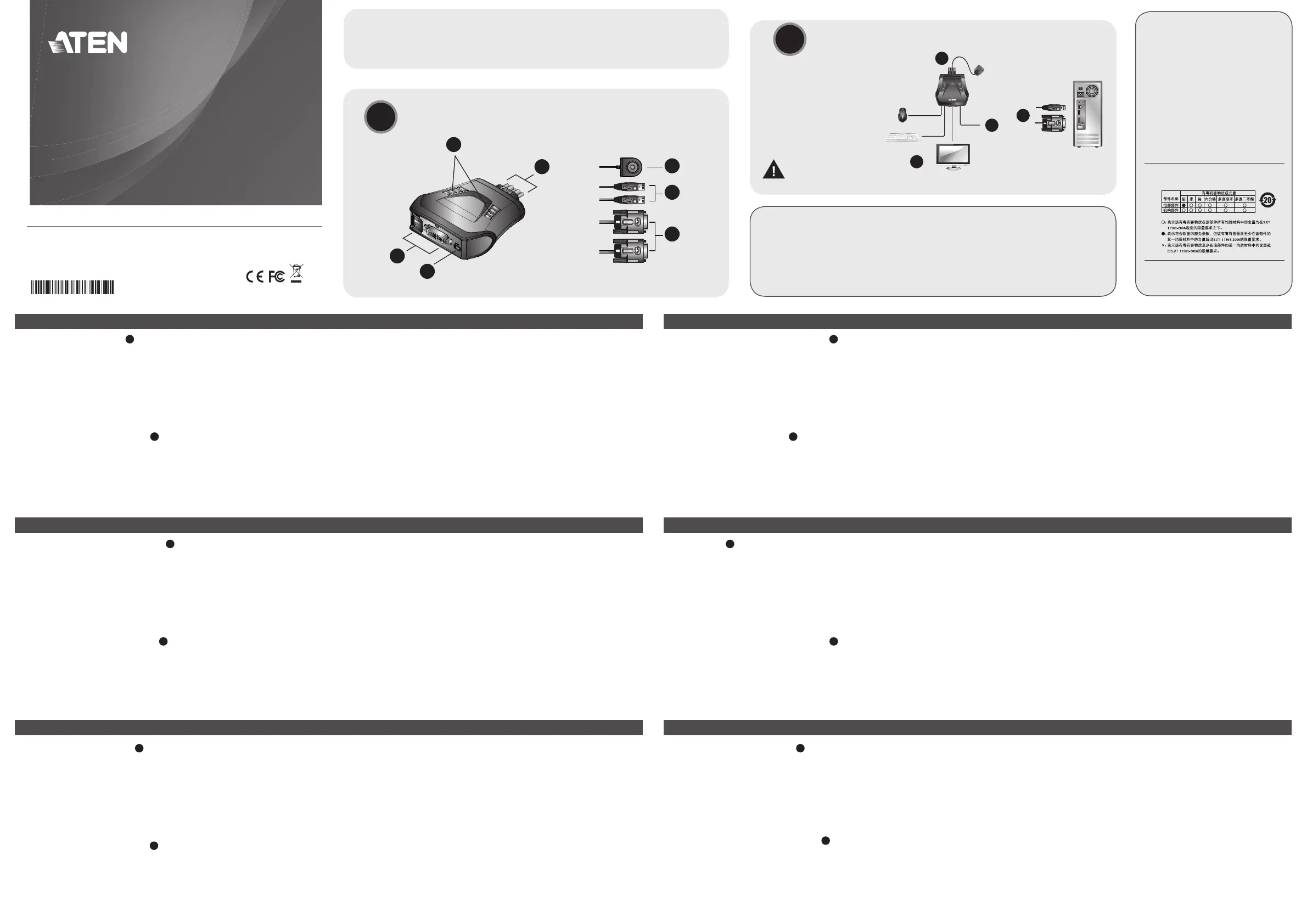
Hardware Review
A
1. Port LEDs
2.KVMCables
3.ConsolePorts
4. USB Power In
5.RemotePortSelector
6. USB Keyboard and Mouse Connectors
7. DVI Connectors
Hardware Installation
B
1.PlugyourUSBkeyboard,USBmouse,andmonitorintotheirrespective
ports on the CS22D.
Note :TheUSBport(s)canbeusedforUSBperipheralsharing.Todoso,
plugtheperipheralsandyourkeyboardormouseintoaUSBhub,
thenplugthehubintothekeyboardormouseport.
Presentación del hardware
A
1.IndicadoresLEDdelospuertos
2.CablesKVM
3.Puertosdeconsola
4.EntradadealimentaciónUSB
5.Selectordepuertosindependiente
6.ConectoresUSBparatecladoymouse
7. Conectores DVI
Instalar el hardware
B
1.ConectesutecladoUSB,mouseUSBymonitoralospuertos
correspondientesdelCS22D.
Nota : El/lospuerto(s)USBsepuede(n)utilizarparacompartir
dispositivosUSB.Paraello,conectelosperiféricosysutecladoo
mouseaunconcentradorUSByluegoconecteelconcentradoral
puertoparatecladoomouse.
Description de l’appareil
A
1. Voyants des ports
2.CâblesKVM
3.Portsdeconsole
4.Entréed’alimentationUSB
5.Sélecteurdeportdistant
6.ConnecteursclavieretsourisUSB
7. Connecteurs DVI
Installation du matériel
B
1.BranchezvotreclavierUSB,votresourisUSBetvotremoniteursurles
ports correspondants du CS22D.
Remarque : Vouspouvezutiliserleoulesport(s)USBpourpartager
plusieurspériphériquesUSB.Pourcefaire,brancher
lespériphériquesetvotreclavierouvotresourisàun
Hardware
A
1.LEDdelleporte
2.CaviKVM
3.Portedicollegamentoallaconsole
4.IngressoalimentazioneUSB
5.Selettoreremotodellaporta
6. Connettori USB di tastiera e mouse
7. Connettori DVI
Installazione dell’hardware
B
1.CollegarelatastieraUSB,ilmouseUSBeilmonitorallerispettiveporte
sulCS22D.
Nota : La/eporta/eUSBpuò/possonoessereutilizzata/eperla
condivisionediperifericheUSB.Atalne,collegareleperiferichee
latastieraoilmouseaunhubUSBepoiinserirel’hubnellaporta
dellatastieraodelmouse.
Hardwareübersicht
A
1. Port-LEDs
2.KVM-Kabel
3.Konsolports
4.BuchsefürStromversorgungüberUSB-Bus
5.UnabhängigerPort-Auswahlschalter
6.USB-Tastatur-undMausanschlüsse
7.AnschlüssefürDVI
Hardware installieren
B
1.SchließenSieIhreUSB-Tastatur,USB-MausunddenMonitorandie
entsprechenden Buchsen des CS22D an.
Hinweis: Derbzw.dieUSB-Port(s)kannbzw.könnenauchfür
freigegebeneUSB-Peripheriegeräteverwendetwerden.Dazu
schließenSiediePeripheriegeräteundIhreTastaturbzw.Maus
Обзор оборудования
A
1.Индикаторыпортов
2.KVM-кабели
3.Портыконсоли
4.ВходпитанияUSB
5.Удаленныйпереключательпорта
6.РазъемыклавиатурыимышиUSB
7.РазъемыDVI
Установка оборудования
B
1.ПодключитеклавиатуруUSB,мышьUSBимониторк
соответствующимпортамCS22D.
Примечание.USB-порт(ы)можетиспользоватьсядляобщего
доступакпериферийнымUSB-устройствам.Дляэтого
подключитепериферийныеустройстваиклавиатуру
илимышькUSB-концентратору,азатемподключите
2.PlugtheUSBandDVIconnectorsoftheattachedKVMcablesintotheir
respectiveportsonthecomputersyouareinstalling.
Note: IfthereisonlyoneUSBportonthecomputer,youcanconnecta
USBhubtothecomputer,thenplugtheKeyboard/Mousecable
into the USB hub.
3.(Optional)IfthepowersupplytoyourattachedUSBperipheral(s)isnot
sufcient,pluginUSBcabletotheMiniUSBpowerjacktogetpowerfrom
anotherUSBpowersource.(i.e.,PC,USBhub,5VUSBpoweradapter)
Note :TheUSBtominiUSBcableisnotincludedinthispackage.
Contactyourproductdealerformoredetails.
2.ConectelosconectoresUSByDVIdeloscablesKVMincluidosalos
puertoscorrespondientesdecadaunadelascomputadorasquequiera
instalar.
Nota : sisucomputadorasolotieneunpuertoUSB,podráconectarun
concentradorUSBalacomputadorayconectarloscablespara
tecladoymousealconcentradorUSB.
3.(Opcional)SielsuministroeléctricodelosperiféricosUSBconectados
noessuciente,enchufeuncableUSBalatomaMiniUSBparaobtener
energíaeléctricadeunafuentedeenergíaUSBexterna.(Porejemploun
PC,concentradorUSB,adaptadordealimentaciónUSBde5V)
Nota : ElcableUSBaMiniUSBnoestáincluidoenelpaquete.Póngase
encontactoconsurevendedorparamásinformación.
concentrateurUSBetcederniersurleportdeclavierou
souris.
2.ReliezlesconnecteursDVIetUSBdescâblesKVMfournisauxports
correspondantsdesordinateursàinstaller.
Remarque : S’iln’yaqu’unseulportUSBsurl’ordinateur,vouspouvez
connecterunconcentrateurUSBàl’ordinateuretbrancher
ensuitelecâbledeclavier/sourissurleconcentrateurUSB.
3.(Enoption)Sil’alimentationduoudespériphériquesUSBraccordésn’est
passufsante,raccordezuncâbleUSBauconnecteurd’alimentationmini
USBpourobtenirdel’alimentationdepuisuneautresourced’alimentation
USB(PC,concentrateurUSB,adaptateursecteurUSB5V,etc.).
Remarque :LecâbleUSBversminiUSBn’estpasinclusdansla
livraison.Contactezvotrerevendeurpourplusdedétails.
2.InserireiconnettoriUSBeDVIdeicaviKVMindotazionenellerispettive
portesuicomputerchesistannoinstallando.
Nota : SeilcomputerèdotatodiunasolaportaUSB,èpossibile
collegarciunhubUSBepoiinserireilcavodellatastiera/mouse
nell’hubUSB.
3.(Opzionale)Sel’alimentazionedelleperifericheUSBcollegateè
insufciente,collegareilcavoUSBallapresadialimentazioneMiniUSB
perriceverealimentazionedaun'altrasorgented'alimentazioneUSB.
(p.es.PC,hubUSB,alimentatoreUSBda5V)
Nota :ilcavodaUSBaminiUSBnonèinclusonellaconfezione.
Rivolgersialpropriorivenditorepermaggioridettagli.
aneinUSB-HubunddenHubandenTastatur-bzw.Mausport
an.
2.VerbindenSiedieUSB-undDVIdesmitgeliefertenKVM-Kabelsmitden
entsprechendenPortsderzuinstallierendenComputer.
Hinweis: BesitztIhrComputernureinenUSB-Port,könnenSieeinen
USB-HubmitdemComputerunddieTastatur-undMauskabel
mitdemUSB-Hubverbinden.
3.(Optional)FallsdieStromversorgungderangeschlossenenUSB-Geräte
nichtausreicht,verbindenSiedasUSB-KabelmitderMini-USB-Buchse
fürdieStromversorgung,ummehrStromvoneineranderenUSB-
Stromquellezuerhalten.(ZumBeispielPC,USB-Hub,5-V-USB-Netzteil)
Hinweis: DasUSB-auf-Mini-USB-KabelistnichtimLieferumfang
enthalten.WendenSiesichfürweitereDetailsanIhren
Fachhändler.
концентраторкпортуклавиатурыилимыши.
2.ПодключитеразъемыUSBиDVIкомплектныхKVM-кабелейк
соответствующимпортамустанавливаемыхкомпьютеров.
Примечание.ЕслинакомпьютереимеетсятолькоодинUSB-порт,
можноподключитьккомпьютеруUSB-концентратор,
азатемподключитькUSB-концентраторукабель
клавиатуры/мыши.
3.(Дополнительно)ЕслинаподключенноепериферийноеUSB-
оборудованиеподаетсянедостаточнопитания,подключитеUSB-
кабельвгнездопитаниямини-USB,чтобыполучатьпитаниеиз
другогоисточникапитанияUSB.(т.е.,ПК,концентраторUSB,5В
адаптерпитанияUSB)
Примечание.КабельUSBнамини-USBневходитвкомплект
поставки.Дляполучениядополнительныхсведений
обращайтеськвашемупоставщикупродуктов.
Important Notice
Consideringenvironmentalprotection,ATEN
doesnotprovideafullyprintedusermanual
for this product. If the information contained
in the Quick Start Guide is not enough for
youtoconfigureandoperateyourproduct,
please visit our website www.aten.com, and
download the full user manual.
Online Registration
http://eservice.aten.com
Technical Phone Support
International:
886-2-86926959
North America:
1-888-999-ATENExt:4988
United Kingdom:
44-8-4481-58923
Allinformation,documentation,and
specicationscontainedinthispackageare
subjecttochangewithoutpriornotication
by the manufacturer.
A
Hardware Review
B
Hardware Installation
Thefollowingcontainsinformationthatrelates
to China:
1
5
6
7
3
4
2
2
1
3
2
FEDERALCOMMUNICATIONSCOMMISSIONINTERFERENCESTATEMENT
ThisequipmenthasbeentestedandfoundtocomplywiththelimitsforaClassAdigitaldevice,pursuanttoPart15oftheFCCRules.
Theselimitsaredesignedtoprovidereasonableprotectionagainstharmfulinterferencewhentheequipmentisoperatedinacommercial
environment.Thisequipmentgenerates,uses,andcanradiateradiofrequencyenergyand,ifnotinstalledandusedinaccordancewiththe
instructionmanual,maycauseharmfulinterferencetoradiocommunications.Operationofthisequipmentinaresidentialareaislikelyto
causeharmfulinterferenceinwhichcasetheuserwillberequiredtocorrecttheinterferenceathisownexpense.
FCCCaution:Anychangesormodicationsnotexpresslyapprovedbythepartyresponsibleforcompliancecouldvoidtheuser'sauthority
tooperatethisequipment.
Warning:
ThisisaclassAproduct.Inadomesticenvironmentthisproductmaycauseradiointerferenceinwhichcasetheusermayberequiredto
takeadequatemeasures.
To prevent damage to your installation
from power surges or static electricity,
it is important that all connected
devices are properly grounded.
Specyfikacje produktu
| Marka: | ATen |
| Kategoria: | przełącznik |
| Model: | CS22D |
Potrzebujesz pomocy?
Jeśli potrzebujesz pomocy z ATen CS22D, zadaj pytanie poniżej, a inni użytkownicy Ci odpowiedzą
Instrukcje przełącznik ATen

28 Grudnia 2024
23 Września 2024
23 Września 2024
22 Września 2024
22 Września 2024
22 Września 2024
22 Września 2024
22 Września 2024
22 Września 2024
22 Września 2024
Instrukcje przełącznik
Najnowsze instrukcje dla przełącznik
9 Kwietnia 2025
9 Kwietnia 2025
7 Kwietnia 2025
5 Kwietnia 2025
4 Kwietnia 2025
4 Kwietnia 2025
4 Kwietnia 2025
3 Kwietnia 2025
3 Kwietnia 2025
2 Kwietnia 2025