Instrukcja obsługi Blackberry 7105T
Blackberry telefon komórkowy 7105T
Przeczytaj poniżej 📖 instrukcję obsługi w języku polskim dla Blackberry 7105T (14 stron) w kategorii telefon komórkowy. Ta instrukcja była pomocna dla 20 osób i została oceniona przez 6 użytkowników na średnio 4.2 gwiazdek
Strona 1/14
BlackBerry 7105t™
Getting Started Guide
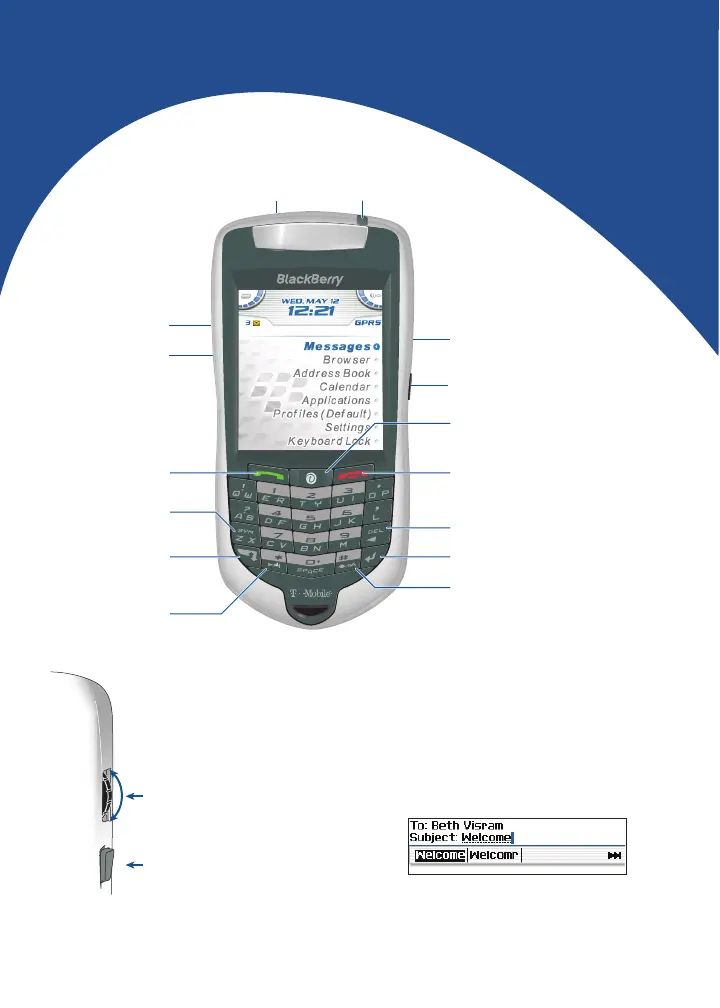
End key
End a phone call
Enter key
Backspace key
Shift key
Type a capital letter
Next key
Move through a list
Alt key
Type the alternate
character on a key
Symbol key
Open the symbol list
Send key
Make a phone call
Convenience key
Open a list of useful links
Open a selected link
Trackwheel
Select or click an item
Escape button
Exit a screen
USB port
Headset jack
Power button
Roll the trackwheelto move the cursor
and highlight items on the screen.
Click (press) the trackwheel to open
the menu or select items.
Press the Escape button to exit a
screen, cancel an action, or go back one
page in the browser.
To type using SureType™ technology, press each
letter key only once until you have typed an entire
word. The letters on the screen change
automatically until a word is formed.
To switch to the multi-tap input method, in a text
field, hold the * key. Press a key once for the first
letter and twice for the second letter.
How do I navigate?How do I type?
Notification LED
Specyfikacje produktu
| Marka: | Blackberry |
| Kategoria: | telefon komórkowy |
| Model: | 7105T |
Potrzebujesz pomocy?
Jeśli potrzebujesz pomocy z Blackberry 7105T, zadaj pytanie poniżej, a inni użytkownicy Ci odpowiedzą
Instrukcje telefon komórkowy Blackberry

1 Października 2024
1 Października 2024
1 Października 2024
1 Października 2024
1 Października 2024
1 Października 2024
1 Października 2024
1 Października 2024
1 Października 2024
1 Października 2024
Instrukcje telefon komórkowy
Najnowsze instrukcje dla telefon komórkowy
3 Kwietnia 2025
3 Kwietnia 2025
3 Kwietnia 2025
3 Kwietnia 2025
3 Kwietnia 2025
3 Kwietnia 2025
3 Kwietnia 2025
2 Kwietnia 2025
1 Kwietnia 2025
1 Kwietnia 2025