Instrukcja obsługi JLab NIGHTFALL Gaming Wired Headset
JLab zestaw słuchawkowy NIGHTFALL Gaming Wired Headset
Przeczytaj poniżej 📖 instrukcję obsługi w języku polskim dla JLab NIGHTFALL Gaming Wired Headset (2 stron) w kategorii zestaw słuchawkowy. Ta instrukcja była pomocna dla 20 osób i została oceniona przez 6 użytkowników na średnio 4.3 gwiazdek
Strona 1/2
NIGHTFALL GAMING
WIRELESS HEADSET
We love that you are rocking JLab!
We take pride in our products and fully stand behind them.
YOUR WARRANTY
All warranty claims are subject to JLab authorization
and at our sole discretion. Retain your proof of
purchase to ensure warranty coverage.
CONTACT US
Reach out to us at support@jlab.com
or visit jlab.com/contact
REGISTER TODAY
jlab.com/register
Product updates | How-to tips
FAQs & more
L
I
M
I
T
E
D
T
W
O
Y
E
A
R
W
A
R
R
A
N
T
Y
S
U
P
P
O
R
T
T
E
A
M
#
T
E
A
M
J
L
A
B
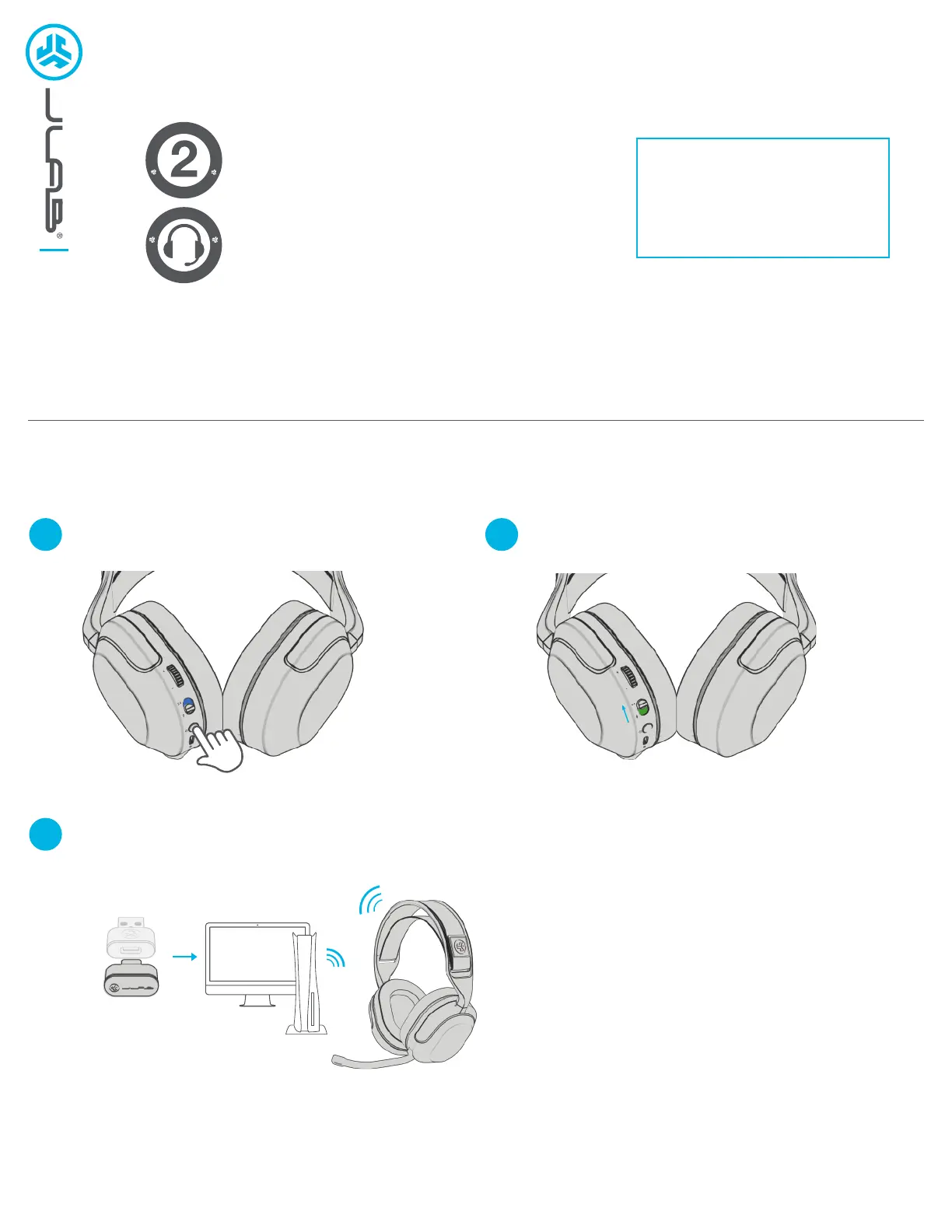
DONGLE CONNECTION
1
3
2
Latency is lowest in 2.4ghz mode, recommended for gaming.
Slide connection switch into 2.4 dongle modePress Hold multifunction button for 3 seconds to turn on
Plug dongle directly into USB-C port or use adapter to plug into USB-A port.
Dongle will work with PC, Mac, PS5, Switch, USB-C tablets and phones
Specyfikacje produktu
| Marka: | JLab |
| Kategoria: | zestaw słuchawkowy |
| Model: | NIGHTFALL Gaming Wired Headset |
Potrzebujesz pomocy?
Jeśli potrzebujesz pomocy z JLab NIGHTFALL Gaming Wired Headset, zadaj pytanie poniżej, a inni użytkownicy Ci odpowiedzą
Instrukcje zestaw słuchawkowy JLab

30 Grudnia 2025
7 Października 2024
4 Października 2024
30 Września 2024
29 Września 2024
25 Września 2024
13 Września 2024
13 Września 2024
2 Września 2024
29 Sierpnia 2024
Instrukcje zestaw słuchawkowy
Najnowsze instrukcje dla zestaw słuchawkowy
9 Kwietnia 2025
8 Kwietnia 2025
30 Marca 2025
30 Marca 2025
28 Marca 2025
27 Marca 2025
26 Marca 2025
9 Marca 2025
2 Marca 2025
25 Lutego 2025