Instrukcja obsługi Kramer KDS-17EN
Kramer przedłużacz AV KDS-17EN
Przeczytaj poniżej 📖 instrukcję obsługi w języku polskim dla Kramer KDS-17EN (4 stron) w kategorii przedłużacz AV. Ta instrukcja była pomocna dla 21 osób i została oceniona przez 6 użytkowników na średnio 4.5 gwiazdek
Strona 1/4
KDS- 17EN Quick Start
P/N:
2900-301678QS
Rev:
1
Scan for full manual
KDS-17EN Start Quick Guide
This guide helps you install and use your KDS-17ENfor the first time.
Go to www.kramerav.com/downloads/KDS17EN-to download the latest user manual and check if firmware
upgrades are available.
Step 1: Check what’s in the box
KDS-17EN 4K60 4:4:4 AVoIP Encoder
1 Bracket set for each product
1 Quick start guide
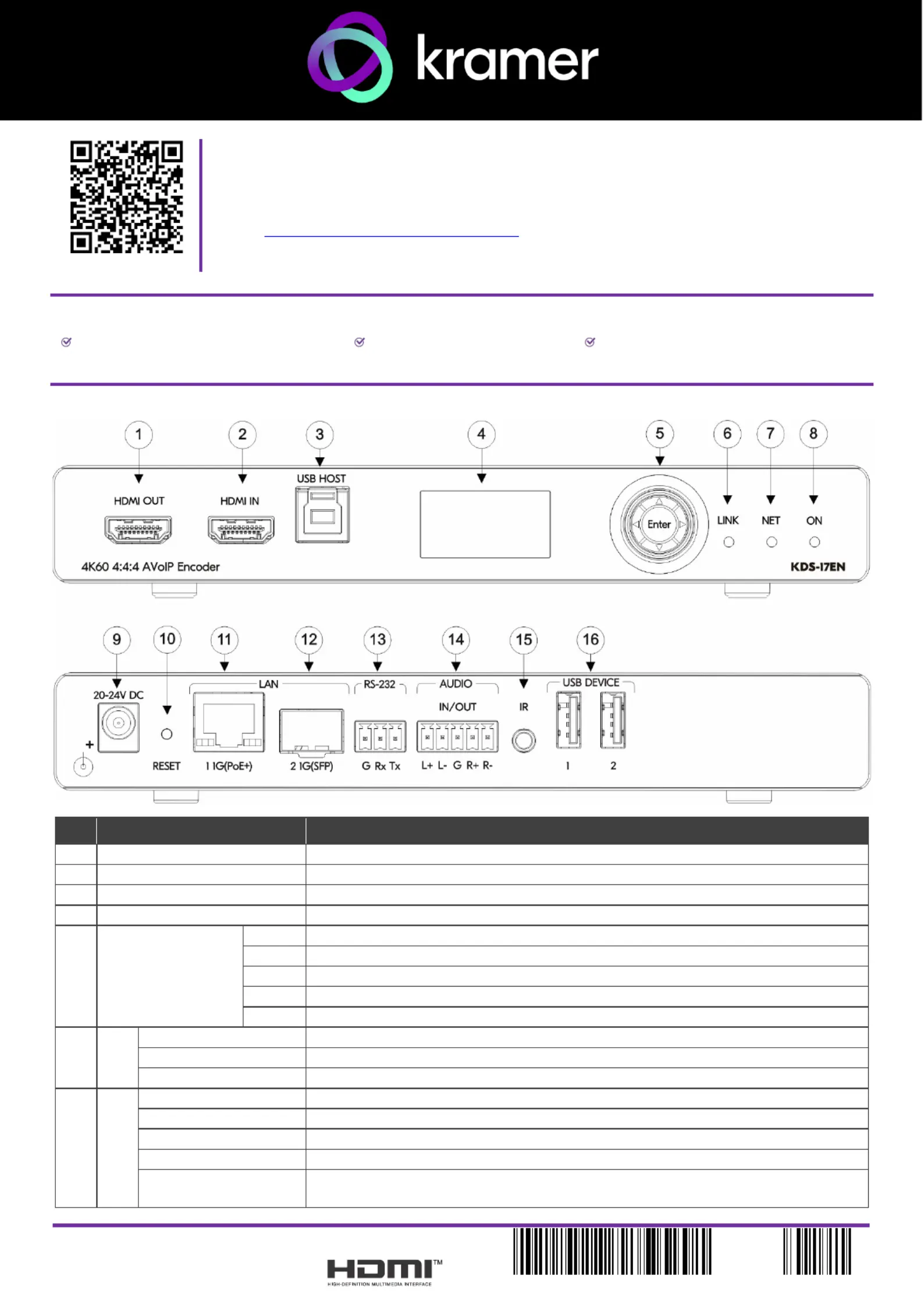
Step 2: -Get to know yourKDS17EN
# ction FeatureFun
1
HDMI OUT Connector
Connect to loop the signal.
2
HDMI IN Connector
Connect to an HDMI source.
3
HOST USB Type B Port
Connect to a USB host, for example, a PC for KVM/USB support.
4
LCD Display
Use for device configuration such as unique channel/AV stream setting.
5
Menu Navigation
Button
Press to return to the previous menu.
Press to go to the next menu.
Press to move up to the next configuration parameter.
Press to move down to the next configuration parameter.
Enter
Press to enter the menu and to accept changes.
6
LINK
LED
Lights Green
A link isestablished from KDSDEC-EN 17to KDS-17and is transmitting A/V signals.
Flashes Green
HDMI input is detected, but no valid AV signal is detected.
Off
No HDMI input is detected.
7
NET
LED
Off
No IP address is acquired.
Lights Green
A valid IP address has been acquired.
Flashes Green Very Fast
When adevice identification command is receivedind (Fme), it flashes for 60 seconds.
Lights Yellow
No DHCP found, dsubnet range 192.168.0.0evice an falls back to IP address in the /16.
Lights Red
Security is blocking IP access.
Specyfikacje produktu
| Marka: | Kramer |
| Kategoria: | przedłużacz AV |
| Model: | KDS-17EN |
Potrzebujesz pomocy?
Jeśli potrzebujesz pomocy z Kramer KDS-17EN, zadaj pytanie poniżej, a inni użytkownicy Ci odpowiedzą
Instrukcje przedłużacz AV Kramer

2 Lutego 2025
19 Grudnia 2024
19 Grudnia 2024
19 Grudnia 2024
19 Grudnia 2024
19 Grudnia 2024
19 Grudnia 2024
19 Grudnia 2024
19 Grudnia 2024
19 Grudnia 2024
Instrukcje przedłużacz AV
Najnowsze instrukcje dla przedłużacz AV
8 Kwietnia 2025
1 Kwietnia 2025
1 Kwietnia 2025
1 Kwietnia 2025
1 Kwietnia 2025
1 Kwietnia 2025
26 Lutego 2025
20 Lutego 2025
20 Lutego 2025
7 Lutego 2025