Instrukcja obsługi Lenovo IdeaCentre 310
Przeczytaj poniżej 📖 instrukcję obsługi w języku polskim dla Lenovo IdeaCentre 310 (2 stron) w kategorii Pulpit. Ta instrukcja była pomocna dla 19 osób i została oceniona przez 6 użytkowników na średnio 4.4 gwiazdek
Strona 1/2
ideacentre
310/510 Series
Quick Start Guide
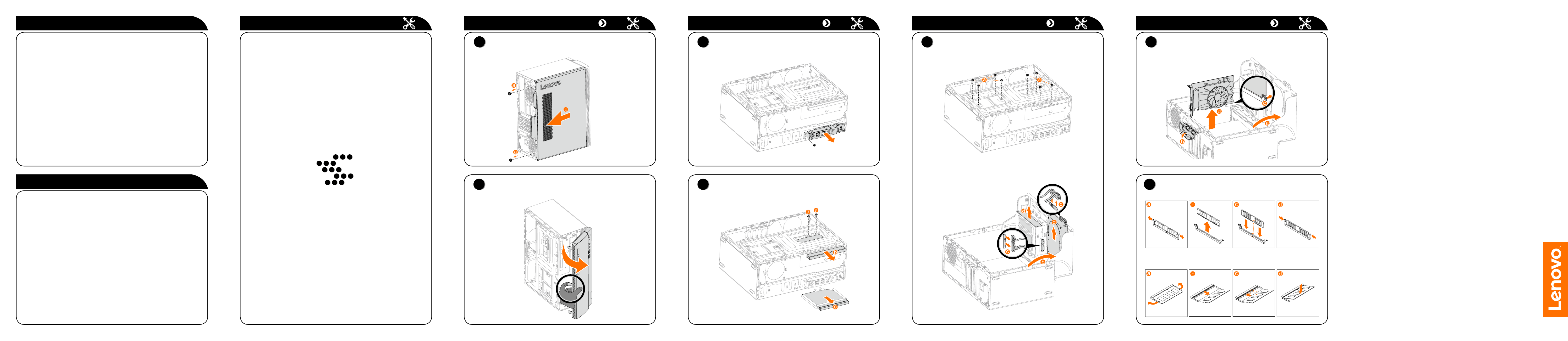
Replacing or upgrading hardware
Safety information for replacing CRUs
Do not open your computer or attempt any repairs before reading the “Important
safety information” in the Safety, Warranty, Environment, Recycling Information
GuideImportant Product Information Guide and that was included with your
computer.
If you no longer have this copy of the Safety, Warranty, Environment, Recycling
Information GuideImportant Product Information Guide and , you can obtain
one online from the website at http://www.lenovo.com/UserManuals.
Pre-disassembly instructions
Before proceeding with the disassembly procedure, make sure that you do the
following:
1. Turn off the power to the system and all peripherals.
2. Unplug all power and signal cables from the computer.
3. Place the system on a flat, stable surface.
The CRUs for your computer including: keyboard, mouse, hard disk drive,
optical drive, card reader module, PCI express adapter, and memory module.
This part contains instructions for replacing the following parts:
• Cardreadermodule(Followsteps:
1
2
3
)
• Opticaldrive(Followsteps:
1
2
4
)
• Harddiskdrive(Followsteps:
1
2
5
)
• PCIexpressadapter(Followsteps:
1
2
6
)
• Memorymodule(Followsteps:
1
2
7
)
Replacing or upgrading hardware
1
Removing the computer cover
2
Removing the front bezel
Replacing or upgrading hardware
4
Replacing the optical drive
Replacing or upgrading hardware Replacing or upgrading hardware
3
Replacing the card reader module
7
Replacing a memory module
Service and Support information
The following information describes the technical support that is available for
your product, during the warranty period or throughout the life of your product.
Refer to the Lenovo Limited Warranty for a full explanation of Lenovo warranty
terms. See “Lenovo Limited Warranty notice” later in this document for details
on accessing the full warranty. If you purchased Lenovo services, refer to the
following terms and conditions for detailed information:
– ForLenovoWarrantyServiceUpgradesorExtensions,
go to: http://support.lenovo.com/lwsu
– ForLenovoAccidentalDamageProtectionServices,
go to: http://support.lenovo.com/ladps
– Onlinetechnicalsupportisavailableduringthelifetimeofaproductat:
http://www.lenovo.com/support
Accessing other manuals
The has been preloaded onto your Important Product Information Guide
computer. To access this guide, do the following:
For models come with Lenovo Companion:
1. OpentheStartmenuandthenclickortapLenovo Companion.
2. Click or tap Support →.User Guide
For models without Lenovo Companion:
OpentheStartmenuandthenclickortapManual to access this guide.
For models without preinstalled operating systems:
Go to the Lenovo Support Web site to access your manuals. See “Downloading
manuals” for additional information.
Downloading manuals
The latest electronic publications for your computer are available from the
Lenovo Support Web site. To download the publications,
go to: www.lenovo.com/UserManuals.
5
Replacing a hard disk drive
6
Replacing a PCI express adapter
or
Specyfikacje produktu
| Marka: | Lenovo |
| Kategoria: | Pulpit |
| Model: | IdeaCentre 310 |
Potrzebujesz pomocy?
Jeśli potrzebujesz pomocy z Lenovo IdeaCentre 310, zadaj pytanie poniżej, a inni użytkownicy Ci odpowiedzą
Instrukcje Pulpit Lenovo

10 Października 2024
2 Października 2024
30 Września 2024
24 Września 2024
14 Września 2024
14 Września 2024
14 Września 2024
13 Września 2024
11 Września 2024
11 Września 2024
Instrukcje Pulpit
Najnowsze instrukcje dla Pulpit
15 Października 2024
15 Października 2024
14 Października 2024
12 Października 2024
9 Października 2024
9 Października 2024
9 Października 2024
8 Października 2024
8 Października 2024
8 Października 2024