Instrukcja obsługi Opticon OPH1005
Opticon czytnik kodów kreskowych OPH1005
Przeczytaj poniżej 📖 instrukcję obsługi w języku polskim dla Opticon OPH1005 (2 stron) w kategorii czytnik kodów kreskowych. Ta instrukcja była pomocna dla 28 osób i została oceniona przez 5 użytkowników na średnio 4.9 gwiazdek
Strona 1/2
Quick Start Guide
• Read this quick start guide carefully before installing and/or using this product.
• Keep this quick start guide for future reference and store in a safe place.
Introduction
OPH
-
1005
Notice
• This quick start guide may be revised or withdrawn at any time without prior notice.
• This quick start guide may not, in whole or in part, be copied, photocopied, reproduced, translated or con-
verted to any electronic or machine readable form without prior written consent of Opticon.
• Trademarks used are property of their respective owners.
• Under no circumstances shall Opticon be held responsible for any special, incidental, consequential or
indirect damages howsoever caused.
Caution and Warning
1. Laser Safety
• Do not stare into the laser beam.
2. Handling Instructions
【
OPH-1005
】
• Do not attempt to disassemble, modify or update this device.
• Operating the scanner while operating machinery or a vehicle can be distracting.
• Do not drop this product or put heavy items on this product.
• Do not insert foreign substances into the device.
• Do not use this product in the following areas:
- In areas exposed to direct sunlight for long periods of time.
- In dusty environments.
- Near water or other liquids, or in extremely high humidity.
- Near heat sources, such as radiators, heat registers, stoves, or other types of devices that produce heat.
- Near microwaves or medical devics.
•
Wh
en cleaning this product, rub gently with either a soft dry cloth or a damp cloth with mild detergent.
【
Battery Pack
】
• Do not attempt to disassemble this battery.
• Do not expose the battery pack to liquids or allow the battery contacts to get wet.
• Do not expose the battery pack to heat sources including other devices that produce heat.
• Do not short the power leads on the battery pack. If the (+) and (-) terminals come in contact with metals
(such as a necklace or hairpin), a short-circuit will occur.
• Do not load the battery pack with its (+) and (-) terminals reversed.
• Check the local regulations for proper battery disposal.
(Please refer to the specification manual and instruction guide for details.)
■
Detailed View
Overview
■
OPH-1005 Basic Specifications
ParameterSpecifications
Physical
Features
Size
(H) 136.1 x (W) 55.4 x (D) 22.8 mm
Weight
Approx. 140g (including Li-ion battery)
Control
Section
CPU
32bit MCU
OS
Proprietary
Memory
FROM
4MB
RAM
4MB
Display
Section
Material
LCD (262144 color)
Number of dots
320dots x 240dots
Dot size
0.24mm x 0.24mm
Dot pitch
0.18mm
BacklightWhite LEDs
Contrast Control
Enabled
Other Display
Section
LED
Bi-color LED (Red and Green)
Buzzer
Tone and loudness can be configured
Operation Section
Keys23 keys
Scanning
Section
Light Source
Red laser diode
Wavelength
650
±
10nm
Light Output
1mW or less
Scan Rate100
±
20scan/sec
Supported
Symbologies
JAN, EAN, UPC-A, UPC-E, NW-
7(Codabar), Industrial 2 of 5,
Interleaved 2 of 5, Code 11,
Code 39, Code 93, Code 128,
MSI/Plessey, UK/Plessey, IATA,
Telepen, Matrix 2 of 5, S-Code,
Tri-Optic, Chinese Post, EAN 128,
RSS-14, RSS Limited, RSS
Expanded, PDF417, MicroPDF417
Power
Supply
Section
Main Battery
Lithium-ion battery (3.7V 1100mAh)
Backup Battery
Manganese dioxide lithium-ion battery (11mAh)
Operating Time
Approx. 50 hours (2 scans/10 sec)
Data Retention Time
More than 24 hours
Comm.
Section
IrDA
IrDA Ver. 1.2
Baud rate: (SiR): 9600 to 115.2kbps
Clock
Section
Real Time
Clock (RTC)
Supports year, month, day, hour,
minute, second (leap year supported)
Durability
Operating Temp.
-10 deg. C to 50 deg. C
Operating Humidity
20% to 85% (non-condensing)
Storage Temp.
-20 deg. C to 60 deg. C
Storage Humidity
20% to 85% (non-condensing)
Charging Temp.
0 deg. C to 40 deg. C
Ambient Light
Immunity
Fluorescent: up to 4,000lx
Sunlight: up to 80,000lx
Dust- and Drip-proof
IP54
Shock
Endurance
Dropped 3 times from each of 6 angles
onto concrete from a height of 150cm
with no defects found. (Total 18 times)
Copyright
©
2012, Opticon All rights reserved.
No.ItemFunction
1Portable TerminalA laser portable terminal with a barcode scanning feature.
2
Strap
3
Quick Start Guid
Provides product information and instruction guide.
Before Getting Started
■
What's in the Box
Confirm that you have the following items before getting started:
* The number of accessories may differ depending on the product specification.
Please contact the nearest dealer if accessories are damaged or missing.
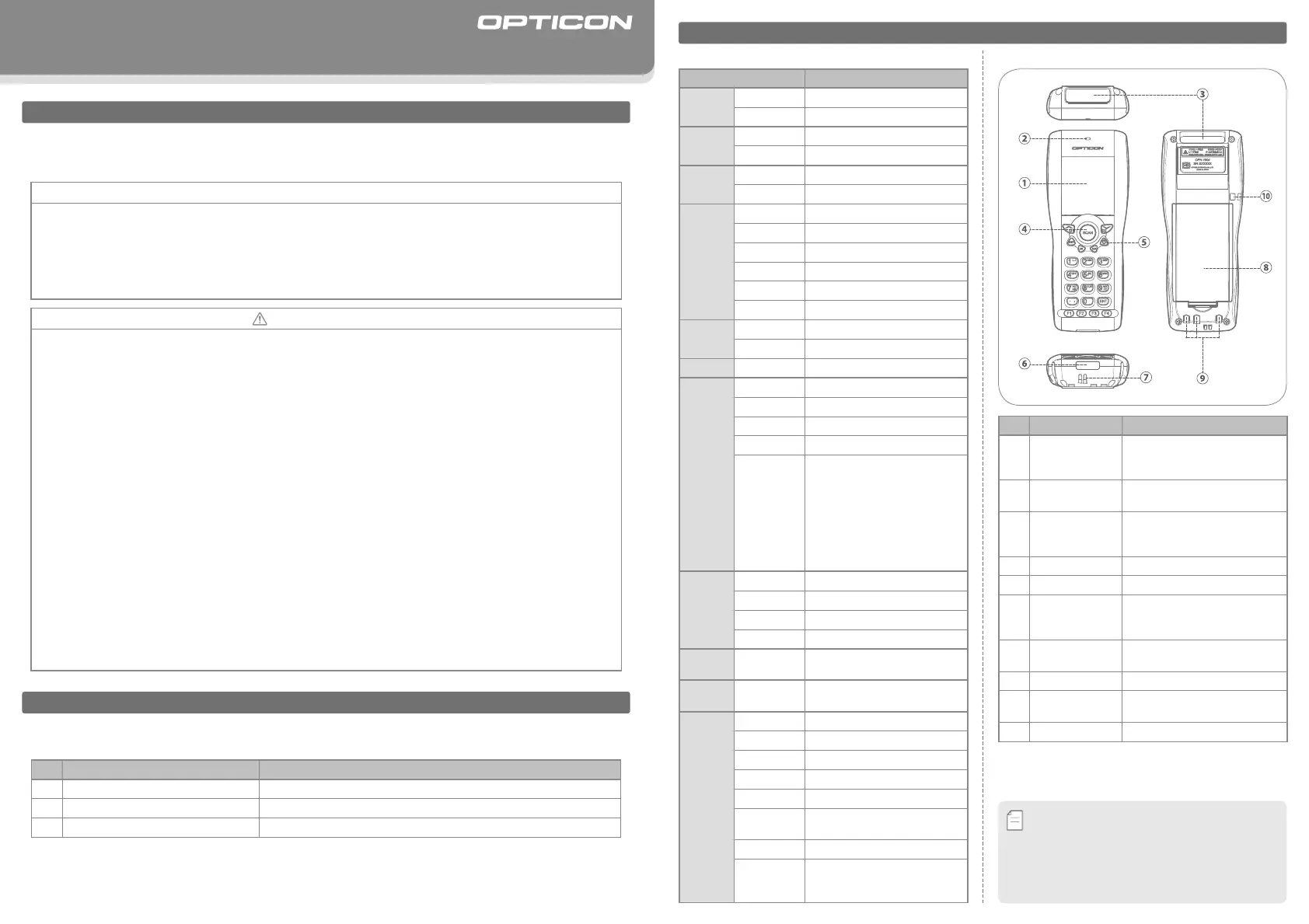
No.PartFunction
①
LCD
Indicates the status of program
execution, scanned data and so
on.
②
Status LED
(Red and Green)
Alerts users the status of scanning
operation and data communication.
③
Optical Window
The scan engine emits a laser beam
through the optical window while
scanning a barcode.
④
SCAN Key
Starts a barcode scanning operation.
⑤
POWER KeyTurns ON or OFF the power.
⑥
IrDA
Communication
Window
This portable terminal communicates
with the designated cradle through
the IrDA communication window.
⑦
Buzzer Hole
Buzzer sounds through the buzzer
hole.
⑧
Battery CoverProtects the battery pack.
⑨
Charging
Terminals
Electrical terminals for power
distri-
bution and power management.
⑩
Strap Hook
・
To avoid communication problems between the portable
terminal and a cradle, keep the IrDA communication
window clean.
・
The IrDA communication performance may decline
due to excessive ambient light especially under
strong sunlight or inverted fluorescent light.
Memo
Overview
■
KeyLayout
KeyFunction
SCAN
Scansabarcode.
Q1
Navigatethroughthemenuortogglebetweenoptions.
(These keys can be programmed suitable for user
ʼ
s application.)
Q2
SHIFT
Shifts from
“
number input mode
”
to
“
alphabet
input mode
”
and vice versa.
BSDeletesoneletterbeforethecursor.
CLRCancelsaninput.
POWERTurnsthepowerONandOFF.
0-9,.
10numerickeystoinputnumbers,alphabetsor
symbols.
ENTDeterminestheinput.
F1-F4
4functionkeyswhichcanbeprogrammedbyauser.
ご
使用
にあたって
TroubleShooting
TheportableterminaldoesnotgetpoweredON.
A.Thebatteryleveloftheportableterminalmaybeextremelyloworempty.Pleasetryagainafteryoucharge
theportableterminal.
B.Checkifthebatterycoverisclosedtight.
The portable terminal does not read a specific type of barcode.
A.That specific type of barcode may not be supported by the portable terminal. Please confirm the specification manual
oftheportableterminalfordetailsofsupportedsymbologies.
B.Thespecifictypeofbarcodemaynotbeenabledintheapplication.Changethesettingsinyourapplication.
Theportableterminaldoesnotreadabarcodesmoothly.
A.Thescanningperformanceoftheportableterminalmaydeclineduetoinappropriatescanangle.Pleaseadjust
theangleoftheportableterminalandtryagain.Makesurethatthebarcodeiswithinthewidthofthelaser
aimingpattern.
Using the Portable Terminal
■
How to Insert or Exchange a Battery
STEP3STEP2STEP1
Pleaseopenthebatterycoverbefore
insertingorexchangingabattery.
STEP
1
Makesurethatthebatterycontactsarein
contactwiththespringcontactsofthe
portableterminal.
STEP
2
Please close the battery cover.
STEP
3
DesignatedCradles
(Optional)*
Weofferaseriesofcommunicationandchargingcradleswithdifferentcommunicationmethods.
Pleaseselectthemostsuitablecradleforthedesiredoperation.
*Pleaserefertothespecificationmanualortheinstructionguidefordetailsofdesignatedcradles.
*AdesignatedSIMcardwillbeneededtousetheCRD-1003GSMcradle.
Memo
CRD-1001
Communication&
ChargingCradle
Communication Method
(Cradle to Host)
CommunicateswiththehostviaRS-232CorUSBinterface.
Size
(H)70.0
×
(W)68.0
×
(D)96.0mmMax
Weight110gMax(excludingACadapterandcable)
Charging Time
2 hours and 10 minutes
RS-232CUSB
*Thelayoutofkeysmaydifferdependingonthe
productspecification.
Memo
The Netherlands
Opticon Sensors Europe B.V.
tel: +31 (0)23-5692700
/
email: sales@opticon.com
U.S.A.
Opticon Inc.
tel: 800-636-0090
/
email: opticon@opticonUSA.com
France
Opticon S.A.S.
tel: +33 (0)1-41461260
/
email: opticon@opticon.fr
Germany
Opticon Sensoren GmbH
tel:+49(0)6074-91890-0
/
email:sales.de@opticon.com
Italy
Opticon s.r.l.
tel:+39(0)051-6321800
/
email:opticon@opticonitalia.it
Spain
Opticon Sensores S.L.
tel: +34 (0)902-747469
/
email: info@opticon.es
Contact
Sweden
Opticon Sensors Nordic AB
tel:+46(0)8-58548560
/
email:henrik@opticon-sensors.se
United Kingdom
Opticon Limited
tel: +44 (0)1582-635100
/
email: sales@opticon.co.uk
Taiwan
Opticon Far Eastern Ltd.
tel: +886 2-27597444 / email: taiwan@opticon.com
China
OpticonSensorsEuropeB.V.,ShanghaiRepresentativeOce
tel: +86 21-64480881
/
email: china@opticon.com
Australia
Opticon Sensors Pty. Ltd.
tel: +61 (0)2-43402666
/
email: sales@opticon.com.au
Brazil
Opticon Sensors Europe B.V., Latin American Oce
tel: +55 11-5081 2088
/
email: sales.la@opticon.com
Please contact OPTICON or your local dealer.
Moreproductdetails,additionalsupport,andconfigurationoptions(fromtheUniversalMenuBook)areavailableatwww.opticon.com.
OPH10049062-0-00
Communication Method
(Cradle to Host)
Communicates via telephone line and connects to the Public
Switched Telephone Network (PSTN)
Size
(H)70.0
×
(W)68.0
×
(D)96.0mmMax
Weight100gMax(excludingACadapterandcable)
Charging Time
2 hours and 10 minutes
MODEM
CRD-1002
Communication&
ChargingCradle
Communication Method
(Cradle to Host)
Communicates with the host via GSM (Global System for Mobile
Communications) Network.
Size
(H)70.0
×
(W)68.0
×
(D)96.0mmMax
Weight115gMax(excludingACadapterandcable)
Charging Time
3hours
GSM
CRD-1003
Communication&
ChargingCradle
CorrectIncorrect
■
How to Scan a Barcode
Pleaserefertothefollowingexamplesofascanningoperation.
Makesurethatthebarcodeiswithinthewidthofthelaseraimingpattern.
*WhenthecoverisnotclosedcorrectlytheportableterminalwillnotbeturnedON.
Specyfikacje produktu
| Marka: | Opticon |
| Kategoria: | czytnik kodów kreskowych |
| Model: | OPH1005 |
Potrzebujesz pomocy?
Jeśli potrzebujesz pomocy z Opticon OPH1005, zadaj pytanie poniżej, a inni użytkownicy Ci odpowiedzą
Instrukcje czytnik kodów kreskowych Opticon

2 Października 2024
2 Października 2024
2 Października 2024
2 Października 2024
2 Października 2024
2 Października 2024
2 Października 2024
2 Października 2024
2 Października 2024
2 Października 2024
Instrukcje czytnik kodów kreskowych
Najnowsze instrukcje dla czytnik kodów kreskowych
1 Kwietnia 2025
1 Kwietnia 2025
1 Kwietnia 2025
27 Lutego 2025
27 Lutego 2025
27 Lutego 2025
25 Lutego 2025
21 Lutego 2025
21 Lutego 2025
20 Lutego 2025