Instrukcja obsługi StarTech.com HD2VID2
StarTech.com Konwerter audio/wideo HD2VID2
Przeczytaj poniżej 📖 instrukcję obsługi w języku polskim dla StarTech.com HD2VID2 (2 stron) w kategorii Konwerter audio/wideo. Ta instrukcja była pomocna dla 25 osób i została oceniona przez 4 użytkowników na średnio 4.6 gwiazdek
Strona 1/2
Quick-Start Guide
To view manuals, FAQs, videos, drivers, downloads, technical drawings, and more, visit www.startech.com/support.
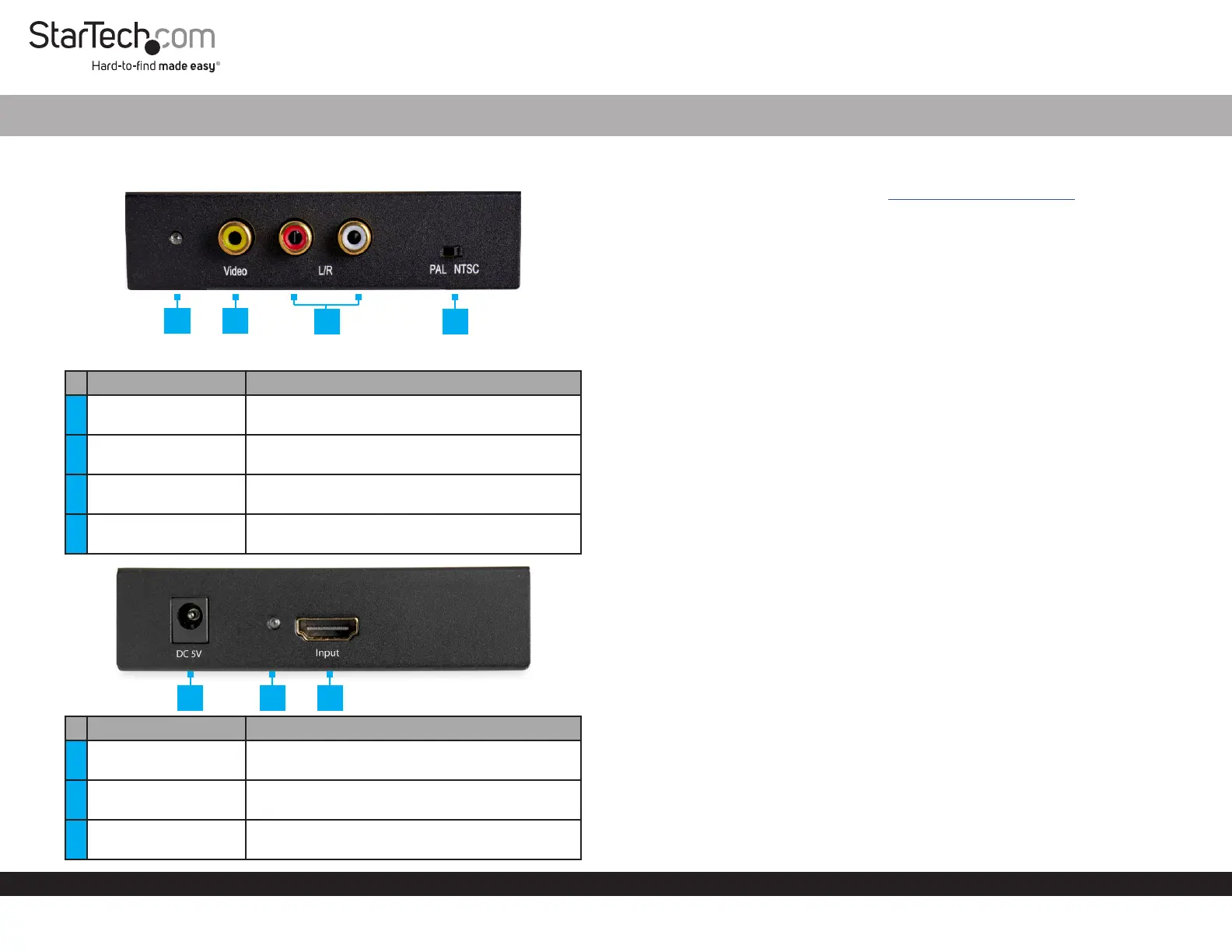
Product Diagram (HD2VID2)
Port/LEDFunction
1Composite LED
• Indicates that video is connected using the
HDMI Port.
2
Composite Video Port
(Yellow)
• Used to connect a Display Device to the
Converter.
3
Stereo Port L/R (Red/
White)
• Used to connect an Audio Device to the
Converter.
4PAL/NTSC Switch
• Used to toggle between PAL and NTSC video
modes.
Port/LEDFunction
5DC/5V Port
• Used with the Universal Power Adapter to
power the Converter.
6Power LED
• Indicates that the Converter is receiving
power.
7HDMI Input Port
• Used to connect a Video Source Device to the
Converter.
HDMI® to Composite Video Converter with Audio
1
Requirements
For the latest requirements, please visit www.startech.com/HD2VID2.
Note: All Required items are sold separately.
• HDMI Enabled Video Source x 1
• Composite Video Enabled Display Device (e.g. Monitor, Projector, HDTV, etc.) x 1
• HDMI Cable x 1
• RCA Composite Video Cable x 1
• Phillips Head Screwdriver x 1
• Composite Audio Cable x 1
Installation
Note: Power o all devices before connecting the Converter.
1. Connect an HDMI Cable to the HDMI Port on the Converter and connect the other
end of the HDMI Cable to the HDMI port on the Video Source Device.
2. Connect an RCA Composite Cable (sold separately) to the Composite Video Port
on the Converter and connect the other end of the RCA Composite Cable to the
composite video port on the Display Device.
3. If HDMI audio is being used, connect Composite Audio Cables (sold separately)
to the Stereo Port L and R Ports on the Converter and the other end of the
Composite Audio Cables to the Speakers/Audio Receiver.
4. Connect the Universal Power Adapter to the DC/5V Port on the Converter and
other end to an AC Electrical Outlet. The Power LED will light up solid.
5. Power on the Video Display Device and the HDMI Video Source.
6. Slide the PAL/NTSC Switch to adjust the video mode to either PAL or NTSC.
Connecting a Regional Power Clip
1. Select a Regional Power Clip.
2. Align the two Side Tabs on the Regional Power Clip with the notches on the face
of the Universal Power Adapter.
3. Slide the Regional Power Clip down until you hear a click, connecting the contact
prongs on the Regional Power Clip with the contact prongs on the Universal
Power Adapter.
2
4
3
56
7
Specyfikacje produktu
| Marka: | StarTech.com |
| Kategoria: | Konwerter audio/wideo |
| Model: | HD2VID2 |
Potrzebujesz pomocy?
Jeśli potrzebujesz pomocy z StarTech.com HD2VID2, zadaj pytanie poniżej, a inni użytkownicy Ci odpowiedzą
Instrukcje Konwerter audio/wideo StarTech.com

10 Stycznia 2025
9 Października 2024
9 Października 2024
9 Października 2024
9 Października 2024
9 Października 2024
9 Października 2024
9 Października 2024
9 Października 2024
9 Października 2024
Instrukcje Konwerter audio/wideo
Najnowsze instrukcje dla Konwerter audio/wideo
7 Kwietnia 2025
3 Kwietnia 2025
2 Kwietnia 2025
2 Kwietnia 2025
1 Kwietnia 2025
1 Kwietnia 2025
1 Kwietnia 2025
29 Marca 2025
28 Marca 2025
26 Marca 2025