Instrukcja obsługi StarTech.com POEEXT1G60W
StarTech.com Wzmacniacz sygnału WiFi POEEXT1G60W
Przeczytaj poniżej 📖 instrukcję obsługi w języku polskim dla StarTech.com POEEXT1G60W (2 stron) w kategorii Wzmacniacz sygnału WiFi. Ta instrukcja była pomocna dla 61 osób i została oceniona przez 9 użytkowników na średnio 4.5 gwiazdek
Strona 1/2
Quick-Start Guide
To view manuals, FAQs, videos, drivers, downloads, technical drawings, and more, visit www.startech.com/support.
Manual Revision: June 19, 2020
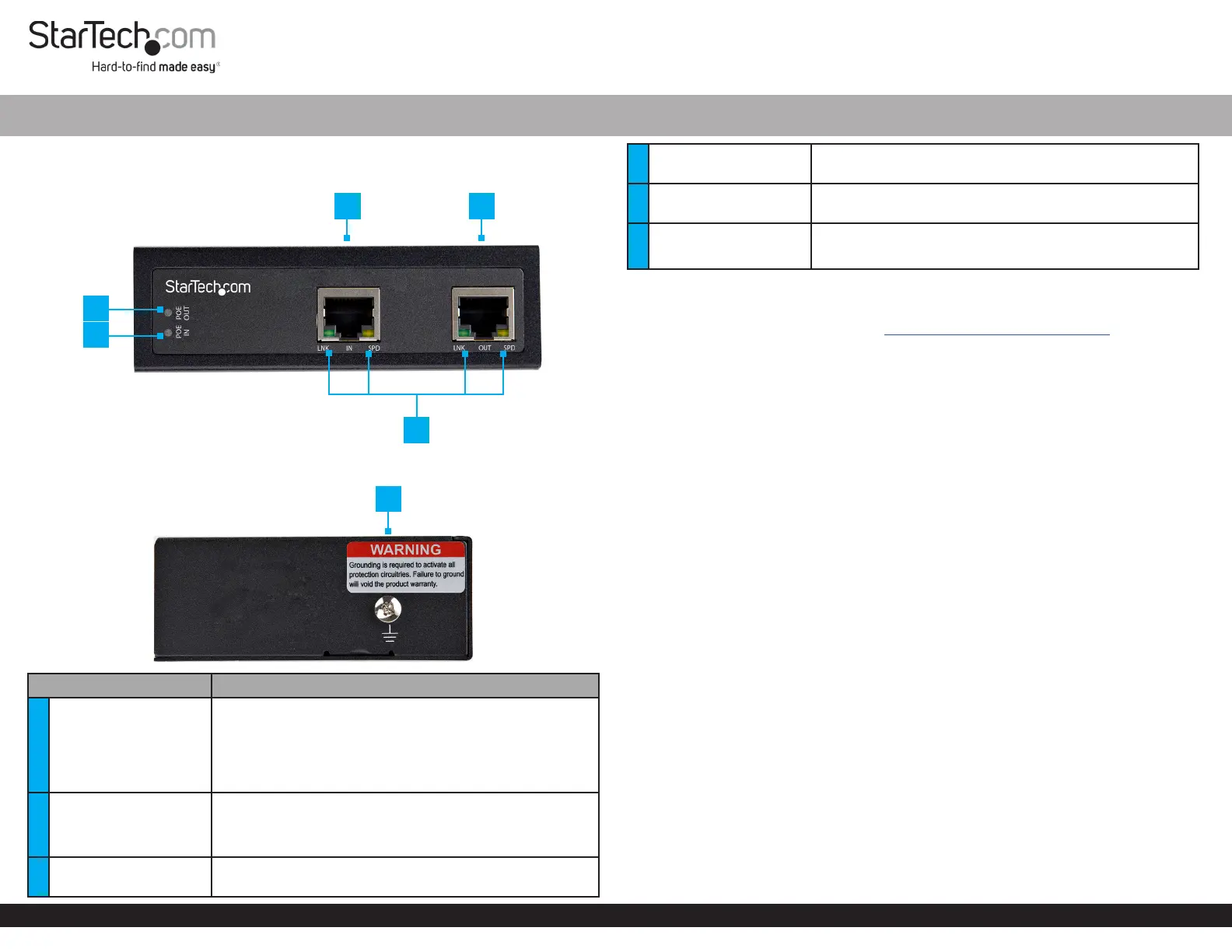
Product Diagram (POEEXT1G60W)
Front View
Side View
ComponentFunction
1
PoE Output LED
Indicator
• Indicates the current status of the PoE Powered
Device (PD)
• ON - Power Source Equipment (PSE) is activated and
PD is detected
• OFF - PSE is not detecting PD
2
PoE Input LED
Indicator
• Indicates the current status of the PSE
• ON - Power is detected
• O - Power is not detected
3PoE Input Port
• PSE provides power and data to the PoE Extender
through a Network Cable
60W Industrial-Grade Hardened 802.3af/at PoE Extender 10/100/1000 Mbps
4PoE Output Port
• The power and data is forwarded to the PD through a
Network Cable
5
PoE Input and Output
LED Indicators
• Indicates the connection status and network speeds of
the PoE Input Port and the PoE Output Port
6Grounding Screw
• Attach a Grounding Wire to protect Network
Equipment
Requirements
For the latest requirements, please visit www.startech.com/POEEXT1G60W.
• Power Source Equipment x 1
• Powered Device x 1
• RJ45 Terminated UTP/STP Cat 5e (or better) Network Cable (sold separately) x 2
• Earth Ground Connection x 1
• Ground Wire x 1
• (Optional) #2 Phillips Head Screwdriver x 1
• (Optional) Screws for Wall Mounting x 2
Installation
Grounding the PoE Extender
1. Using the Phillips Head Screwdriver loosen the Grounding Screw on the PoE
Extender.
2. Attach the Grounding Wire to the Grounding Screw.
3. Tighten the Grounding Screw.
4. Connect the other end of the Grounding Wire to the Earth Ground Connection.
Connecting the PoE Extender to an Existing PoE Connection
1. Connect a Network Cable to the Output Port on a PSE Device and to the PoE
Input Port on the PoE Extender.
2. Connect a Network Cable to the PoE Output Port on the PoE Extender and to the
Input Port on the PD.
Cascade PoE Extenders
1. Connect a Network Cable to the Output Port on a PSE Device and to the PoE
Input Port on the PoE Extender.
2. Connect a Network Cable to the PoE Output Port on the PoE Extender and to the
PoEInput Port on the next PoE Extender.
6
1
34
2
5
Specyfikacje produktu
| Marka: | StarTech.com |
| Kategoria: | Wzmacniacz sygnału WiFi |
| Model: | POEEXT1G60W |
Potrzebujesz pomocy?
Jeśli potrzebujesz pomocy z StarTech.com POEEXT1G60W, zadaj pytanie poniżej, a inni użytkownicy Ci odpowiedzą
Instrukcje Wzmacniacz sygnału WiFi StarTech.com

5 Października 2024
4 Października 2024
22 Września 2024
22 Września 2024
21 Września 2024
21 Września 2024
20 Września 2024
20 Września 2024
19 Września 2024
18 Września 2024
Instrukcje Wzmacniacz sygnału WiFi
Najnowsze instrukcje dla Wzmacniacz sygnału WiFi
29 Marca 2025
29 Marca 2025
24 Marca 2025
21 Lutego 2025
20 Lutego 2025
20 Lutego 2025
20 Lutego 2025
20 Lutego 2025
5 Lutego 2025
5 Lutego 2025