Instrukcja obsługi Advance X-FTB01
Przeczytaj poniżej 📖 instrukcję obsługi w języku polskim dla Advance X-FTB01 (2 stron) w kategorii odbiornik. Ta instrukcja była pomocna dla 39 osób i została oceniona przez 5 użytkowników na średnio 4.1 gwiazdek
Strona 1/2
QuickStartX-FTB01
3ÉTAPESPOURRÉGLERVOTRESYSTÈME
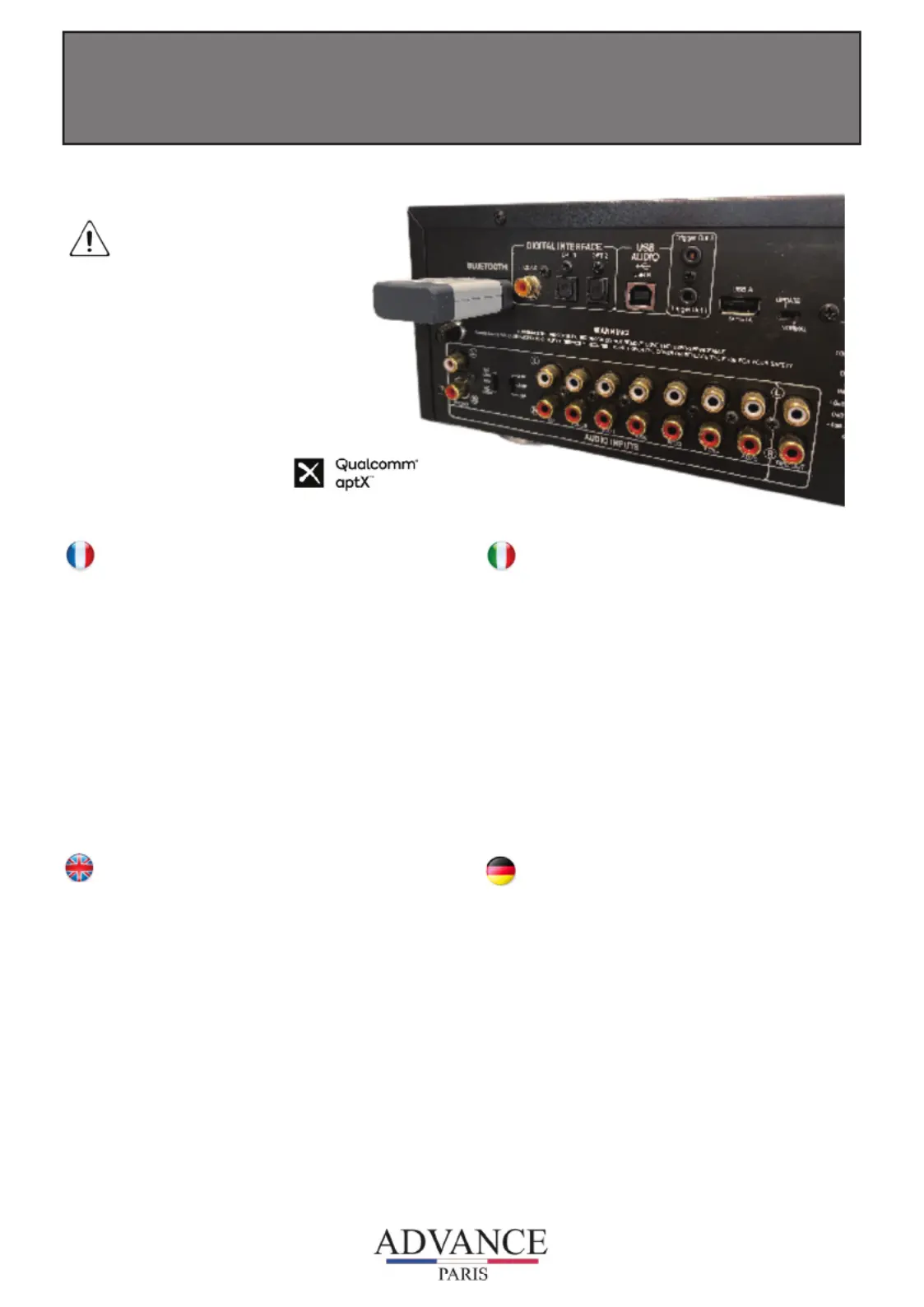
1-ConnecterleX-FTB01l’entréeBluetoothdevotreamplicateurHiFi
commeindiquésurlaphoto.Laledbleudoitclignoter.
2-Allezdanslemenuréglage,sous-menubluetooth,delasource
audioquevoussouhaitezappaireravecvotreX-FTB01.Après
quelquesinstants,leX-FTB01apparaitrasouslenomX-FTB01.
Sélectionnezleetvalidezsaconnexion.AucuncodePinn’est
nécessaire.Lorsquel’appairageestréalisé,laledbleudevientxe.
3-Passervotrepériphèriqueaudioenmodelectureetprotezd’une
restitutionsonoredequalité“AirblueCertied“grâceàlatechnologie
Apt-XBluetooth.
Sivousvouséloignezvotrepériphèriqueaudioàunedistancehorsde
portéedevotresystèmeAir,laliaisonbluetoothsedésactiveraetvous
devrezrépéterl’étape2pourvousreconnecter.Sivoussouhaitez
changerdepériphèriqueBluetooth,vousdevezdésactiverlaconnexion
dupremieretactiverlaconnexiondusecondvialesmenusréglages
respectifs.
TOFINETUNE,FOLLOWTHOSE3STEPS
1-ConnecttheX-FTB01ontheBletoothinputofyourHiFiamplierorAV
receiver.Plugonanoutletthepowersupplyadapter.Theblueledof
yourX-FTB01isashing.
2-GototheBluetoothManagerofyouriPhone,iPodtouch,iPad,tablet,
smartphone,PCorMACcomputer,thengoonthebluetoothsettings.
YouwillseeanewbluetoothconnectionunderX-FTB01name.Conrm
thatyouchooseit,afterfewseconds,youraudiodeviceispairingwith
theX-FTB01.Ifpairingisok,then,theblueledoftheAiramplierwillbe
xed.Youdon’tneedanyPincodeconrmation.
3-YourX-FTB01isnowconnectedandreadytoplaymusic!Justplay
musiconyourdeviceasyounormallywouldandthesoundwillcome
outofyourHiFisystem.
IfyoumoveoutofrangeorturnofftheBluetoothfeatureonyouraudio
device,theBluetoothMusicReceiverwilldisconnectfromyourdevice.
Toreconnect,simplyaccesstheBluetoothManageronyourdeviceand
selecttheX-FTB01connection.
PERSINTONIZZAREILVOSTRO
SISTEMA,SEGUIREQUESTITREPASSAGGI
1-CollegareilX-FTB01suuningressobluetoothdelvostroamplicatore
hioricevitore.Collegarel’alimentatore.IlledbludelvostroX-FTB01
lampeggerà.
2-EntrarenelmenubluetoothdelvostroiPhone,iPodtouch,iPad,tablet,
smartphone,PCocomputerMAC,poiandarenelleimpostazioni
Bluetooth.Vedreteunanuovaconnessionebluetoothsottoilnome
X-FTB01.Confermarelascelta,dopoalcunisecondiilcollega
mentoècompletatoeilledbludell’amplicatoreAirdiventeràsso.
NonènecessarionessuncodicePinperlaconferma.
3-OrailVostroX-FTB01èprontoperfunzionare.E’sufcienteriprodurre
ilsuonodalVostroapparecchioequestosaràemessodalVostro
sistema.Seuscitedall’areadicoperturadelBluetootholospegnete,
ilBluetoothmusicreceiversidisconnetteràdalvostroapparatoper
riconnettersiaccedetealBluetoothmanagerdelvostroapparatoe
selezionatelaconnessioneX-FTB01.
UMDASGERÄTZUNUTZEN,BEFOLGENSIEBITTE
DIEFOLGENDEN3SCHRITTE
1-VerbindenSiedasX-FTB01ModulmitdemBluetoothEingangihres
VerstärkersoderAVReceivers.VerbindenSienundasNetzteil
mitdemAdapter(kleinerStecker)unddanachmitderStromzufuhr.
DieblaueLEDamModulblinktnun.
2-WählenSienundieBluetoothEinstellungenIhresiPhones,iPod
Touchs,iPads,Tablets,Smartphones,PCsoderMACComputers.
SieerkennennunalsverfügbareBluetooth-Verbindung«X-FTB01».
WählenSiediese
Verbindungaus,nacheinigenSekundenwirdIhreAudioquellemit
demX-FTB01Modulgepaart.BeierfolgreicherVerbindungleuchtet
dieLEDamModuldauerhaft.SiebrauchenkeinenCodezur
Verbindungeinzugeben!
3-IhrX-FTB01ModulistjetztverbundenundSiekönnenMusikabspielen.
GebenSiedieMusikwiegewohntaufIhrerAudioquellewieder,die
MusikwirddannvonIhremHiFiSystemwiedergegeben.SolltenSie
außerhalbderReichweitekommenoderdieBluetooth-Verbindung
anIhrerAudioquelleabschalten,wirddasModulvonder
Audioquellegetrennt.
UmwiedereineVerbindungherzustellenwiederholenSie
wiederPunkt2.
www.advanceparis.com
CAUTION
Beforeconnecting
yourX-FTB01,
youneedtomake
sureyourdevice
isturnedo
Specyfikacje produktu
| Marka: | Advance |
| Kategoria: | odbiornik |
| Model: | X-FTB01 |
Potrzebujesz pomocy?
Jeśli potrzebujesz pomocy z Advance X-FTB01, zadaj pytanie poniżej, a inni użytkownicy Ci odpowiedzą
Instrukcje odbiornik Advance

7 Października 2024
7 Października 2024
7 Października 2024
7 Października 2024
7 Października 2024
7 Października 2024
7 Października 2024
7 Października 2024
7 Października 2024
7 Października 2024
Instrukcje odbiornik
Najnowsze instrukcje dla odbiornik
9 Kwietnia 2025
9 Kwietnia 2025
5 Kwietnia 2025
4 Kwietnia 2025
3 Kwietnia 2025
2 Kwietnia 2025
2 Kwietnia 2025
1 Kwietnia 2025
30 Marca 2025
30 Marca 2025