Instrukcja obsługi AMX VARIA-80
AMX nieskategoryzowany VARIA-80
Przeczytaj poniżej 📖 instrukcję obsługi w języku polskim dla AMX VARIA-80 (2 stron) w kategorii nieskategoryzowany. Ta instrukcja była pomocna dla 30 osób i została oceniona przez 5 użytkowników na średnio 4.8 gwiazdek
Strona 1/2
QUICK START GUIDE
VARIA-80 8” Touch Panel
Overview
AMX VARIA- 80(AMX- UTP0811) is an 8” professional-grade touch panel designed
to adapt to the unique needs of your environment by offering a selection of
personas. Varia personas are pre-loaded apps that define the entire panel
experience.
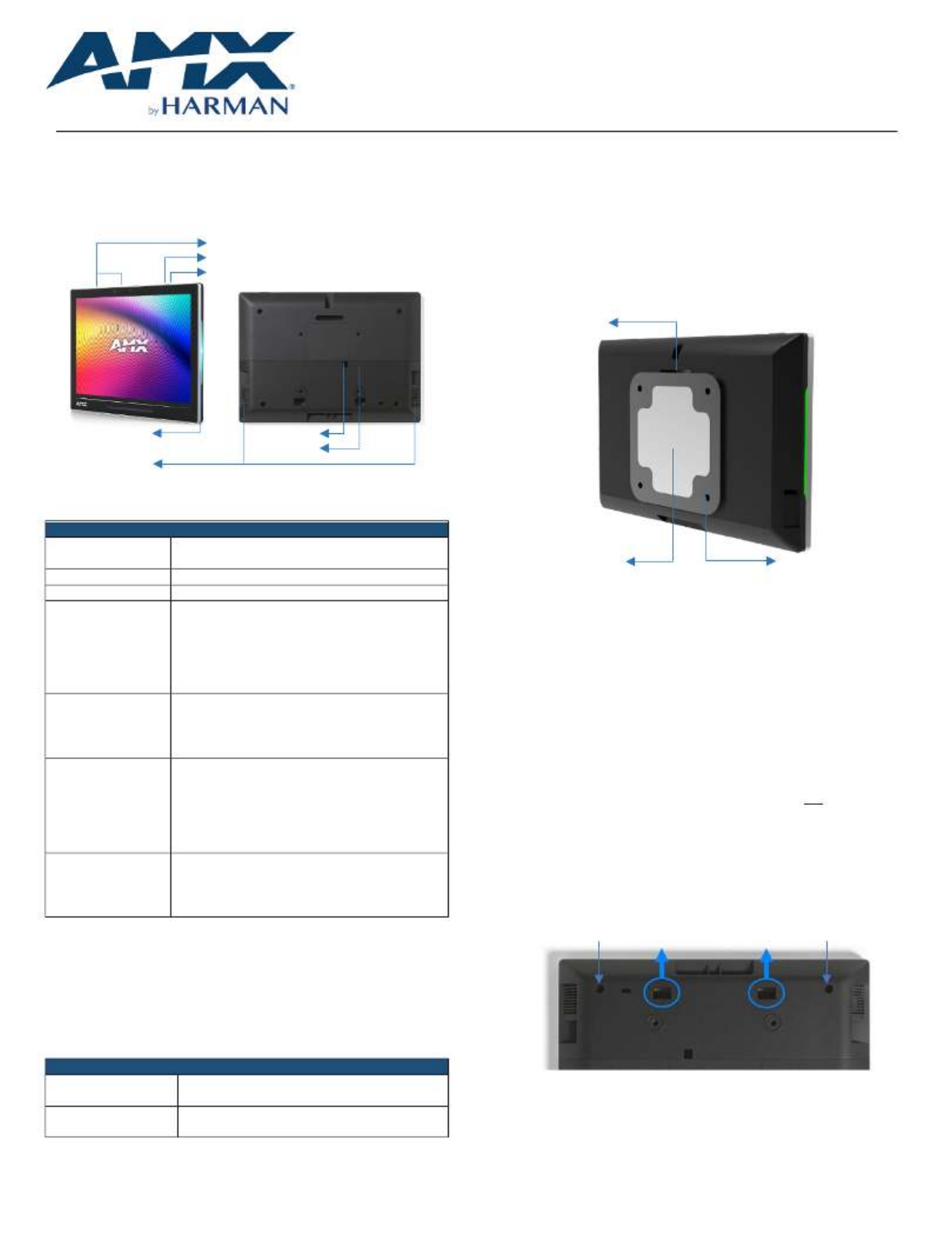
s Microphone
S ettingsButton
Function Button
Side LED LAN/POE
USB
Speakers
FIG. 1 - TP AMXVARIA80ouch anel
Product Specifications
VARIASPECIFICATIONS-80
Dimensions (HWD)
5 7⁄8” x 7 15⁄16” x 7⁄8”
(148.9 mm x 201.2 mm x 21.7 mm)
Product Weight
1.17 lb (532 g)
Power Consumption
PoE, 802.3af, 15.4 watt
External Power
Supply Required
Optimal performance requires use of one of the
following AMX PoE power supplies (not included):
•PS---POEAFTC, PoE Injector, 802.3AF
Compliant (FG423- 83)
•PS--AT-POETC, PoE Injector, 802.3AT
Compliant (FG423-84)
Certifications &
Compliance
•UL
•CE
•CB
•FCC Class B (- 5dB)
Environmental
Operating Temperature
•0°C - – 40° C (32°F 104°F)
•5% - 85% Humidity
Storage Temperature
•-2– 4– 0 0°C 60° C (°F 14°F)
•5% - 90% Humidity
Included Accessories
•Mounting Plate
•Adhesive Pad
•Set Screw
•Installation Template
VARIA-80 Installation
Varia - can be surfacemountedonto a wall, glass or other smooth surface, or
connect to any number of popular VESA mountswith the included mounting
bracket & hardware.
The VARIAtouch panel when used in conjunction with -8 0 converts to atabletop
a tabletop stand accessory (sold separately).
TABLETOP STAND ACCESSORIES
VARIA--8 ACS0F
(--01) AMXUMT08
AMX Varia Fixed Tabletop S tand
for VARIA- 80
VARIA-- ACS810A
(--) AMXUMT8111
AMX Varia Angle- Select Tabletop Stand
for VARIA--80, VARIA100, & VARIA-100N
Power Over Ethernet
Power is supplied via Power Over Ethernet (PoE), utilizing an AMX certified PoE
injector such as the PS---POEAFTC PoE Injector (FG423-83) or compatible
network switch which is classified as ES1 and PS2 output in accordance with
IEC/EN/UL 62368-1. Connect the incoming Ethernet cable to the RJ-45 port on
the VARIA-80.
Mounting Plate
The included mounting plate contains a 75x75 VESA hole pattern, set screw, and
dedicated area for the included adhesive pad.
Set Screw
Adhesive Pad 75x75 VESA
FIG. 2 Mounting Plate
STEP 1: Installation Prer equisites
Prior to touch panel installation, identify a proper installation surface in
accordance with local laws and building codes.Ensure that your category cable
(networking cable) has access to the location.
STEP 2: Install the Mounting Plate
If installing on wall, mark your surface using the included installation template
for thefour (4)VESA holes and one (1) - desired cable passthrulocation. Drill
holes as required and screw the mounting bracket o, nto the surfaceusing
appropriate hardware for the surface (ie. drywall, concrete, brick, etc.).
If installing on glass or other smooth surface using the adhesive pad, first apply
the adhesive pad to the mounting bracket, only exposing one side of the pad.
Then adhere the mounting bracket to the surface with the set screw hole facing
UP and the two tabs on the BOTTOM. Make sure it is a secure fit, but do not
apply too much pressure as glass may break.
STEP 3: Route Category Cable
Remove the panel’s lower touch rear cover by removing two (2) screws and then
sliding the cover off. Press therectangular holes to push the cover away from
you.
FIG. 3 Lower CoverHoles
P lug in the networking cableand route it outone (1) (3) of the three available
openings in the lower coverOnce fully seated, : left, right, or bottom. reattach
the lower rear cover.
Screw Location
Screw Location
Specyfikacje produktu
| Marka: | AMX |
| Kategoria: | nieskategoryzowany |
| Model: | VARIA-80 |
Potrzebujesz pomocy?
Jeśli potrzebujesz pomocy z AMX VARIA-80, zadaj pytanie poniżej, a inni użytkownicy Ci odpowiedzą
Instrukcje nieskategoryzowany AMX

2 Sierpnia 2024
2 Sierpnia 2024
2 Sierpnia 2024
2 Sierpnia 2024
2 Sierpnia 2024
2 Sierpnia 2024
2 Sierpnia 2024
10 Lipca 2024
10 Lipca 2024
21 Czerwca 2024
Instrukcje nieskategoryzowany
Najnowsze instrukcje dla nieskategoryzowany
28 Października 2024
28 Października 2024
27 Października 2024
27 Października 2024
27 Października 2024
27 Października 2024
27 Października 2024
27 Października 2024
27 Października 2024
27 Października 2024