Instrukcja obsługi CAD Audio U1
Przeczytaj poniżej 📖 instrukcję obsługi w języku polskim dla CAD Audio U1 (59 stron) w kategorii mikrofon. Ta instrukcja była pomocna dla 24 osób i została oceniona przez 8 użytkowników na średnio 4.8 gwiazdek
Strona 1/59
U1 USB Recording Microphone
Before using the U1 in your favorite audio or communications
application you must confi rm that the computer’s operating
system recognizes the U1.
Windows XP recognition instructions
1. Plug the U1 into the USB port on the computer.
(When using a USB hub, check with the hub manufacturer to
be sure the hub supports a device such as a microphone. Plug
the U1 directly into the computer’s powered USB port for
optimal performance.)
2. Allow 30 to 60 seconds for the system software to recognize
the U1. (A series of bubbles will appear by the Windows
toolbar to notify you of a new device.)
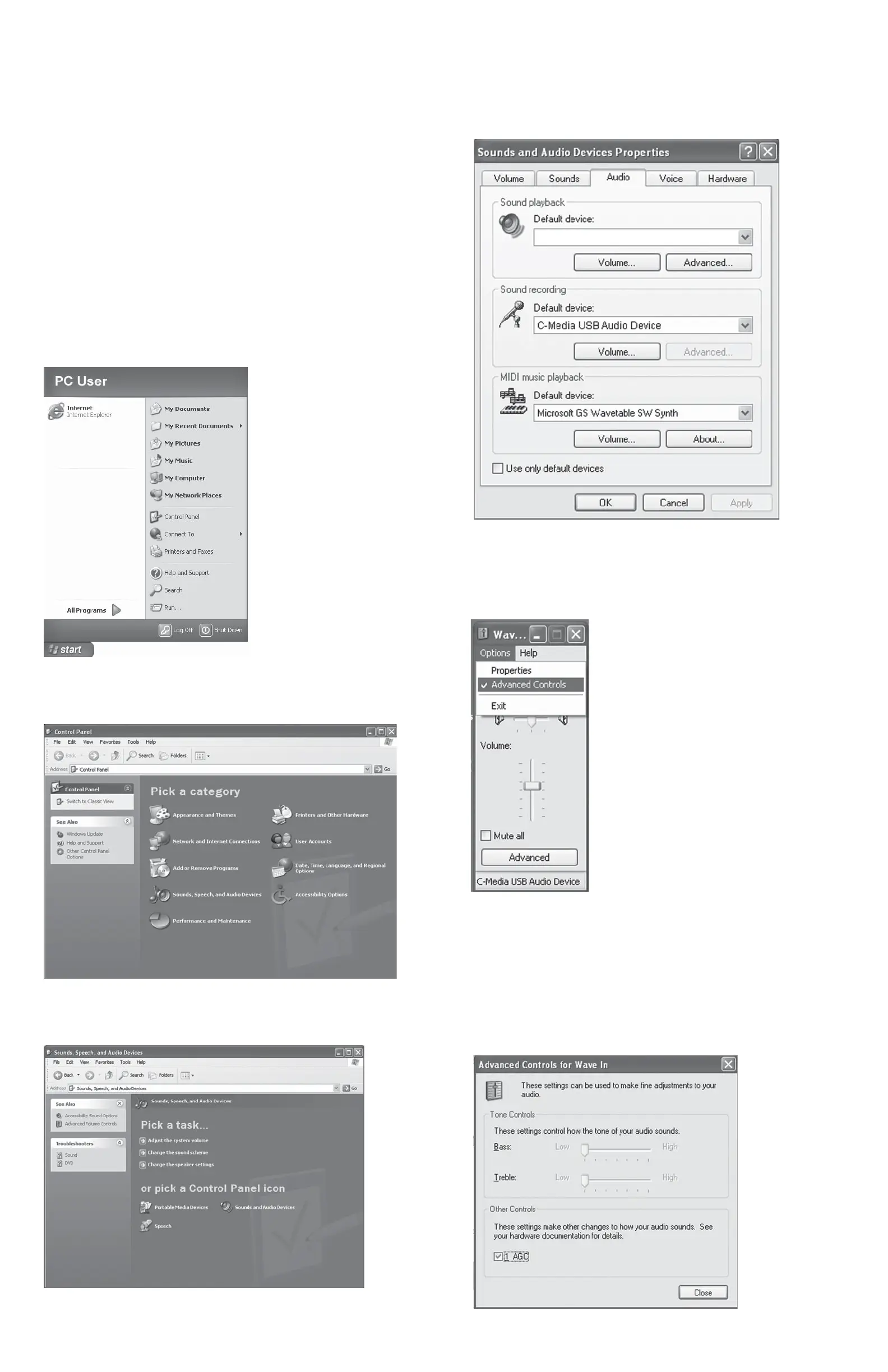
3. In the Start Menu, select Control Panel.
4. Select “Sounds, Speech, and Audio Devices”.
5. Select “Sounds and Audio Devices”.
6. Select the “Audio” tab. Confi rm that under the “Sound
recording” section the “C-Media USB Audio Device” is
selected. (The “Sound playback” should remain your usual
sound output device).
7. Select the “Volume” tab under the Sound recording heading
and select “Advanced Controls” in the Options menu of this
window.
8. Click the “Advanced” button to open the “Advanced Controls
for Wave In” window. Depending upon your system, you
might have the option of selecting “1 AGC” or “Mic boost”.
Checking this option will signifi cantly increase the sensitivity
of the microphone. Use this for recording softer sounds. If you
experience distortion when recording louder sounds, try
unchecking this option.
(Default playback device)
Specyfikacje produktu
| Marka: | CAD Audio |
| Kategoria: | mikrofon |
| Model: | U1 |
| Kolor produktu: | Czarny |
| Wbudowany wyłącznik: | Tak |
| Źródło zasilania: | USB |
| Technologia łączności: | Przewodowa |
| Typ kierunku mikrofonu: | Kardioid |
| Wyciszenie mikrofonu: | Tak |
| Przewody: | USB |
| Interfejs urządzenia: | USB |
| Model: | Mikrofon do komputera |
| Podstawa biurkowa: | Tak |
| Zasilane prze USB: | Tak |
| Typ cewki: | Dynamiczny |
Potrzebujesz pomocy?
Jeśli potrzebujesz pomocy z CAD Audio U1, zadaj pytanie poniżej, a inni użytkownicy Ci odpowiedzą
Instrukcje mikrofon CAD Audio

5 Października 2024
21 Września 2024
21 Września 2024
20 Września 2024
20 Września 2024
20 Września 2024
20 Września 2024
20 Września 2024
20 Września 2024
Instrukcje mikrofon
Najnowsze instrukcje dla mikrofon
9 Kwietnia 2025
9 Kwietnia 2025
9 Kwietnia 2025
9 Kwietnia 2025
9 Kwietnia 2025
9 Kwietnia 2025
8 Kwietnia 2025
2 Kwietnia 2025
2 Kwietnia 2025
2 Kwietnia 2025