Instrukcja obsługi Casio DQD-105
Przeczytaj poniżej 📖 instrukcję obsługi w języku polskim dla Casio DQD-105 (6 stron) w kategorii zegar. Ta instrukcja była pomocna dla 35 osób i została oceniona przez 7 użytkowników na średnio 5.0 gwiazdek
Strona 1/6
Operation Guide DQD-105
1
MA0702-EA
346
2
7
1
5
2
1
8
•
A sticker is affixed to the glass of this clock when you purchase it. Be sure to remove the sticker before using the clock.
•Depending on its model number, the appearance of your clock may differ somewhat from that shown in the
illustration.
Alarm OffSnooze Alarm On
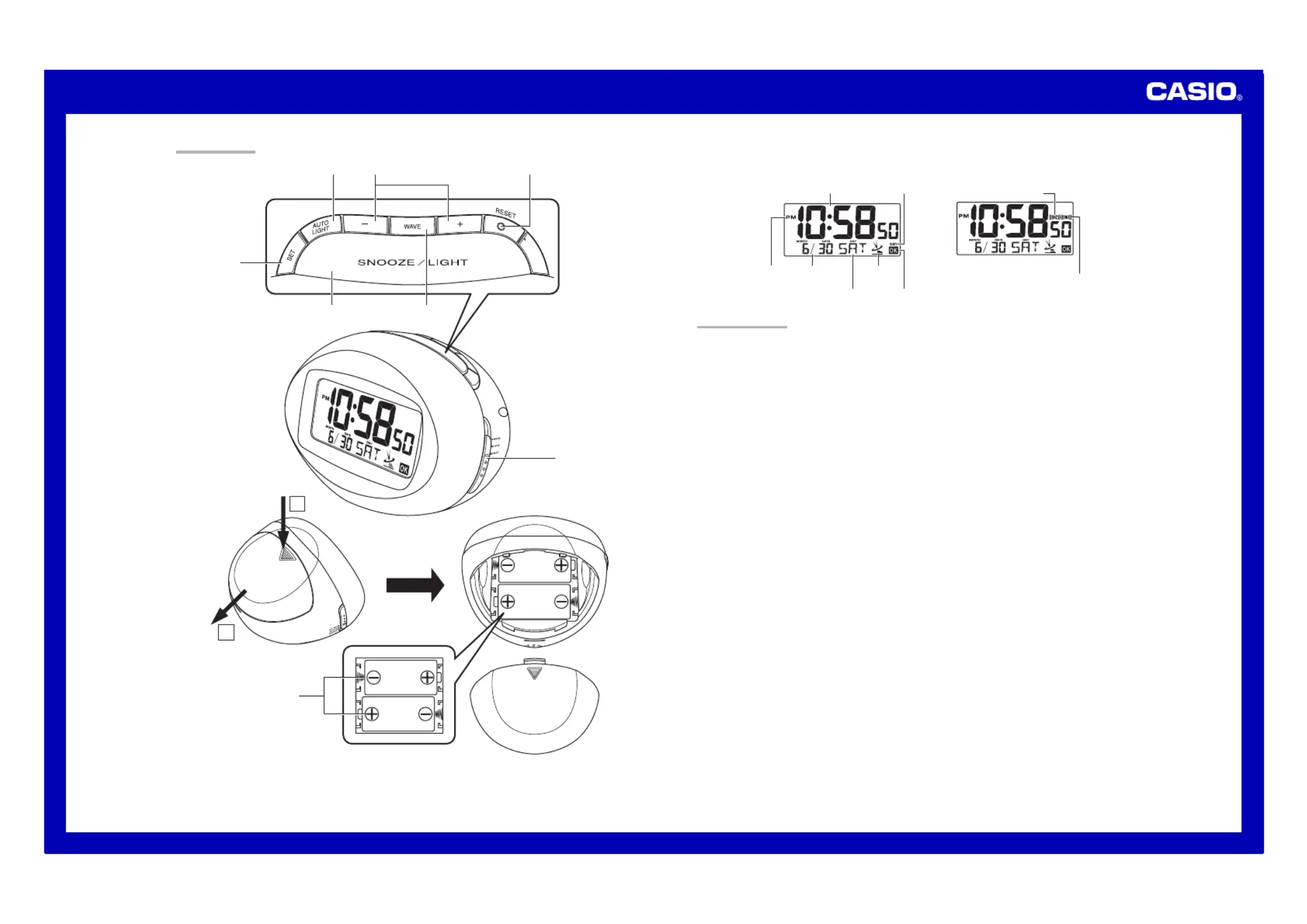
GENERAL GUIDE
1SNOOZE/LIGHT button
•Press this button to illuminate the display for about four seconds.
•Pressing this button while the alarm is sounding stops the alarm.
2WAVE button
Press this button to receive the time calibration signal and adjust timekeeping.
3AUTO LIGHT button
Use this button to configure Auto Light settings.
4Alarm Time Set buttons
Use these buttons to change the alarm time or current time setting.
5SET button
Use this button when setting the current time.
6RESET button
Press this button to reset the clock after replacing its batteries.
7Alarm Mode selector
SNOOZE: Snooze alarm on
ALM ON: Alarm on
ALM OFF: Alarm off
8Batteries
DST indicator
PM indicator
Wave OK indicator
Antenna Icon
Current time (Hour, minutes, seconds)
Day of the week
Date
(month – date)
Alarm on indicator
Snooze on indicator
ILLUSTRATION
Specyfikacje produktu
| Marka: | Casio |
| Kategoria: | zegar |
| Model: | DQD-105 |
Potrzebujesz pomocy?
Jeśli potrzebujesz pomocy z Casio DQD-105, zadaj pytanie poniżej, a inni użytkownicy Ci odpowiedzą
Instrukcje zegar Casio

3 Lipca 2024
3 Lipca 2024
3 Lipca 2024
3 Lipca 2024
30 Czerwca 2024
30 Czerwca 2024
28 Czerwca 2024
28 Czerwca 2024
28 Czerwca 2024
28 Czerwca 2024
Instrukcje zegar
Najnowsze instrukcje dla zegar
9 Kwietnia 2025
9 Kwietnia 2025
3 Kwietnia 2025
2 Kwietnia 2025
13 Marca 2025
5 Marca 2025
4 Marca 2025
19 Lutego 2025
28 Stycznia 2025
15 Stycznia 2025