Instrukcja obsługi CyberPower BU600E
CyberPower UPS BU600E
Przeczytaj poniżej 📖 instrukcję obsługi w języku polskim dla CyberPower BU600E (2 stron) w kategorii UPS. Ta instrukcja była pomocna dla 30 osób i została oceniona przez 6 użytkowników na średnio 4.5 gwiazdek
Strona 1/2
K01-C000053-04
User’sManual
BU600E/BU800E
BU1000EA
IMPORTANTSAFETYINSTRUCTIONS
(SAVETHESEINSTRUCTIONS)
Thismanualcontainsimportantsafetyinstructions.Pleasereadandfollowallinstructionscarefullyduring
installationandoperationoftheunit.Readthismanualthoroughlybeforeattemptingtounpack,install,or
operateyourUPS.
CAUTION!Topreventtheriskoffireorelectricshock,installinatemperatureandhumiditycontrolledindoor
areafreeofconductivecontaminants.(Seethespecificationsfortheacceptabletemperatureandhumidity
range.)
CAUTION!ToreducetheriskofoverheatingtheUPS,donotcovertheUPS'coolingventsandavoidexposing
theunittodirectsunlightorinstallingtheunitnearheatemittingappliancessuchasspaceheatersorfurnaces.
CAUTION!Donotattachnon-computer-relateditems,suchasmedicalequipment,life-supportequipment,
microwaveovens,orvacuumcleanerstoUPS.
CAUTION!DonotplugtheUPSinputintoitsownoutput.
CAUTION!DonotallowliquidsoranyforeignobjecttoentertheUPS.Donotplacebeveragesoranyother
liquid-containingvesselsonorneartheunit.
CAUTION!Intheeventofanemergency,presstheOFFbuttonanddisconnectthepowercordfromtheAC
powersupplytoproperlydisabletheUPS.
CAUTION!DonotattachapowerstriporsurgesuppressortotheUPS.
CAUTION!UnplugtheUPSpriortocleaninganddonotuseliquidorspraydetergent.
CAUTION!Servicingofbatteriesshouldbeperformedorsupervisedbypersonnelknowledgeableofbatteries
andtherequiredprecautions.Keepunauthorizedpersonnelawayfrombatteries.
CAUTION!Thebatterysupplyshouldbethereforedisconnectedintheplusandminuspoleatthequick
connectorsofthebatterywhenmaintenanceorserviceworkinsidetheUPSisnecessary.
CAUTION!Internalbatteryvoltageis12Vdc.Sealed,lead-acid,6-cellbattery.
CAUTION!Whenreplacingthebatteries,usethesamenumberandtypeofbatteries.
CAUTION!Donotdisposeofbatteriesinafire.Thebatterymayexplode.Donotopenormutilatethebatteryor
batteries.Releasedelectrolyteisharmfultotheskinandeyes.
INSTALLINGYOURUPSSYSTEM
UNPACKING
Theboxshouldcontainthefollowing:(1)UPSUnitx1;(2)UserManualx1
OVERVIEW
TheBU600/800/1000EAprovidesautomaticvoltageregulationforinconsistentutilitypower,andprovides
batterybackupduringpoweroutages.TheBU600/800/1000EAensuresconsistentpowertoyourcomputer
system.
HARDWAREINSTALLATIONGUIDE
1.YournewUPSmaybeusedimmediatelyuponreceipt.However,rechargingthebatteryforatleast8hours
isrecommendedtoensurethatthebattery'smaximumchargecapacityisachieved.Chargelossmayoccur
duringshippingandstorage.Torechargethebattery,simplyleavetheunitpluggedintoanACoutlet.The
unitwillchargeinboththeonandoffposition.
2.WiththeUPSunitoffandunplugged,connectthecomputer,monitor,andanyexternallypowereddata
storagedevice(Zipdrive,Jazzdrive,Tapedrive,etc.intothebatterypowersuppliedoutlets.DONOTplug
alaserprinter,copier,spaceheater,vacuum,papershredderorotherlargeelectricaldeviceinto
thebatterypowersuppliedoutlets.Thepowerdemandsofthesedeviceswilloverloadandpossibly
damagetheunit.
3.PlugtheUPSintoa2pole,3wiregroundedreceptacle(walloutlet).Makesurethewallbranchoutletis
protectedbyafuseorcircuitbreakeranddoesnotserviceequipmentwithlargeelectricaldemands(e.g.air
conditioner,refrigerator,copier,etc.Avoidusingextensioncords.
4.Pressthepowerswitchtoturntheuniton.Thepoweronindicatorlightwillilluminateandtheunitwill
"beep".
5.Ifanoverloadisdetected,anaudiblealarmwillsoundandtheunitwillemitonelongbeep.Tocorrectthis,
turntheUPSoffandunplugatleastonepieceofequipmentfromthebatterypowersuppliedoutlets.Wait
10seconds.Makesurethecircuitbreaker/fuseisnormalandthenturnstheUPSon.
6.Tomaintainoptimalbatterycharge,leavetheUPSpluggedintoanACoutletatalltimes.
7.TostoreyourUPSforanextendedperiod,coveritandstorewiththebatteryfullycharged.Rechargethe
batteryeverythreemonthstoensurebatterylife.
BASICOPERATION
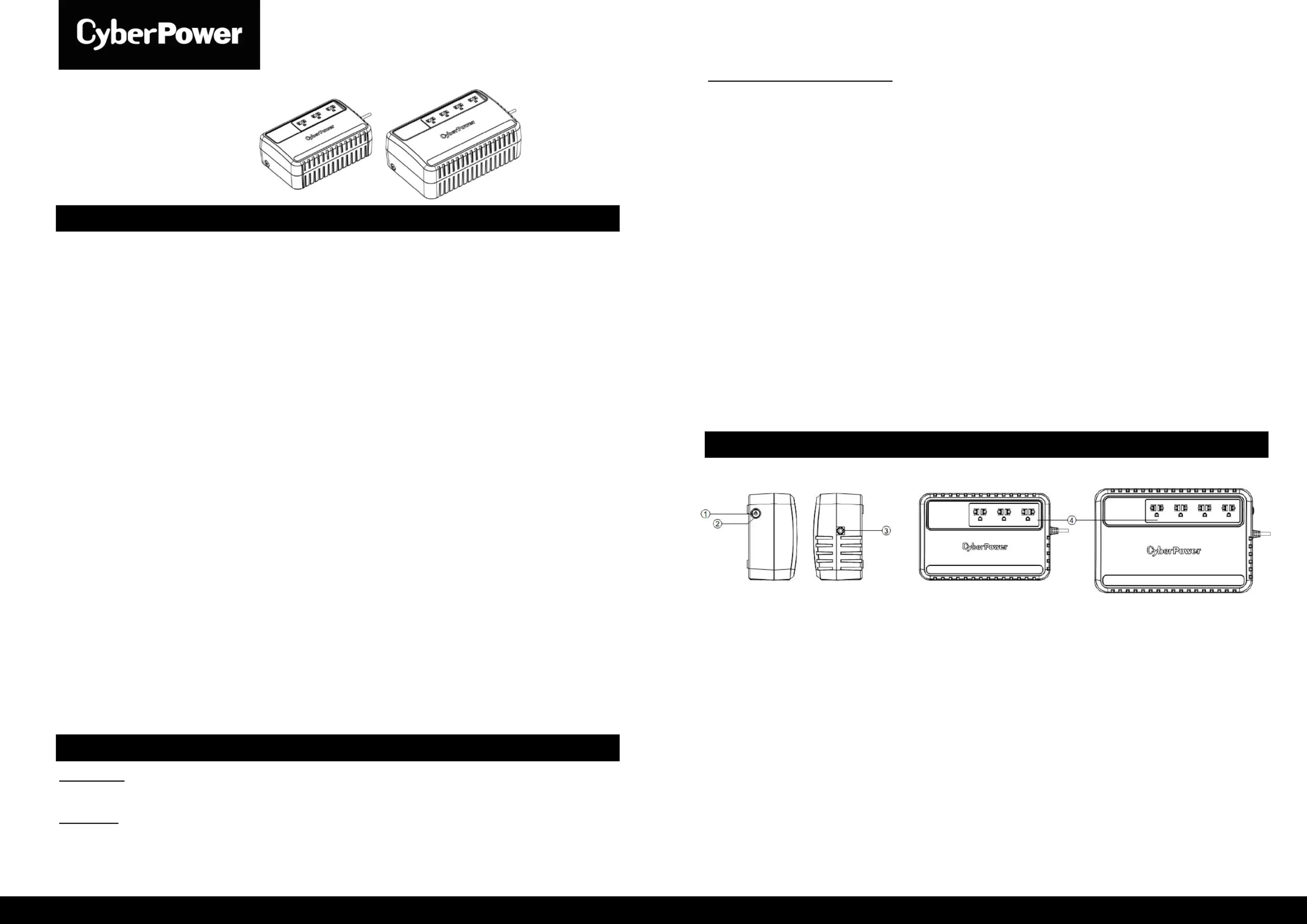
1.PowerSwitch
Presstheswitchfor2secondstoturntheUPSONorOFF.
Alarmsetting:TheaudiblealarmcanbeturnedOFForONbyquicklypressingthePOWERbutton
twice.ThedefaultsettingisfortheAlarmOn.ToturntheAlarmOff,quicklypressthepowerbutton
twice.YouwillheartwoshortbeepswhentheAlarmisturnedoff.ToturntheAlarmbackon,quickly
pressthepowerbuttontwice.YouwillhearasingleshortbeepwhentheAlarmisturnedon.
2.LedIndicators
ThisLEDisilluminatedwhentheUPSisworking.
3.InputPowerCord
Connecttoutilitypower.
4.ACoutlet
TheUPSprovidesoutletsforconnectedequipmenttoinsuretemporaryuninterruptedoperationduringa
powerfailureandagainstsurgesandspikes.
Specyfikacje produktu
| Marka: | CyberPower |
| Kategoria: | UPS |
| Model: | BU600E |
Potrzebujesz pomocy?
Jeśli potrzebujesz pomocy z CyberPower BU600E, zadaj pytanie poniżej, a inni użytkownicy Ci odpowiedzą
Instrukcje UPS CyberPower

28 Stycznia 2025
28 Stycznia 2025
28 Stycznia 2025
28 Stycznia 2025
27 Stycznia 2025
27 Stycznia 2025
15 Stycznia 2025
3 Stycznia 2025
3 Stycznia 2025
30 Grudnia 2025
Instrukcje UPS
Najnowsze instrukcje dla UPS
2 Kwietnia 2025
2 Kwietnia 2025
30 Marca 2025
29 Marca 2025
29 Marca 2025
29 Marca 2025
29 Marca 2025
29 Marca 2025
29 Marca 2025
27 Marca 2025