Instrukcja obsługi Epson perfection 3170
Przeczytaj poniżej 📖 instrukcję obsługi w języku polskim dla Epson perfection 3170 (6 stron) w kategorii skaner. Ta instrukcja była pomocna dla 12 osób i została oceniona przez 5 użytkowników na średnio 5.0 gwiazdek
Strona 1/6
EPSON Perfection 3170
8/03EPSON Perfection 3170 - 1
Scanner PartsScanner Specifications
Basic Specifications
Scanner typeFlatbed, color
PhotoelectricColor EPSON MatrixCCDTM line sensor
device
Effective pixels27,200 × 37,440 pixels at 3200 dpi,
100% scaling
Maximum US letter or A4 size
document size(8.5 × 11.7 inches [216 × 297 mm])
Optical resolution3200 dpi
Maximum 3200 dpi (main scan) × 6400 dpi hardware
resolution*(sub scan)
*The maximum hardware resolution of 3200 × 6400 dpi is achieved
using EPSON’s Micro Step Drive™ technology.
Maximum 12,800 dpi
interpolated
resolution
Speed (color)8.7 msec/line at 3200 dpi (draft mode)
2.8 msec/line at 600 dpi (draft mode)
Pixel depth16 bits per pixel (input/output)
Line art settingsFixed threshold
Gamma correction1 type for user-defined
Interface
USB 1.1/2.0 (Type B receptacle connector)
Light sourceWhite cold cathode fluorescent lamp
Dimensions Width: 10.9 inches (276 mm)
Depth: 18.0 inches (458 mm)
Height: 4.6 inches (117 mm)
WeightApprox. 8.9 lb (3.8 kg)
Electrical
Input voltage range100-120 VAC
Rated frequency50 to 60 Hz
Rated input 0.7 A
current
Rated output 1.1 A
current
Power Approx. 23 W operating
consumptionapprox. 19 W in stand-by mode
approx. 5.5 W in power saving mode
Note:Scanners sold outside the US market may operate at a different
voltage. Check the label on the back of the scanner for voltage
information.
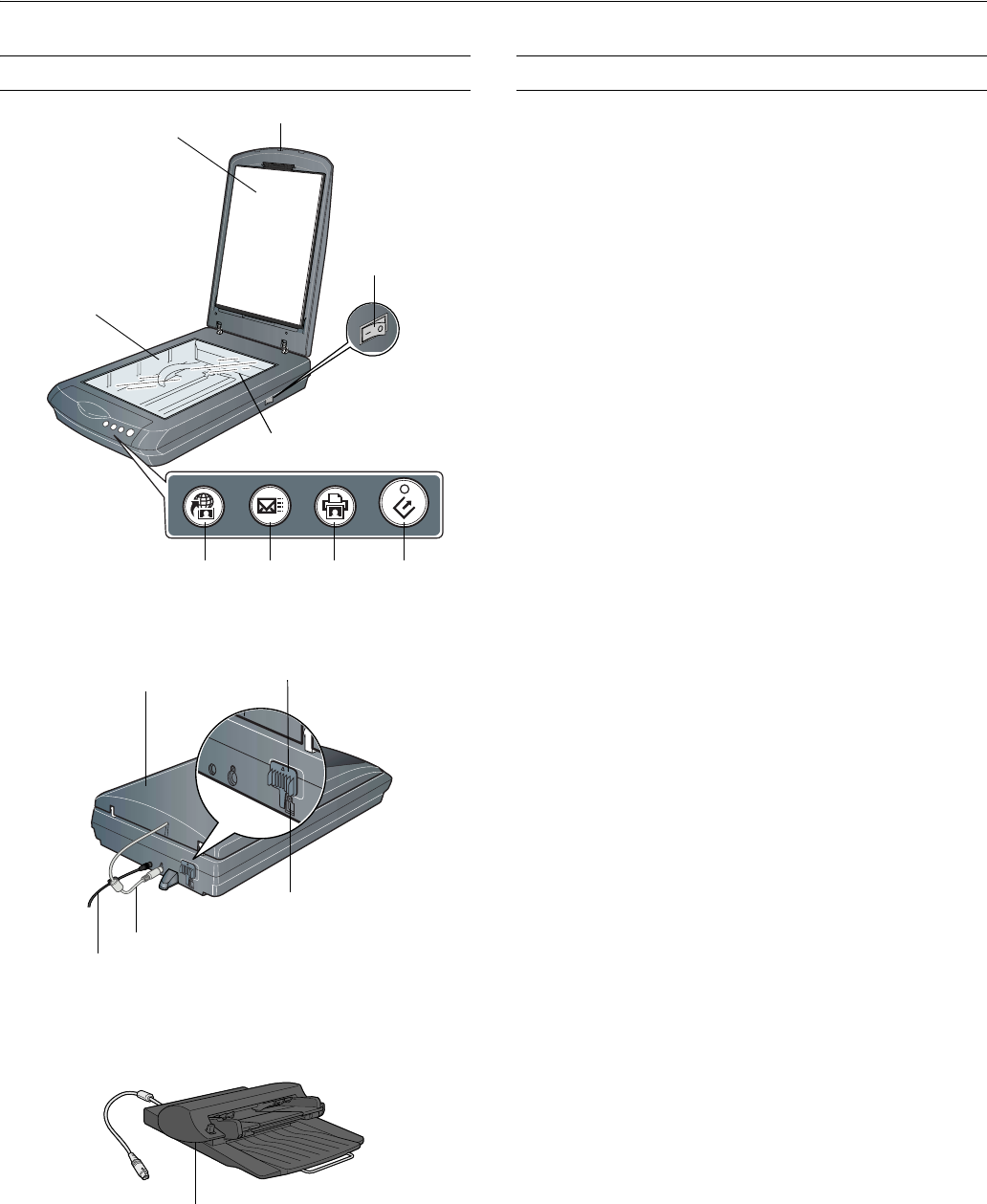
TPU indicator light
Document
table
Carriage and lamp
(in the home position)
USB port
Power cord
Transparency unit
(TPU) connector
Transportation lock
(in unlocked position)
Start
button
Power button
Transparency unit
(TPU) under lid
Document
cover
Copy
button
Scan to
e-mail
button
Scan to
Web
button
Automatic Document Feeder
(ADF) (optional)
Note:3 film holders are included (not shown)
Specyfikacje produktu
| Marka: | Epson |
| Kategoria: | skaner |
| Model: | perfection 3170 |
Potrzebujesz pomocy?
Jeśli potrzebujesz pomocy z Epson perfection 3170, zadaj pytanie poniżej, a inni użytkownicy Ci odpowiedzą
Instrukcje skaner Epson

11 Października 2024
4 Października 2024
26 Września 2024
26 Września 2024
26 Września 2024
26 Września 2024
24 Września 2024
24 Września 2024
24 Września 2024
22 Września 2024
Instrukcje skaner
Najnowsze instrukcje dla skaner
29 Marca 2025
22 Lutego 2025
19 Lutego 2025
28 Stycznia 2025
16 Stycznia 2025
12 Stycznia 2025
11 Stycznia 2025
11 Stycznia 2025
29 Grudnia 2024
22 Grudnia 2024