Instrukcja obsługi IFi Audio ZEN Blue
IFi Audio system hi-fi ZEN Blue
Przeczytaj poniżej 📖 instrukcję obsługi w języku polskim dla IFi Audio ZEN Blue (1 stron) w kategorii system hi-fi. Ta instrukcja była pomocna dla 20 osób i została oceniona przez 6 użytkowników na średnio 4.3 gwiazdek
Strona 1/1
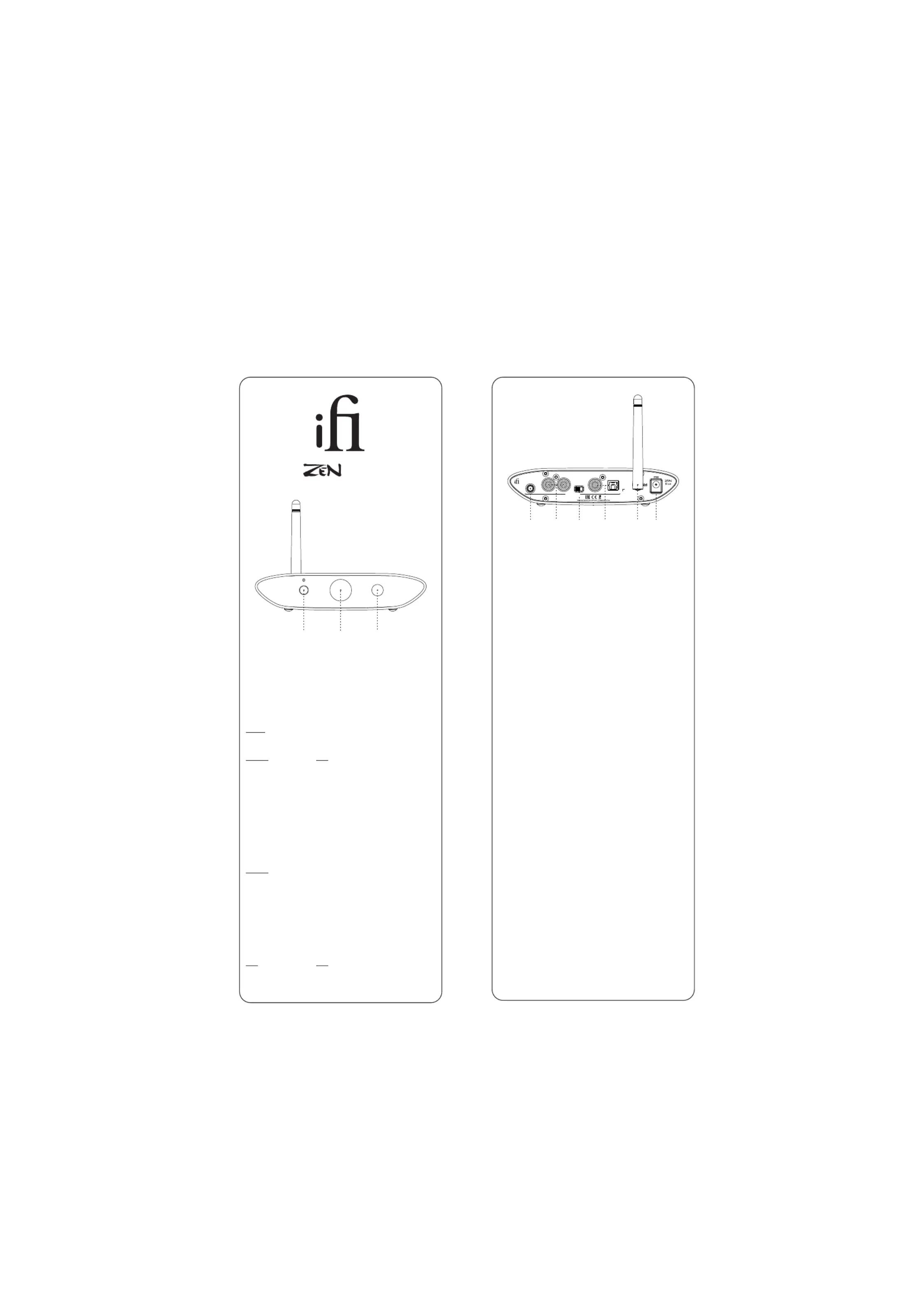
4. Balanced 4.4mm outputs
For connection of 4.4mm > XLR or similarly balanced interconnects.
Warning: do NOT connect 4.4mm balanced headphones to the ZEN Blue as the full
signal is likely to damage your headphones and your hearing! iFi audio is not
responsible for any hearing or equipment damage arising from mis-use.
5. Single-Ended RCA outputs
Connect analogue RCA interconnects to an amplifier.
6. Digital/Analogue switch
Select between digital OR analogue signal output.
7. Digital outputs
To connect a coaxial or optical cable to a DAC.
8. Antenna
Please attach the enclosed antenna for maximum reception quality.
An optional +3dB antenna has been included for better performance.
9. DC 5V power
Connect the enclosed 5v power supply.
Tip: The ZEN Blue MUST be powered by 5 volts only. It is possible to
upgrade the enclosed 5v power supply by using a super low-noise supply
such as the iPower or iPower X.
Specifications:
Power Source:
Chipset:
Input:
Output:
Frequency Response:
Output Voltage @ 0dBFS:
Dynamic Range:
Signal/Noise ratio:
THD & N @ 0dBFS:
Output Impedance:
Power Consumption:
Dimensions:
Net weight:
Warranty period:
Specifications are subject to change without notice.
kHz
123
456789
Thank you for purchasing the B from the Z series. ThelueEN
B is a wireless Bluetooth DAC with digital and analogue lue
outputs.
1. Bluetooth pairing button
The ZEN Blue receives a Bluetooth signal via apt, aptX,X HD
aptX Adaptive, aptX LL, LDAC, HWA, AAC and SBC.
2. Bluetooth codec display
Codec
The colour of the ‘iFi’ logo in the centre of the front display
represents the file format received:
Format LED
SB OffC
AAC Yellow
apt X Blue
aptX HD Magenta
aptX Adaptive Green
aptX RedLL
LDAC Cyan
LHDC/HWA White
3. Bluetooth pairing display
Pairing
From switch on, the ZEN Blue will blink blue as it searches for a
previously paired device. If a stored device is not found, it will
automatically enter pairing mode and blink blue/red.
To enter pairing mode, press and hold the front leftmost button
until the ‘Bluetooth mode LED’ is blinking blue/red. To pair, on
your handset, look for ‘iFi Hi-Res audio’ in the list of available
Bluetooth devices.
The ZEN Blue is able to store up to 8 paired Bluetooth devices.
kHzLED
44/48 Blue
88/96 hite W
Ver1.1
ifi-audio.com
BALANCED
COAXIAL
DC 5V
L
R
OPTICAL
Outputs
ANALOG
DIGITAL
DC5V
Qualcomm QCC 5100 Series
Bluetooth 5.0with ,
TM
AACSBC, aptX,
aptX aptX AdaptiveaptX HD, , LL, LDAC,
HWA Codec
OpticalCoaxial, /Audio RCA L/R,
44Balanced Lineout.
20Hz - 20kHz +0/-0.5dB (44.1kHz)
1Hz - 44khz +0/-3.0dB (>= 88.2kHz)
2.05V (+/-0.05V)
109dB (A)
109dB (A) @ 0dBFS
<0.0015% 10k Load
<50Ω
<2.5W
1 x 100 x mm5835
6.2" x 3.9" x 1.4"
4761.05g ( lbs)
12 months
V2
Blue
Specyfikacje produktu
| Marka: | IFi Audio |
| Kategoria: | system hi-fi |
| Model: | ZEN Blue |
Potrzebujesz pomocy?
Jeśli potrzebujesz pomocy z IFi Audio ZEN Blue, zadaj pytanie poniżej, a inni użytkownicy Ci odpowiedzą
Instrukcje system hi-fi IFi Audio

22 Września 2024
21 Września 2024
18 Września 2024
18 Września 2024
18 Września 2024
18 Września 2024
Instrukcje system hi-fi
Najnowsze instrukcje dla system hi-fi
9 Kwietnia 2025
5 Kwietnia 2025
3 Kwietnia 2025
2 Kwietnia 2025
2 Kwietnia 2025
1 Kwietnia 2025
1 Kwietnia 2025
29 Marca 2025
28 Marca 2025
28 Marca 2025