Instrukcja obsługi INOGENI 4K2USB3
INOGENI Konwerter audio/wideo 4K2USB3
Przeczytaj poniżej 📖 instrukcję obsługi w języku polskim dla INOGENI 4K2USB3 (2 stron) w kategorii Konwerter audio/wideo. Ta instrukcja była pomocna dla 22 osób i została oceniona przez 6 użytkowników na średnio 4.5 gwiazdek
Strona 1/2
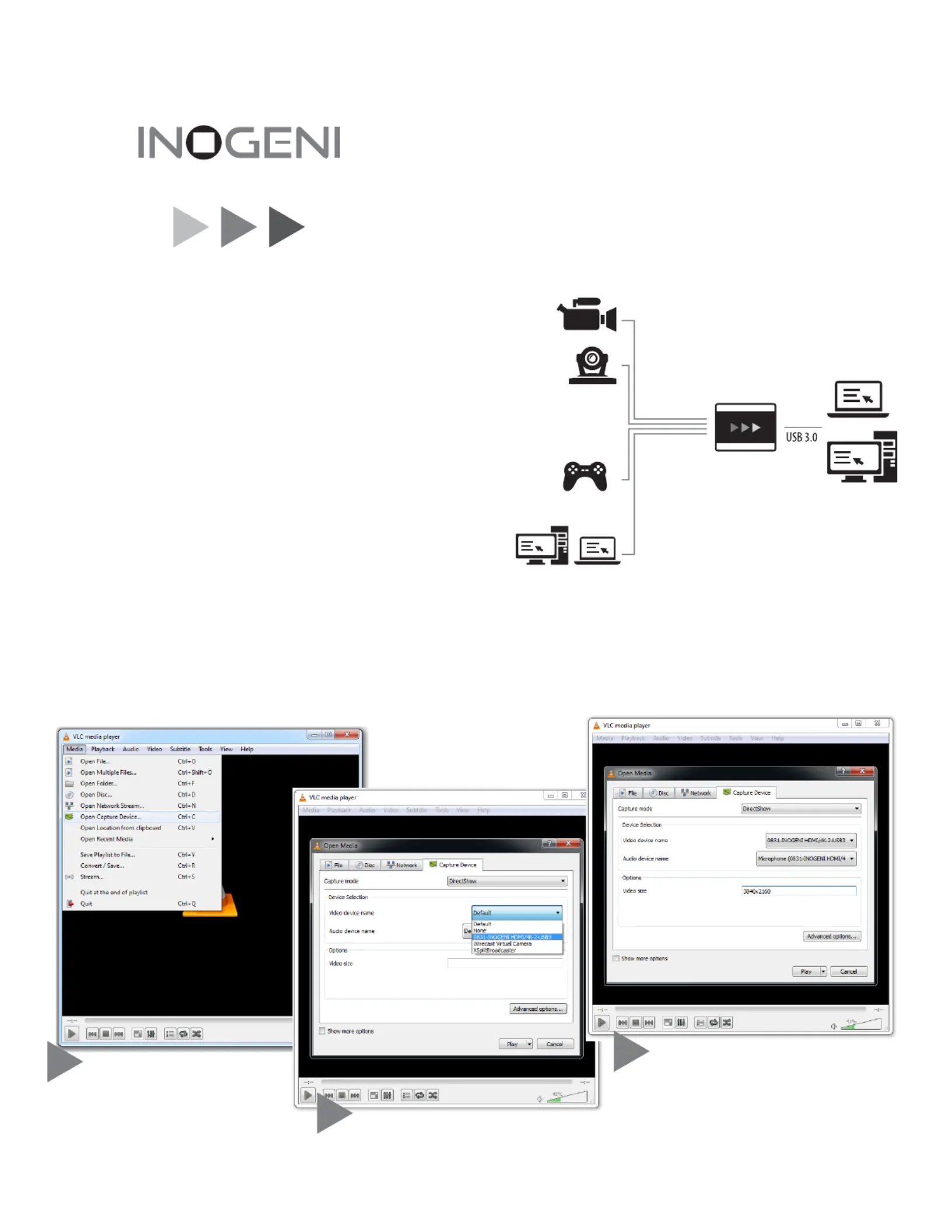
Download and run VideoLan VLC
player, for Windows, Linux or OSX:
www.videolan.org/vlc/index.html
Go to Media->Open Capture Device.
Eager to try it, Now?
Connect the INOGENI to a USB 3.0 port and to your HDMI source,
WWW.INOGENI.COM
HDMI
/
4K to USB 3.0
In the , enter the resolution
of your video source, for example 3840x2160.
(if your source is not 60 Hz, go to
and set the frame rate)
Hit !Play
You sld sehouend he aar your live video!
Video device name and Audio
device name, select INOGENI
HDMI/4K-2-USB3.
Thank you!
With the INOGENI HDMI/4K to USB 3.0 capture device, you have just
acquired the finest and easiest to use HDMI/4K to USB 3.0 converter.
Engineered by video professionals, for video professionals, it is the most
compatible USB 3.0 device across most OSes and USB 3.0 chipsets.
No driver installation insures trouble-free operation, just Plug’n Go!
Since the list of features and software/hardware compatibilities is growing
constantly, please consult the website, , for the latest
information.
You will also find the latest firmware, FAQs and upgrade tools on the
web site.
Connection Diagram:
Quickstart:
1
2
3
Quick Start Guide
HDMI + AUDIO
up to Ultra HD 4K
USB 3.0
HDMI + AUDIO
Up to Ultra HD
3840x2160
Video size text box
Advanced
options
www.inogeni.com
Specyfikacje produktu
| Marka: | INOGENI |
| Kategoria: | Konwerter audio/wideo |
| Model: | 4K2USB3 |
Potrzebujesz pomocy?
Jeśli potrzebujesz pomocy z INOGENI 4K2USB3, zadaj pytanie poniżej, a inni użytkownicy Ci odpowiedzą
Instrukcje Konwerter audio/wideo INOGENI

2 Kwietnia 2025
20 Lutego 2025
20 Lutego 2025
14 Stycznia 2025
7 Października 2024
7 Października 2024
7 Października 2024
7 Października 2024
Instrukcje Konwerter audio/wideo
Najnowsze instrukcje dla Konwerter audio/wideo
7 Kwietnia 2025
3 Kwietnia 2025
2 Kwietnia 2025
1 Kwietnia 2025
1 Kwietnia 2025
1 Kwietnia 2025
29 Marca 2025
28 Marca 2025
26 Marca 2025
26 Marca 2025