Instrukcja obsługi Kramer VP-772T
Kramer prezenter bezprzewodowy VP-772T
Przeczytaj poniżej 📖 instrukcję obsługi w języku polskim dla Kramer VP-772T (4 stron) w kategorii prezenter bezprzewodowy. Ta instrukcja była pomocna dla 24 osób i została oceniona przez 4 użytkowników na średnio 4.4 gwiazdek
Strona 1/4
VP
- 772TQuick Start (P/N: 2900-300875QS REV 1)
P/N:
2900-300875QS
Rev:
1
Scan for full manual
VP- 772TQuick Start Guide
This guide helps you install and use your VP-772Tfor the first time.
Go to www.kramerav.com/downloads/VP-772Tto download the latest user manual and check if firmware
upgrades are available.
Step 1: Check wb hat’s in the ox
VP-772TPresentation Matrix Switcher Control Panel
2 Lamps
1 Bracket set
1 Quick start guide
1 Desktop mounting bracket kit
4 Rubber feet
1 Power adapter
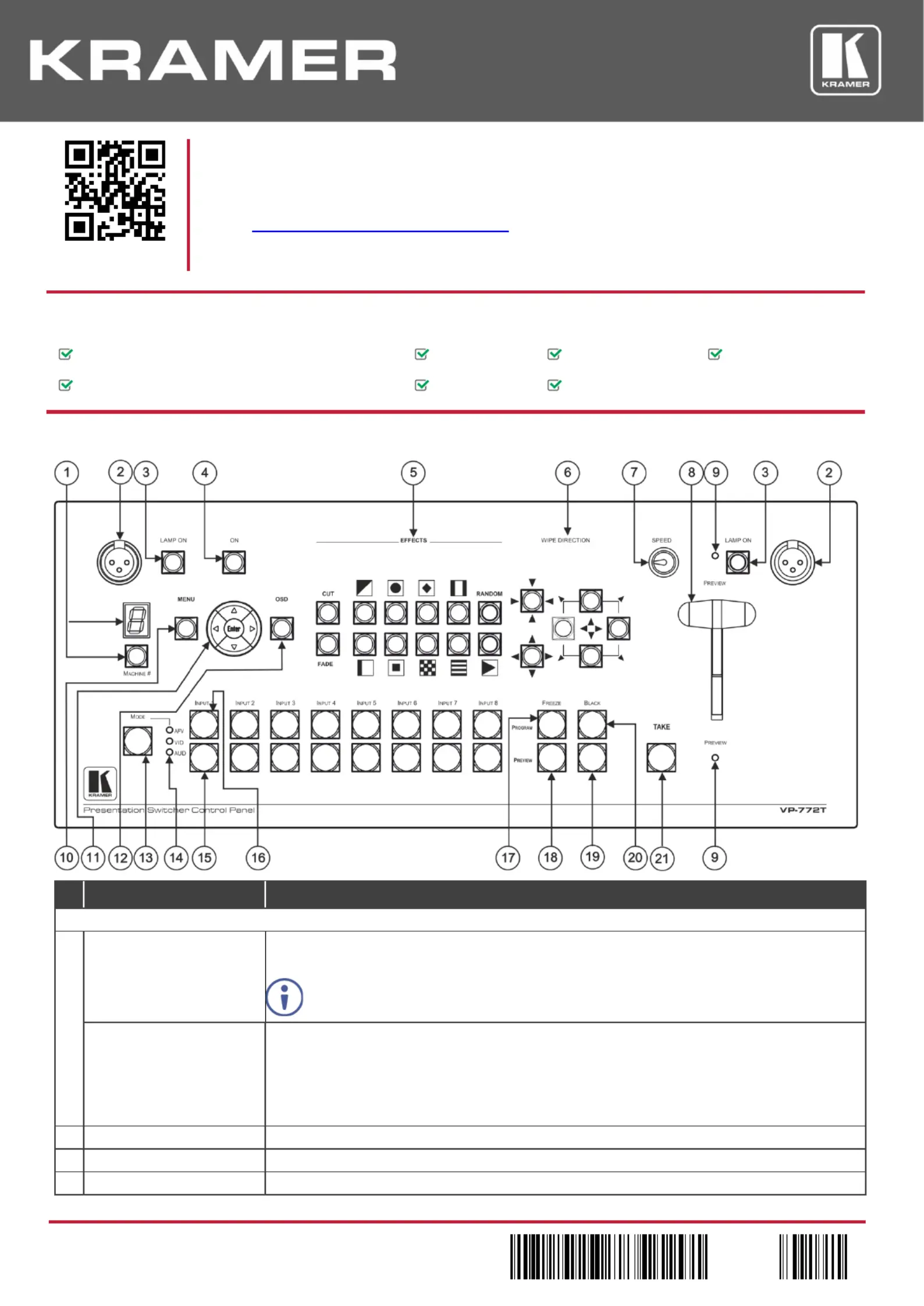
Step 2: VP-Get to know your 772T
# FeatureFunction
Control Panel Functionality
1 -MACHINE # ButtonPress to select the device to be controlled.The 7segment display shows the selection (cycles
through 1 to 4 and A (ll the devices).a
All the operation buttons on the front panel refer to the controlled device.selected
7-segment Display Displays the number of the device that is currently controlledas well as other indications :
1– The VP-772unit that is connected to RS-485-1 portis currently controlled (same for 2, 3 and 4 ).
A–All the connected devices are currently controlled.
L– Indicating that VP- 772Tis currently powering up.
F– Indicates factory resetpowering the device pressing the ON button. . Appears when while
2 . Lamp XLR Connector(x2)Connect a gooseneck lamp
3
LAMP ON Button (x2)
Press to turn light on or off.
4
ON Button
Power the T- bar consoleon or off.
Specyfikacje produktu
| Marka: | Kramer |
| Kategoria: | prezenter bezprzewodowy |
| Model: | VP-772T |
Potrzebujesz pomocy?
Jeśli potrzebujesz pomocy z Kramer VP-772T, zadaj pytanie poniżej, a inni użytkownicy Ci odpowiedzą
Instrukcje prezenter bezprzewodowy Kramer

19 Grudnia 2024
19 Grudnia 2024
Instrukcje prezenter bezprzewodowy
Najnowsze instrukcje dla prezenter bezprzewodowy
25 Lutego 2025
20 Lutego 2025
31 Grudnia 2025
17 Grudnia 2024
17 Grudnia 2024
17 Grudnia 2024
17 Grudnia 2024
17 Grudnia 2024
17 Grudnia 2024
17 Grudnia 2024