Instrukcja obsługi Kramer WP-211X
Kramer przełącznik WP-211X
Przeczytaj poniżej 📖 instrukcję obsługi w języku polskim dla Kramer WP-211X (3 stron) w kategorii przełącznik. Ta instrukcja była pomocna dla 30 osób i została oceniona przez 8 użytkowników na średnio 4.1 gwiazdek
Strona 1/3
WP-211X Quick Start
P/N:
2900-301398QS
Rev:
1
Scan for full manual
WP-211X Quick Start Guide
This guide helps you install and use your WP-211Xfor the rst time.
Go to www.kramerav.com/downloads/WP-211X to download the latest user manual and check if rmware
upgrades are available.
Step 1: Check in the b what’sox
WP-211X 4K HDR HDMI Auto Switcher Wall Plate
1 Quick start guide
Installation accessories
Frame (or frame set) and faceplate
1 Power adapter and cord
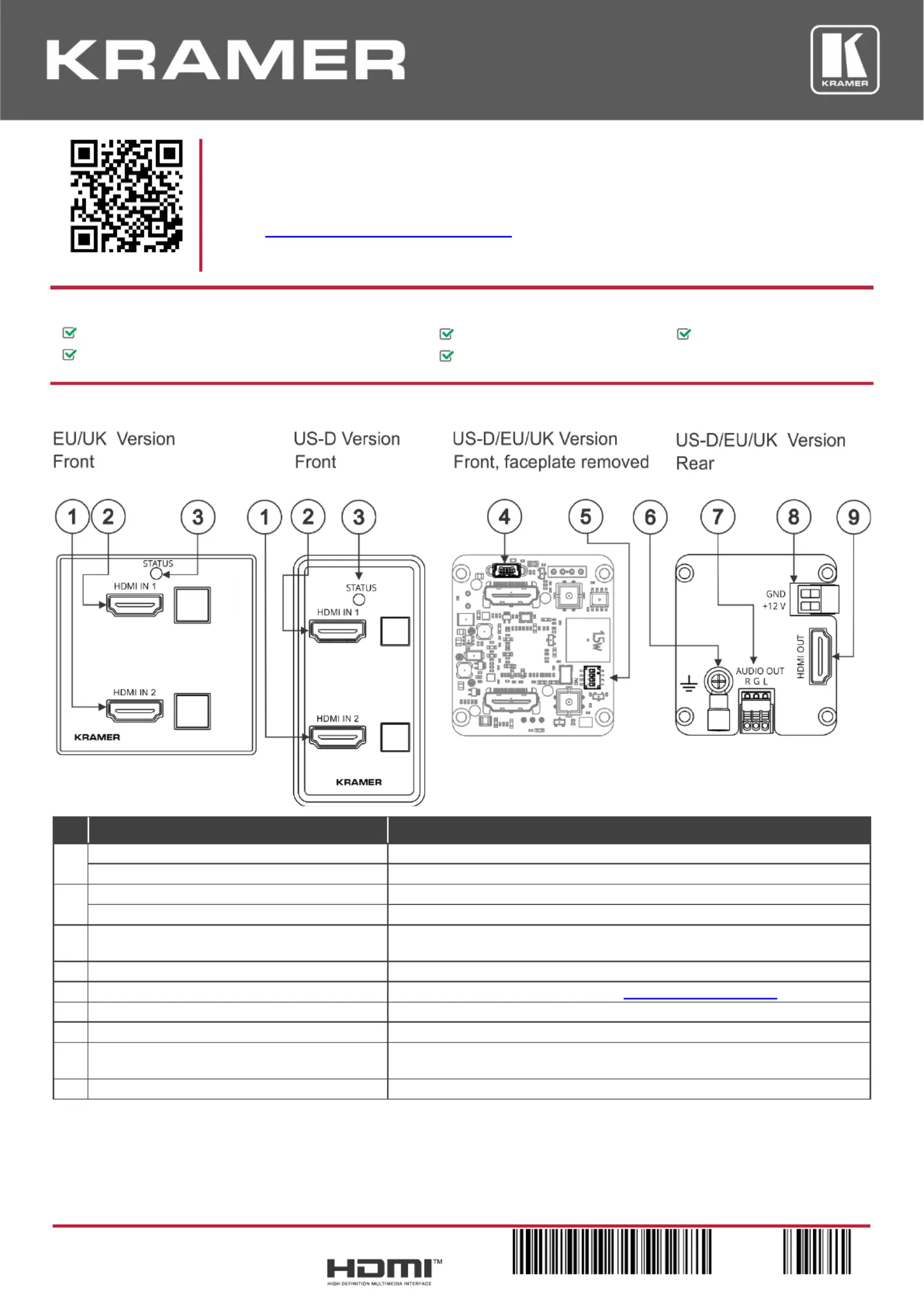
Step 2: Get to know your -211X WP
#
Feature
Function
1
HDMI IN 2 Connector
Connects to an HDMI source.
HDMI IN 2 Button
Press to select the HDMI 2 input (button lights orange).
2
HDMI IN 1 Connector
Connects to an HDMI source.
HDMI IN 1 Button
Press to select the HDMI 1 input (button lights orange).
3
STATUS LED
Lights green when the device is powered and blue when an HDMI output is
connected.
4
PROG Mi USB Connector ni
Connect to upgrade the firmware.
5
SETUP 4-way DIP-Switches
Set the operation DIP-switches (see Setting the DIP-Switches).
6
Ring Tongue Terminal Grounding Screw
Connect to grounding wire (optional).
7
AUDIO OUT 3-pin Terminal Block Connector
Connect to an unbalanced analog audio acceptor.
8
Power Supply 2-pin Terminal Block
Connector
Connect to the power supply. Connect GND to GND, +V to + 1212V.
9
HDMI OUT Connector
Connect to an HDMI acceptor.
The terms HDMI, HDMI High-Denition Multimedia Interface, and the HDMI Logo are trademarks or registered trademarks of HDMI Licensing Administrator, Inc.
Specyfikacje produktu
| Marka: | Kramer |
| Kategoria: | przełącznik |
| Model: | WP-211X |
Potrzebujesz pomocy?
Jeśli potrzebujesz pomocy z Kramer WP-211X, zadaj pytanie poniżej, a inni użytkownicy Ci odpowiedzą
Instrukcje przełącznik Kramer

2 Lutego 2025
19 Grudnia 2024
19 Grudnia 2024
19 Grudnia 2024
19 Grudnia 2024
19 Grudnia 2024
18 Grudnia 2024
20 Września 2024
4 Sierpnia 2024
3 Sierpnia 2024
Instrukcje przełącznik
Najnowsze instrukcje dla przełącznik
9 Kwietnia 2025
9 Kwietnia 2025
7 Kwietnia 2025
5 Kwietnia 2025
4 Kwietnia 2025
4 Kwietnia 2025
4 Kwietnia 2025
3 Kwietnia 2025
3 Kwietnia 2025
2 Kwietnia 2025