Instrukcja obsługi Minix Neo A2 lite
Minix Inne - Różne Neo A2 lite
Przeczytaj poniżej 📖 instrukcję obsługi w języku polskim dla Minix Neo A2 lite (1 stron) w kategorii Inne - Różne. Ta instrukcja była pomocna dla 20 osób i została oceniona przez 9 użytkowników na średnio 4.2 gwiazdek
Strona 1/1
- Six-axis gyroscope & accelerometer
- Spacious keyboard
- Advanced power management
- Battery Type : 2* AAA batteries (not included)
- Operating range up to 10 meters
- Multi-OS support: Windows, Mac OS X,
Android and Linux
Thank you for purchasing the NEO A2 Lite.
NEO A2 Lite is a double-sided 2.4GHz wireless air mouse
and keyboard. NEO A2 Lite utilizes the latest six-axis
gyroscope and accelerometer technology to give users
total control of their MINIX media hub or other compatible
electronic devices. Whilst, the spacious keyboard has
been specifically designed to enable efficient typing,
ideal for writing emails and other typing based activities
whilst sitting on the sofa.
Package Content
- 1 x NEO A2 Lite 2.4GHz Wireless AirMouse
- 1 x USB Receiver
- 1 x User Guide
Basic Instructions
Installation
1. Open battery covers on the back of the keyboard,
remove the USB receiver.
2. Insert 2 x AAA batteries.
3. Plug the micro receiver into a USB port on your
MINIX media hub or other compatible electronic device.
How to use
- The air mouse pointer function is ‘OFF’ by default.
- Press button to activate the mouse pointer function.
- Rotate up-down, left-right to control the mouse cursor.
- Swing your wrist to form an easy and smooth motion.
How to recalibrate
- If the cursor begins to drift please follow these instructions:
1. for approximately Press and hold
3
seconds.
2. Lay the air mouse on a flat surface, LED 1 should glow.
3. LED 1 will then go off and flashing 3 times.
4. Recalibration is now complete.
How to change air mouse axials
- Press and hold together.
How to switch between white and orange characters
- Press
NEO A2 Lite
2.4GHz Wireless AirMouse
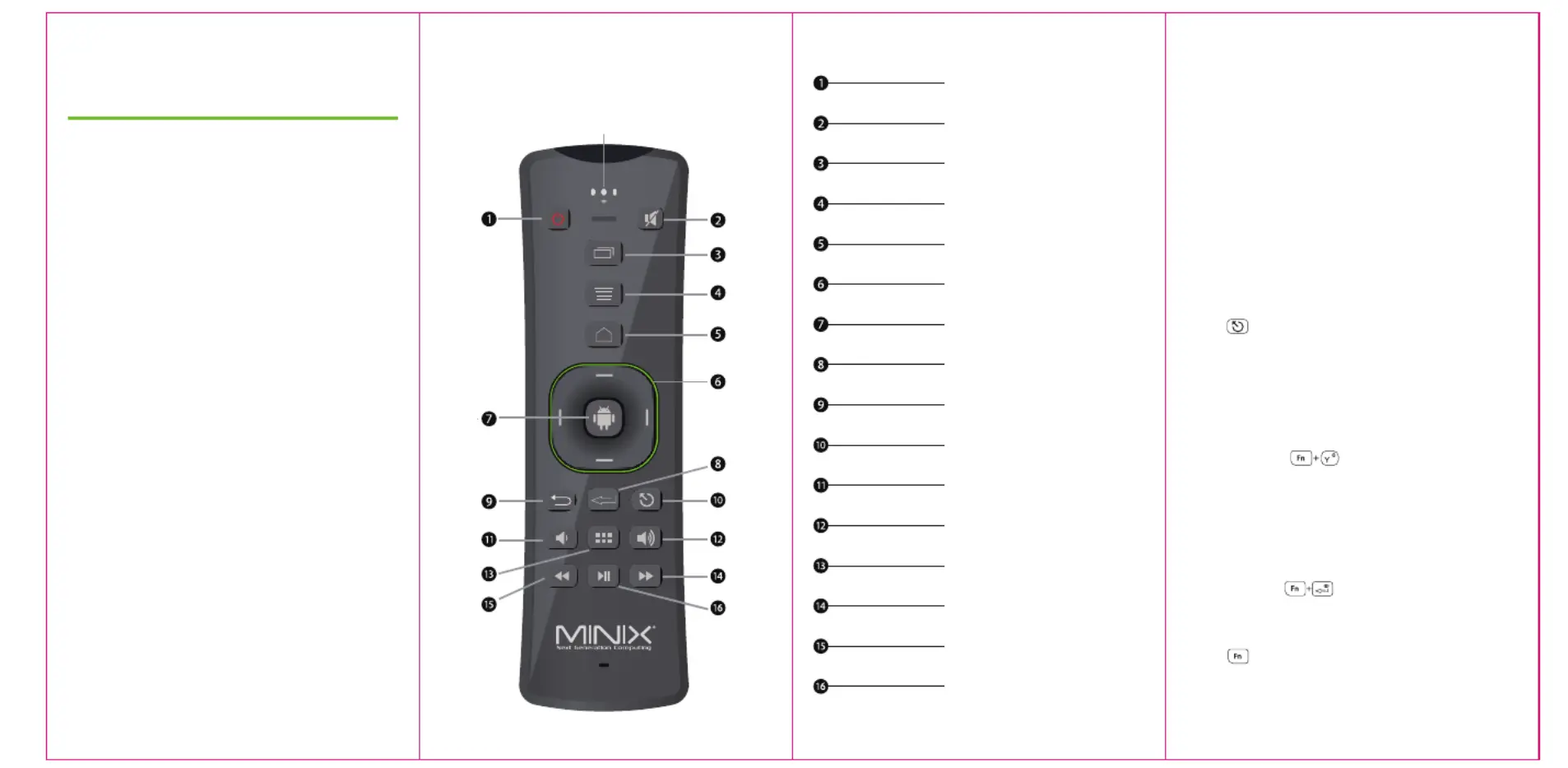
Key Pad Layout
Mute
Recent apps list (Shortcut)
Menu (Options)
Launcher Home screen (Shortcut)
Directional Pad
Left-click (or Enter when using D-Pad)
Enter
Return / Back
Volume Down
Volume Up
List of apps installed (Shortcut)
Fast Forward (for stock video player)
Rewind (for stock video player)
Play / Pause
Press to activate mouse-pointer
Long Press - Power Options Menu
Short Press - Standby Mode
Activation Key
LED 1
Specyfikacje produktu
| Marka: | Minix |
| Kategoria: | Inne - Różne |
| Model: | Neo A2 lite |
Potrzebujesz pomocy?
Jeśli potrzebujesz pomocy z Minix Neo A2 lite, zadaj pytanie poniżej, a inni użytkownicy Ci odpowiedzą
Instrukcje Inne - Różne Minix

24 Września 2024
22 Września 2024
15 Września 2024
8 Września 2024
4 Września 2024
4 Września 2024
3 Września 2024
2 Września 2024
1 Września 2024
1 Września 2024
Instrukcje Inne - Różne
Najnowsze instrukcje dla Inne - Różne
12 Stycznia 2025
11 Stycznia 2025
11 Stycznia 2025
18 Grudnia 2024
28 Września 2024
28 Września 2024
28 Września 2024
28 Września 2024
28 Września 2024
28 Września 2024