Instrukcja obsługi Motorola Mag One BPR40
Motorola walkie talkie Mag One BPR40
Przeczytaj poniżej 📖 instrukcję obsługi w języku polskim dla Motorola Mag One BPR40 (2 stron) w kategorii walkie talkie. Ta instrukcja była pomocna dla 49 osób i została oceniona przez 6 użytkowników na średnio 4.9 gwiazdek
Strona 1/2
PRODUCT SAFETY AND RF EXPOSURE COMPLIANCE
ATTENTION!
This radio is restricted to occupational use only to satisfy FCC RF energy exposure
requirements. Before using this product, read the RF energy awareness information and operating
instructions in the Product Safety and RF Exposure booklet enclosed with your radio (Motorola
Publication part number 6881095C98) to ensure compliance with RF energy exposure limits.
For a list of Motorola-approved antennas, batteries, and other accessories, visit the following web
site which lists approved accessories: http://www.motorola.com/governmentandenterprise
Mag One™
by Motorola is registered in the U.S. Patent and Trademark Office.
All other products and service names are the property of their own respective owners.
© Motorola, Inc. 2005, 2006, 2007
1301 E. Algonquin Rd.,
Schaumburg, IL 60196-1078, U.S.A.
Printed in China. 02/07. All Rights Reserved.
Before using this product, read the operating instructions for safe usage
contained in the Product Safety and RF Exposure booklet enclosed with your
radio.
*6881098C61*
6881098C61-D
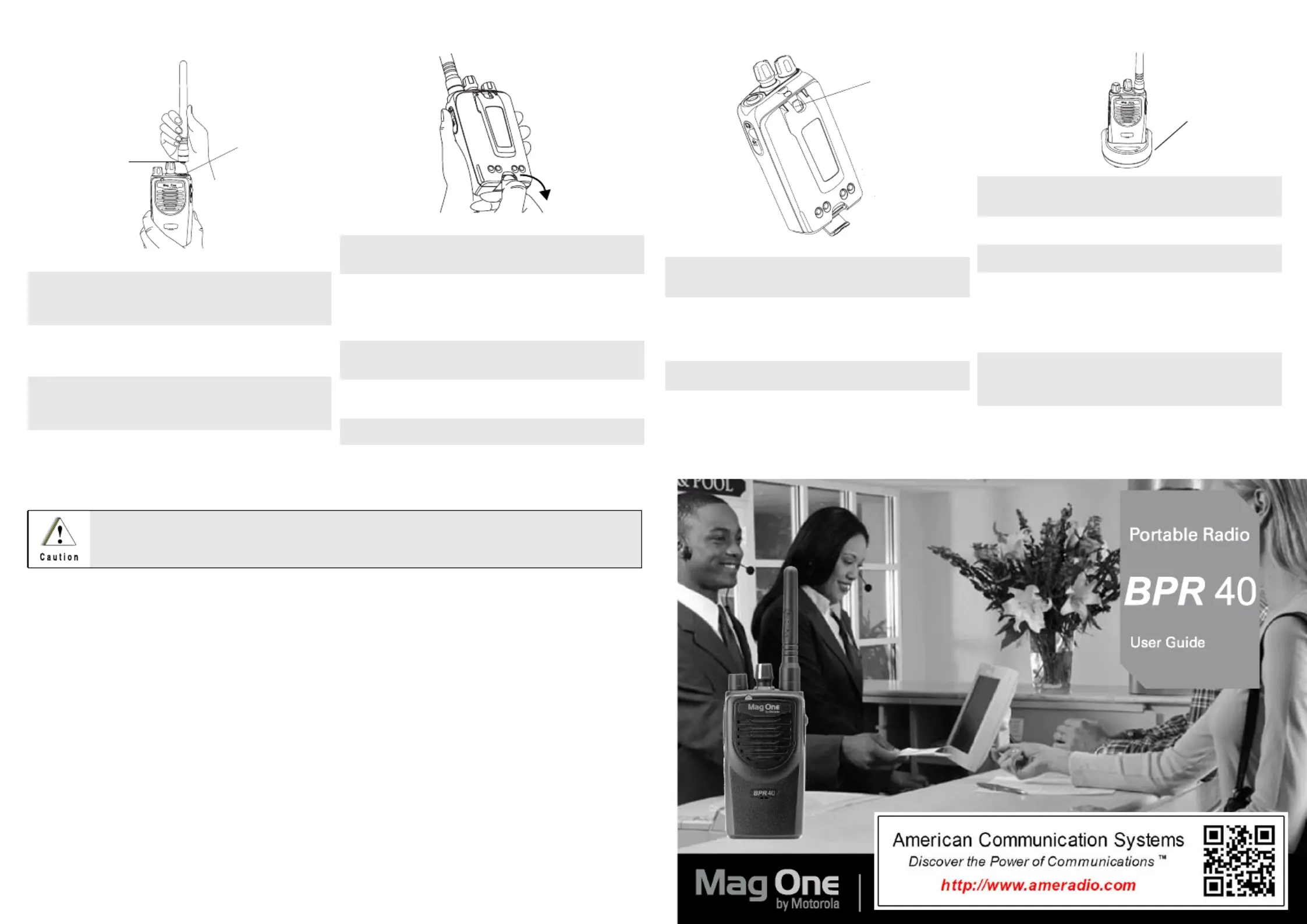
Attaching andmovingthetenna Re An
Toach Antenna Att
Toemove Antenna R
1.Fastene antenna toe radio by placing th th
the threadedenofhe antennainto d t the
Antenna Connector.
2.Rotatethe antenna clockwiseuntil tight.
1.
Tuthenteinunter-clockwisern anna a co
direction until itsengages fromthe di
radio.
Threaded End
ofenna Ant
Antenna
Connector
Attaching and Removinge Battery th
To BatteryAttach
ToBattery Remove
1.Align afitbattery tonintohend the gue t
grooveofe chassis ofthe radio. th
2.Secure thelatch atthe bottom of the
radio.
1.Unlatchbattery clasp attbottom of the he
the radio.
2.Gently lifthe hiltofbattery nearestto t the
the battlatch awayrthe housing.ery fom
3.Slide battdownwards toremove.ery
Attaching and Removing the BeltClip
ToaBelt Clip Attch
ToRemove Belt Clip
1.Align mounting rails ofthe radio with the
grooofheltlip.ves t be c
2.Slide the beltpwnwards untilicks cli do it cl
intolace. p
1.Lifte release tab. th
2.Slide the belt clip upwards.
Release abT
Charginguradio yo R
1.Turn offyour radiand thA/C power o e
supply to yourcharger (ifthey are on).
2.Place your radiinhe charger pocket.o t
3.Turn on the charger’sA/C power supply.
4.Whilchargingur radio,thearger’se yo ch
LEshows asteady red light. The radioD
should behargedeast6ours initially c at l 1 h
before decreasingargingi12 ch tme to
hours.
5.Turn offcharger’spower supply, the A/C
and remove the radifrom thchargero e
pocket.
6.For more details, refertoyour Tri-Chem
ChargeUser Guide (6871916T01).r
Charger Pocket
Specyfikacje produktu
| Marka: | Motorola |
| Kategoria: | walkie talkie |
| Model: | Mag One BPR40 |
Potrzebujesz pomocy?
Jeśli potrzebujesz pomocy z Motorola Mag One BPR40, zadaj pytanie poniżej, a inni użytkownicy Ci odpowiedzą
Instrukcje walkie talkie Motorola

3 Stycznia 2025
9 Października 2024
7 Października 2024
2 Października 2024
2 Października 2024
29 Września 2024
21 Września 2024
17 Września 2024
12 Września 2024
9 Września 2024
Instrukcje walkie talkie
Najnowsze instrukcje dla walkie talkie
30 Marca 2025
25 Lutego 2025
17 Lutego 2025
13 Stycznia 2025
12 Stycznia 2025
1 Stycznia 2025
1 Stycznia 2025
1 Stycznia 2025
1 Stycznia 2025
1 Stycznia 2025