Instrukcja obsługi Noctua NH-U14S DX-4677
Noctua Sprzęt komputerowy NH-U14S DX-4677
Przeczytaj poniżej 📖 instrukcję obsługi w języku polskim dla Noctua NH-U14S DX-4677 (2 stron) w kategorii Sprzęt komputerowy. Ta instrukcja była pomocna dla 42 osób i została oceniona przez 2 użytkowników na średnio 4.7 gwiazdek
Strona 1/2
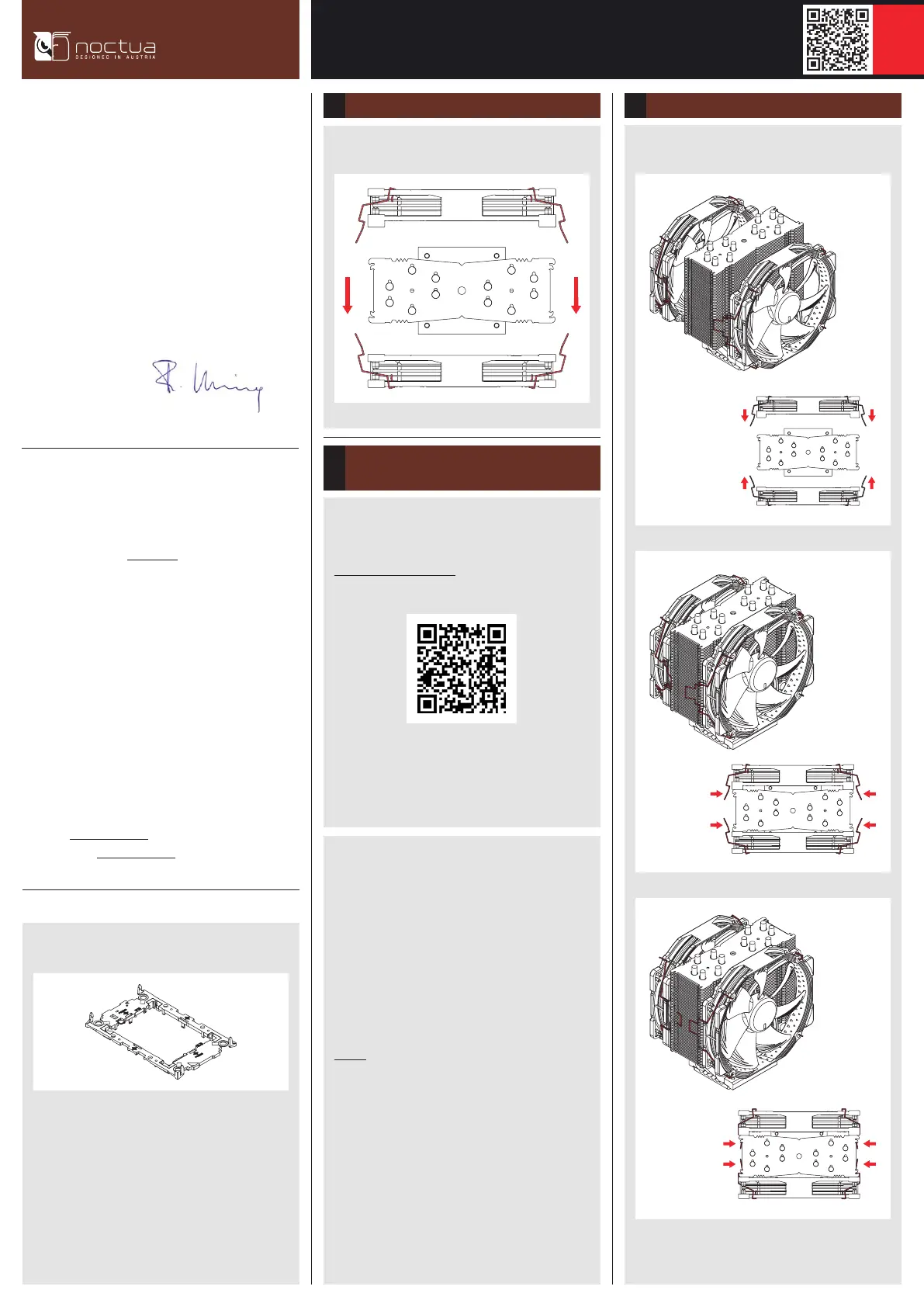
Take the fans off the cooler.
Dear customer,
Thank you very much for choosing the Noctua NH-U14S DX-4677.
Our DX line of coolers has become a default choice in high
performance quiet cooling solutions for Intel Xeon processors,
and I’m confident that you will be able to sense some of the
research, attention and care we’ve put into making this product.
Enjoy your NH-U14S DX-4677!
Yours sincerely,
Roland Mossig, Noctua CEO
When attaching the CPU carrier frame to the base of the heatsink,
turn the heatsink upside down so that the base is facing upwards.
Carefully put it down onto the tips of the heatpipes and secure
it with your hand so that it cannot tilt and that the fins cannot
get bent.
Remove the plastic protection cover from the base of the heatsink
and be careful not to damage the layer of pre-applied thermal
compound.
Caution: If you are not using the heatsink for the first time and
it therefore doesn’t have a fresh layer of pre-applied thermal
compound anymore, you need to apply a thin layer of thermal
compound to the CPU yourself before clipping it to the heatsink.
If there are residual traces of previous thermal paste or thermal
pads on your CPU or on the heatsink, please clean them off first.
NOCTUA NH-U14S DX-4677
INSTALLATION MANUAL
Required mounting parts:
Removing the fans1
Assembly of carrier frame, CPU and heatsink &
installation to the socket
2
Please follow the official Intel installation manual for how to
attach the CPU carrier frame to the heatsink, insert the CPU to the
carrier frame and install the CPU/heatsink assembly to the socket:
www.intel.com/processorinstall
Note that while the Intel illustrations show a 2U heatsink, the
Noctua NM-XFB9 brackets use the same mounting parts, so the
procedure is identical for Noctua heatsinks.
Reattach the fans to the heatsink using the supplied fan clips:
6 Installing the fans3
Connect the fans to the motherboard’s CPU fan headers.
NOCTUA MOBILE-TAG
Plastic CPU carrier frame
Please note that installing an LGA4677 processor and heatsink
requires a plastic CPU carrier frame such as the one shown
above. These carrier frames are included with boxed retail CPUs
and available separately via Intel sales partners for tray type
CPUs. As different CPUs require different carrier frame types
(E1A, E1B or E1C), please make sure to purchase the correct
carrier frame for tray type CPUs.
This manual will guide you through the installation process of the
SecuFirm2™ mounting system step by step.
Prior to installing the cooler, please consult the compatibility
centre on our website (ncc.noctua.at) and verify that the cooler
is fully compatible with your motherboard.
Please also make sure that your PC case offers sufficient clearance
for the cooler and that there are no compatibility issues with any
other components (e.g. tall RAM modules).
Double check that the heatsink and fan clips do not make
contact with the VGA card, other PCIe cards, motherboard heatsinks
or any other components.
Noctua cannot be held responsible for any damage or losses
caused by compatibility issues.
Should you encounter any difficulties, please check the FAQs on our
website (www.noctua.at/faqs) and don’t hesitate to contact our
support team at support@noctua.at.
Specyfikacje produktu
| Marka: | Noctua |
| Kategoria: | Sprzęt komputerowy |
| Model: | NH-U14S DX-4677 |
| Kolor produktu: | Brown, Light brown, Silver |
| Odpowiednia lokalizacja: | Procesor |
| Wysokość produktu: | 165 mm |
| Szerokość produktu: | 150 mm |
| Głębokość produktu: | 111 mm |
| Waga produktu: | 1136 g |
| Model: | Chłodnica powietrza |
| Liczba wentylatorów: | 2 went. |
| Procesor: | Intel® Xeon W |
| Złącze wentylatora: | 4-pin |
| Obsługiwane gniazda procesora: | LGA 4677 (Socket E) |
| Poziom hałasu (wysoka prędkość): | 24.6 dB |
| Średnica czaszy wentylatora: | 140 mm |
| Prędkość obrotowa (min): | 300 RPM |
| Prędkość obrotowa (max): | 1599 RPM |
| Przepływ powietrza: | 140.2 m³/h |
| Typ łożyska: | Self-Stabilising Oil-pressure Bearing (SSO) |
| Tworzywo płyta podstawy: | Miedź |
| Tworzywo chłodnicy: | Aluminium |
| Ilość ciepłowodów: | 6 |
| Natężenie wentylatora: | 12 V |
| Średnica wentylatora 2: | 140 mm |
| Szerokość chłodnicy: | 150 mm |
| Głębokość chłodnicy: | 52 mm |
| Wysokość chłodnicy: | 165 mm |
| Pobór mocy wentylatora: | 1.56 W |
| Prędkość obrotowa wentylatora 2 (min.): | 300 RPM |
| Prędkość obrotowa wentylatora 2 (maks.): | 1500 RPM |
Potrzebujesz pomocy?
Jeśli potrzebujesz pomocy z Noctua NH-U14S DX-4677, zadaj pytanie poniżej, a inni użytkownicy Ci odpowiedzą
Instrukcje Sprzęt komputerowy Noctua

9 Kwietnia 2025
9 Stycznia 2025
9 Stycznia 2025
9 Października 2024
9 Października 2024
9 Października 2024
9 Października 2024
9 Października 2024
3 Października 2024
3 Października 2024
Instrukcje Sprzęt komputerowy
Najnowsze instrukcje dla Sprzęt komputerowy
9 Kwietnia 2025
9 Kwietnia 2025
8 Kwietnia 2025
8 Kwietnia 2025
8 Kwietnia 2025
8 Kwietnia 2025
8 Kwietnia 2025
8 Kwietnia 2025
8 Kwietnia 2025
8 Kwietnia 2025