Instrukcja obsługi PAC MCI-GM53
PAC Nie skategoryzowane MCI-GM53
Przeczytaj poniżej 📖 instrukcję obsługi w języku polskim dla PAC MCI-GM53 (4 stron) w kategorii Nie skategoryzowane. Ta instrukcja była pomocna dla 26 osób i została oceniona przez 7 użytkowników na średnio 4.3 gwiazdek
Strona 1/4
Multi Camera Input Interface
for select General Motors Vehicles
© 2019 AAMP Global. All rights reserved. PAC is a Power Brand of AAMP Global.
PAC-audio.com
C
Page 1
Rev. V2
Date: 072419
MCI-GM53
The MCI-GM53 will allow the addition of a reverse, blind spot, and one more additional camera in vehicles equipped
with the 7” screen.
Introduction and Features
Important Notes
1. Compatible build code: IOB. Incompatible build codes: IOA, IO4, IO5, and IO6 . Build codes can be found on a silver sticker either in
the glove box or by scanning the QR code in the driver door frame.
2. If you change the DIP switch settings, you must disconnect and reconnect power for the change to take eect.
3. It is very important that you make all connections with the key in the o position.Failure to do so will result in the factory
touchscreen becoming unresponsive. If you do make the connections with the key on, you must turn the vehicle o, shut all doors, and
leave it alone for 5 minutes. After 5 minutes, turn the key back on, and the interface should operate as intended.
4. If you are installing this interface strictly to add a reverse camera, please note that the blind spot inputs will need to be disabled by
entering the menu and manually disabling the inputs (see page 3, step 3 for details).
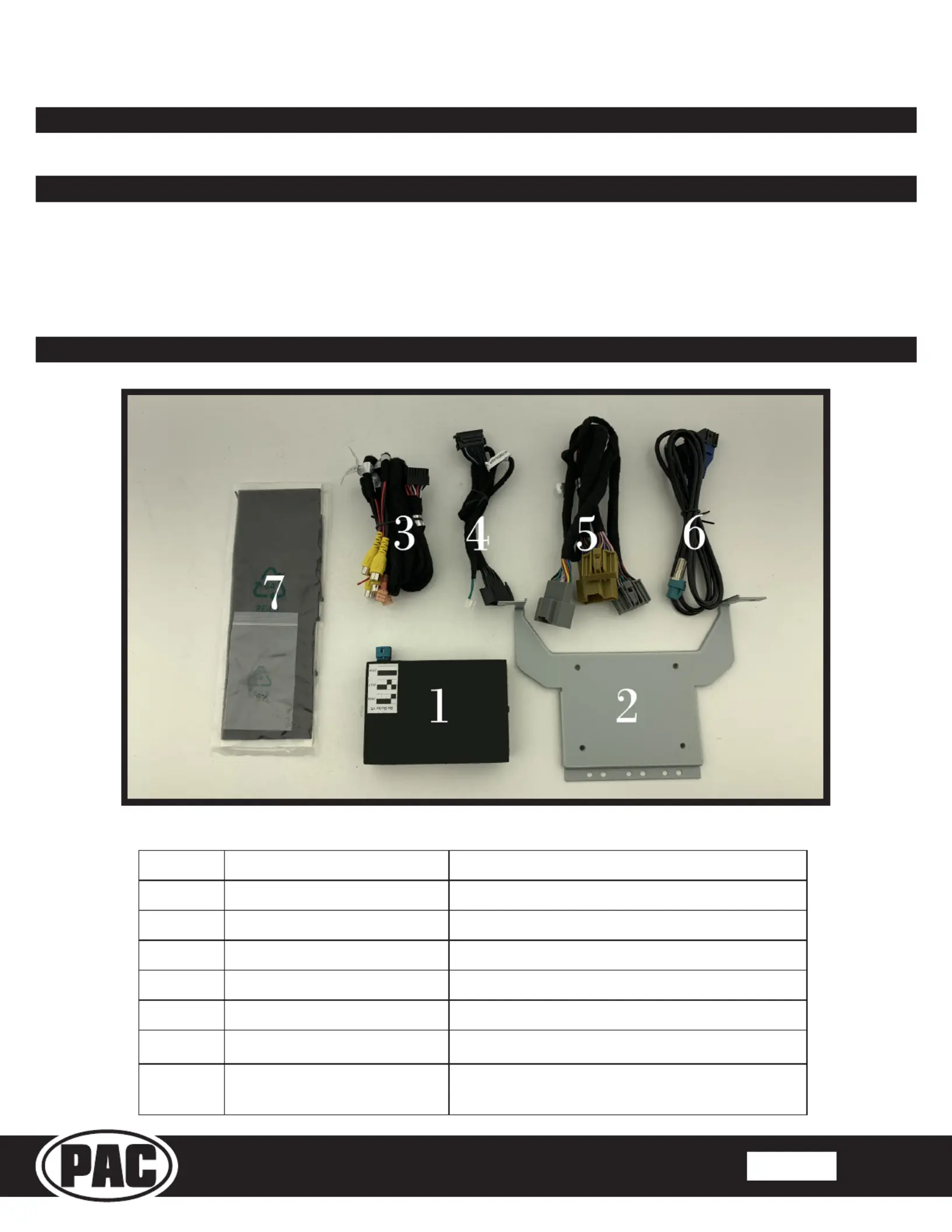
What’s Included
NumberDescriptionReplacement Part Number
1ModuleMCI-GM53
2Mounting BracketGMSWRBRKT
3Video Input Harness BSM2-CEH
4VBM HarnessBSM1-TMON-HAR V2
5Power HarnessBSM2-PTH
6LVDS HarnessBSM1-LVDS
7
Foam Padding/
Mounting Screws
Miscellaneous
Specyfikacje produktu
| Marka: | PAC |
| Kategoria: | Nie skategoryzowane |
| Model: | MCI-GM53 |
Potrzebujesz pomocy?
Jeśli potrzebujesz pomocy z PAC MCI-GM53, zadaj pytanie poniżej, a inni użytkownicy Ci odpowiedzą
Instrukcje Nie skategoryzowane PAC

10 Marca 2025
19 Lutego 2025
19 Lutego 2025
19 Lutego 2025
19 Lutego 2025
19 Lutego 2025
19 Lutego 2025
19 Lutego 2025
12 Lutego 2025
12 Lutego 2025
Instrukcje Nie skategoryzowane
Najnowsze instrukcje dla Nie skategoryzowane
9 Kwietnia 2025
9 Kwietnia 2025
9 Kwietnia 2025
9 Kwietnia 2025
9 Kwietnia 2025
9 Kwietnia 2025
9 Kwietnia 2025
9 Kwietnia 2025
9 Kwietnia 2025
9 Kwietnia 2025