Instrukcja obsługi Skmei 1283
Przeczytaj poniżej 📖 instrukcję obsługi w języku polskim dla Skmei 1283 (6 stron) w kategorii Oglądać. Ta instrukcja była pomocna dla 20 osób i została oceniona przez 5 użytkowników na średnio 4.0 gwiazdek
Strona 1/6

2016-12-13Model:CRH123Page:
1
/2Edition:A
A.Features
13DigitsLCDDisplay,DisplayHour,Minute,Second,Month,Day,YearandWeek
AutomaticCalendar(2000~2099)
DualTime
12/24Hformatselectable,AutoCalendar
DailyAlarm,ChimehourlyandSNZ
1/100secondto23hour59.99secondChronographwithsplitfunctions,12groupsofLAPsegment
timing
Countdownfunction
ELbacklight
Touch-tone
B.
OperationalManual
1.Atanymode,pressAkeyELbacklightfor3s.
2.PressBtochangethedisplaymode
3.InrealtimemodepressDkeytoswitch12hoursor24hoursdisplay.
4.RealTimeanddate
TimeSetting
a).PressandholdCkeyfor2stotimesettingmodeand"Second"flashing,PressBkeytoselectitemas
followingsequence:
(CKey)RESET
(DKey)ST/STP
LIGHT(AKey)
MODE(BKey)
____
RealTime
Chronograph
Alarm
BKey
BKey
BKey
BKey
DualTime
BKey
Countdown

2016-12-13Model:CRH123Page:
2
/2Edition:A
b).PressDkeywhilethesecondsareintherangeof30to59,resettingthemto00andadding1tothe
minutes.Whilethesecondsareintherangeof00to29,theminuteswon’tbechanged.
c).PressDkeytoadjustthevalueincrement,holddownDkeytoquicklyadjust.
d)PressCkeytoreturntoRealTimeMode.
e)Insettingmode.1minuteNokeyoperationautomaticallyexitsetting,returntorealtimedisplay
mode.
5.DualTimeMode
Intherealtimemode,PressBkey3timestoenterDualTimeMode,PressandholdCkeyfor2sto
select"Hour"setting,PressBkeytoselect"Minute"setting,
PressDkeytoadjustthevalueincrement,holddownDkeytoquicklyadjust.
PressCkeyagaintofinishsetting,andreturntoDualTimedisplayingmode.
Insettingmode.1minuteNokeyoperationautomaticallyexitsetting,returntoDualTimedisplaying
mode.
ThesecondofDualTimeisthesameasrealtime
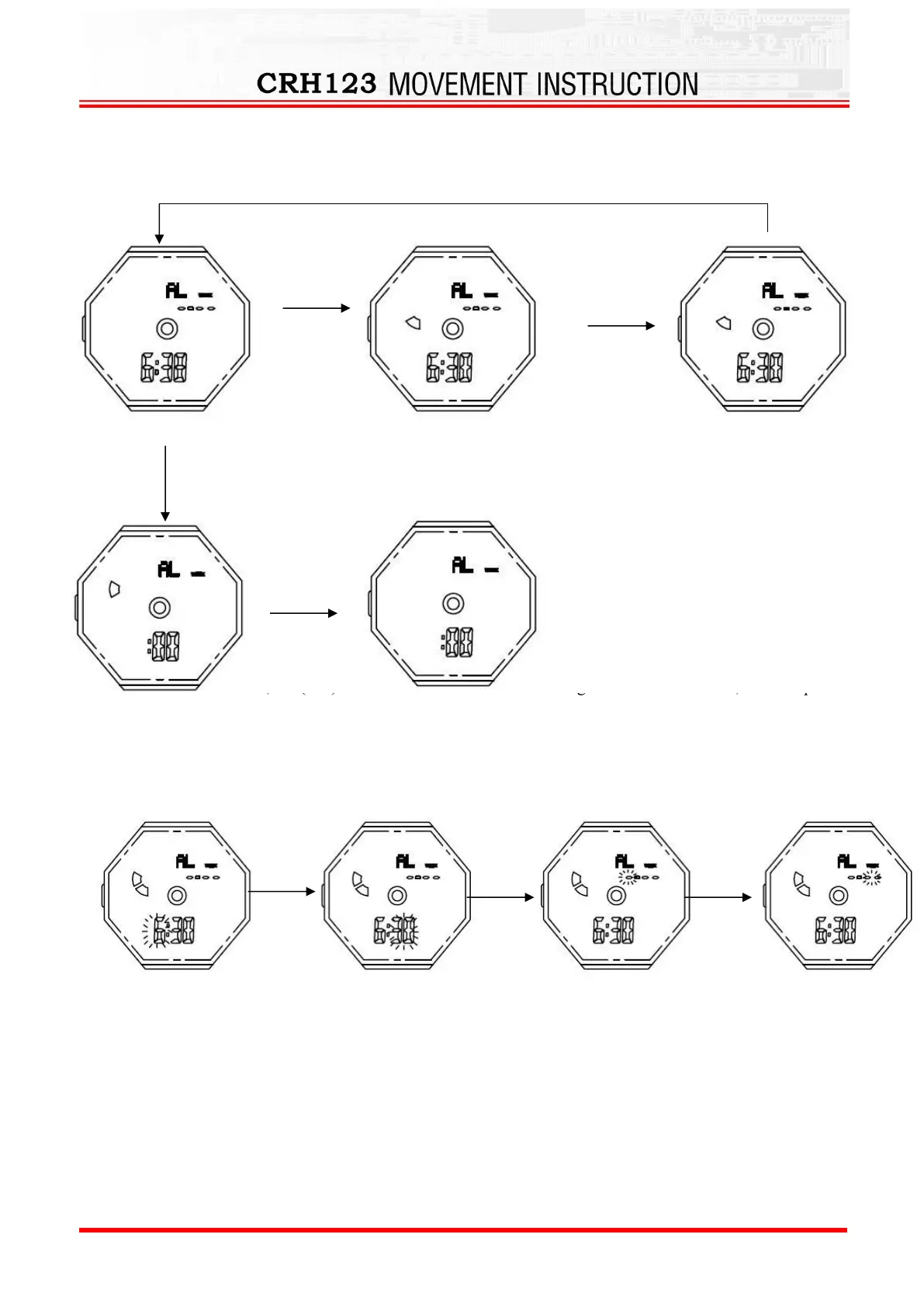
6.DailyAlarm
TurnOn/OffAlarm,ChimeandSnooze
a)InAlarmmode,PressDandthenPressCkeytoturnon/offAlarm(),
b)InAlarmMode,pressCtoturnon/offhourlychime()andsnooze(“SNZ”),
HoldCKey
for2s
RealTime
Second
Hour
Minute
BKey
BKey
BKey
BKey
BKey
Year
Month
Day
CKey
BKey
Hour
Minute
2016-12-13Model:CRH123Page:
3
/2Edition:A
Alarmsetting
PressandholdCkeyfor2stoselect"Hour"setting;PressBkeytoselect"Minute"setting;PressDkey
toadjusttheflashingitem.
WhenAlarmisON,the()willflashonceitreachesthesettingtime.After9seconds,itwillstop
AlarmMode:
Inalarmmode,pressandholdCkeyfor2secondstoenterthealarmtimesettingstate,thenpressBkeyto
selectthesettingitemsasfollows:
PressDkeytoadjustthevalueincrement,holddownDkeytoquicklyadjust.
PressCkeytoreturntoAlarmMode.
Insettingmode.Noanykeyoperationthenwillbacktoalarmdisplaymodeautomaticallyafter1
minute.
Remarks:
Whenyouneedadailyalarm,donotenteranumberatthebottomofthescreen.Pleasesetitto"-
---".
Whenyouneedaspecifymonthalarm,youneedtoenterthenumber"12---"atthebottomof
thescreen.
CKey
CKey
CKey
Alarm
Turnonhourlychime
TurnonSnooze
TurnonAlarm
TurnoffAlarm
DKey→CKey
BKey
BKey
BKey
Hour
Minute
Month
Day
CKey
Specyfikacje produktu
| Marka: | Skmei |
| Kategoria: | Oglądać |
| Model: | 1283 |
Potrzebujesz pomocy?
Jeśli potrzebujesz pomocy z Skmei 1283, zadaj pytanie poniżej, a inni użytkownicy Ci odpowiedzą
Instrukcje Oglądać Skmei

17 Stycznia 2025
28 Września 2024
6 Lipca 2024
6 Lipca 2024
6 Lipca 2024
6 Lipca 2024
6 Lipca 2024
6 Lipca 2024
4 Lipca 2024
4 Lipca 2024
Instrukcje Oglądać
Najnowsze instrukcje dla Oglądać
30 Marca 2025
26 Marca 2025
26 Marca 2025
13 Marca 2025
13 Marca 2025
13 Marca 2025
13 Marca 2025