Instrukcja obsługi Starkey TruLink for Apple
Przeczytaj poniżej 📖 instrukcję obsługi w języku polskim dla Starkey TruLink for Apple (10 stron) w kategorii Dźwięk. Ta instrukcja była pomocna dla 19 osób i została oceniona przez 4 użytkowników na średnio 4.3 gwiazdek
Strona 1/10
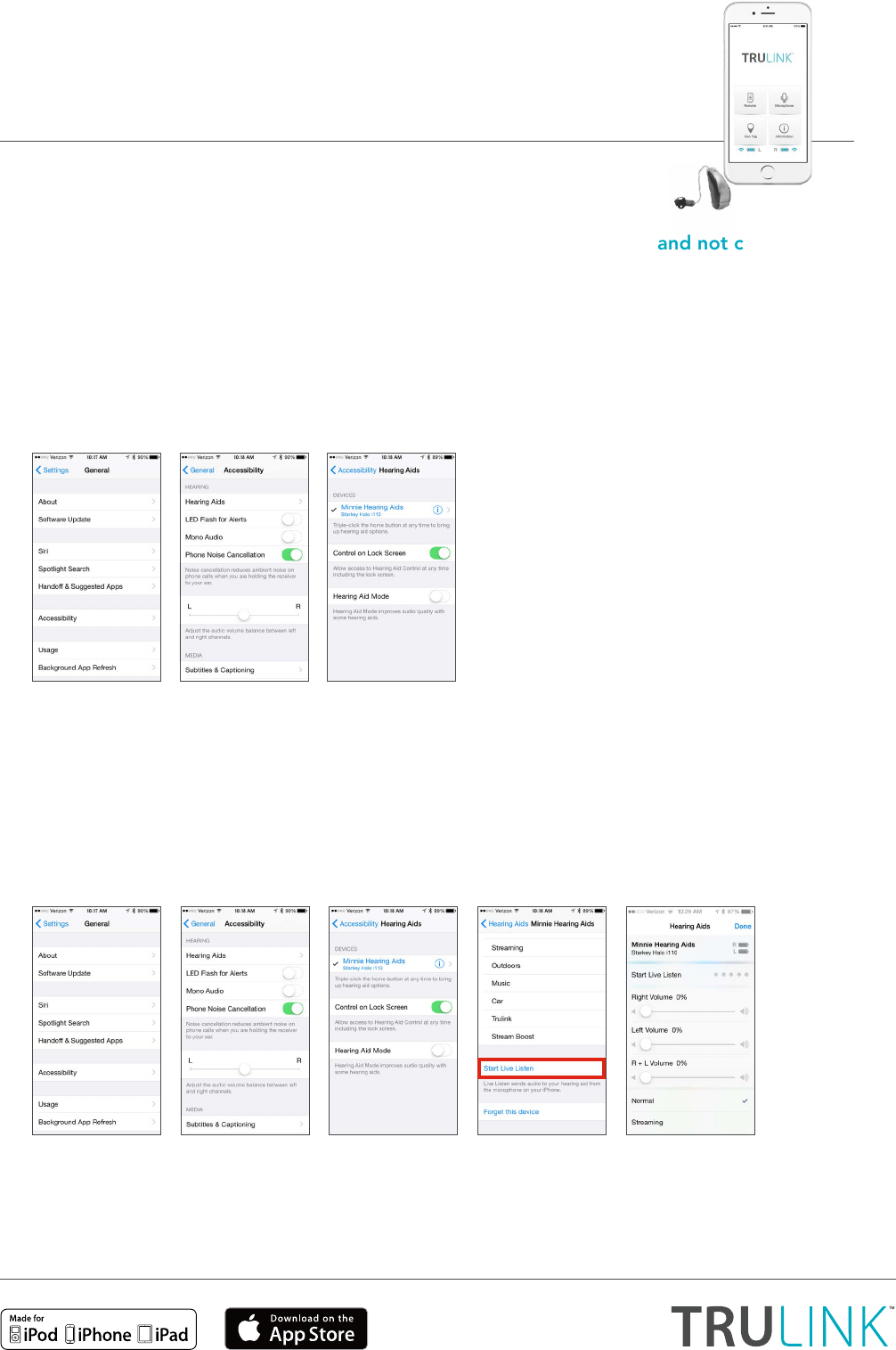
1. What is the difference between paired and connected versus paired and not connected?
a. How do I know if my hearing aids are paired:
• If there is a black checkmark in front of the Hearing Aid Name, then you are paired but not
necessarily connected to the Apple device.
• To access this screen: select Settings > General > Accessibility > Hearing Aids to view
the checkmark.
b. How do I know if my hearing aids are connected:
• Open the iPhone® controls by triple-clicking the home button or by navigating to
Settings > General > Accessibility > Hearing Aids.
• Confirm that the option for Start Live Listen is available.
• Listen as you make a memory or volume change.
NOTE: Simply changing the memory or volume slider without going into Start Live Listen does NOT confirm
that the hearing aids are connected. You may be able to visually see a change, but the change may not occur
in the hearing aid.
TruLink for Apple
Frequently Asked Questions
Visit www.TruLinkHearing.com for Apple® compatibility
and TruLink™ Hearing Control app information.
Specyfikacje produktu
| Marka: | Starkey |
| Kategoria: | Dźwięk |
| Model: | TruLink for Apple |
Potrzebujesz pomocy?
Jeśli potrzebujesz pomocy z Starkey TruLink for Apple, zadaj pytanie poniżej, a inni użytkownicy Ci odpowiedzą
Instrukcje Dźwięk Starkey

28 Września 2024
28 Września 2024
28 Września 2024
28 Września 2024
28 Września 2024
28 Września 2024
28 Września 2024
28 Września 2024
28 Września 2024
28 Września 2024
Instrukcje Dźwięk
Najnowsze instrukcje dla Dźwięk
14 Stycznia 2025
28 Września 2024
28 Września 2024
28 Września 2024
28 Września 2024
28 Września 2024
28 Września 2024
28 Września 2024
28 Września 2024
28 Września 2024