Instrukcja obsługi StarTech.com 155NA-USB4-DOCK
StarTech.com Inne akcesoria komputerowe 155NA-USB4-DOCK
Przeczytaj poniżej 📖 instrukcję obsługi w języku polskim dla StarTech.com 155NA-USB4-DOCK (2 stron) w kategorii Inne akcesoria komputerowe. Ta instrukcja była pomocna dla 37 osób i została oceniona przez 5 użytkowników na średnio 4.1 gwiazdek
Strona 1/2
Quick-Start Guide
To view manuals, FAQs, videos, drivers, downloads, technical drawings, and more, visit www.startech.com/support.
Manual Revision: June 1, 2023 1:18 PM
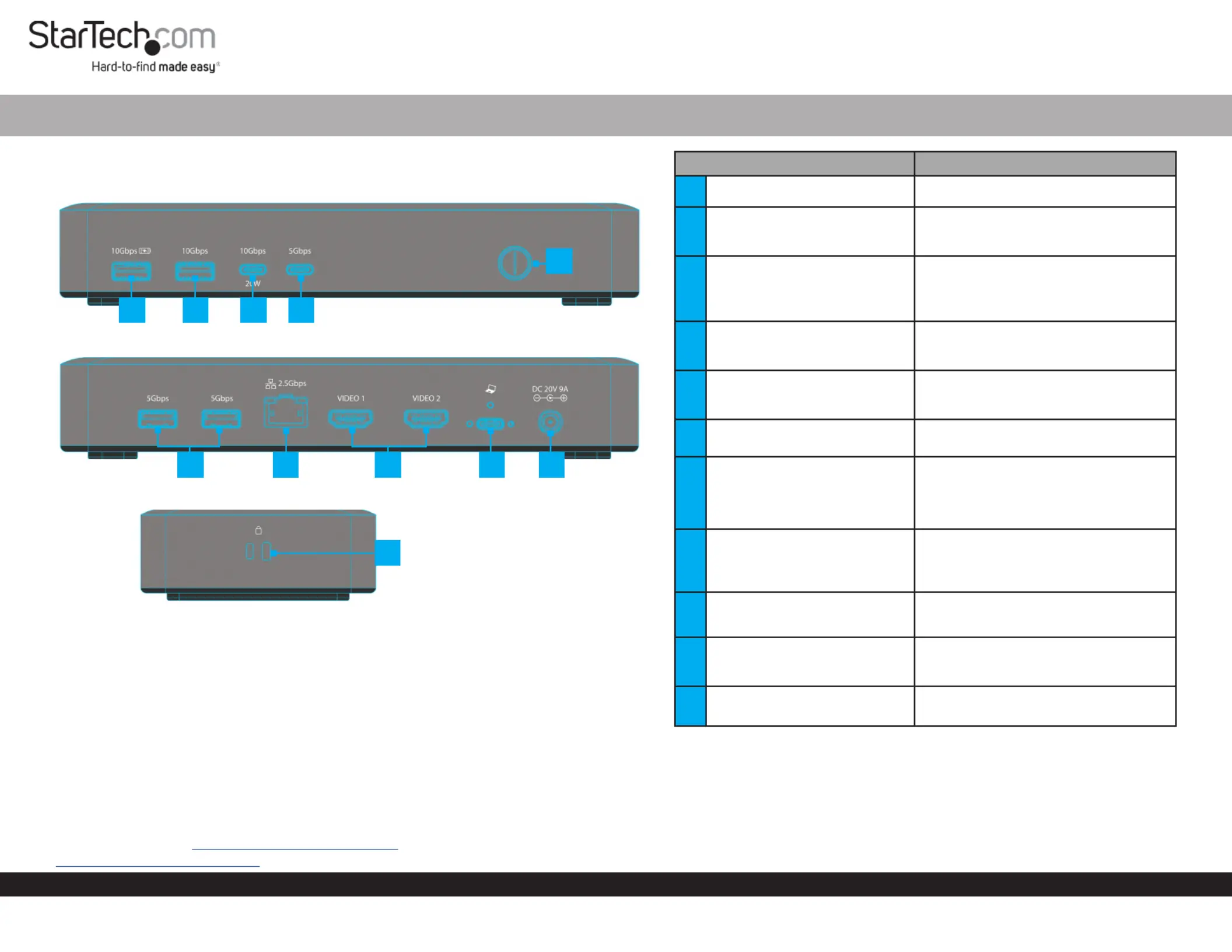
Product Diagram (Side A)
USB4 Docking Station - Dual 4K 60Hz HDMI, 6-Port USB Hub, 2.5GbE, 100W PD
1
67
9
2
(Side B)
Product ID
155NA-USB4-DOCK / 155UE-USB4-DOCK
(Side C)
ComponentFunction
1Power Button
• Press and Release to Toggle Power for the
Dock
2USB-C Data Port
• Connect a USB-C Peripheral
• USB 3.2 Gen 1 (5Gbps)
• Supports up to 7.5W(5V/1.5A) of Power
3USB-C Data/Power Port
• Connect a USB-C Peripheral
• USB 3.2 Gen 2 (10 Gbps)
• Power Delivery 3.0
4USB-A Data Port
• Connect a USB-A Peripheral
• USB 3.2 Gen 2 (10 Gbps)
• Supports up to 4.5W (5V/0.5A) of Power
5USB-A Data/Charge Port
• Connect and/or Charge a USB-A Peripheral
• USB 3.2 Gen 2 (10 Gbps)
• Supports 7.5W BC 1.2 Charging (5V/1.5A)
6DC 20V Port
• Connect the Dock to a Power Source, using
the Universal Power Adapter
7
USB4 Host Port
(Screw-Locking, USB Type-C)
• Connect to a USB-C Port on a Host Computer
• USB4 (40 Gbps)
• Power Delivery 3.0 Specication
• Capability of charging the Host Computer
up to 100W
82x HDMI Video Ports
• Connect HDMI Displays
• HDMI 2.1
• Up to 8K (7680x4320) 60Hz
• Via DisplayPort 1.4 Alt Mode
92.5 Gigabit Ethernet Port
• Connect the Dock to a Network Device,
using a Network Cable
• 2.5GBASE-T
102x USB-A Data Ports
• Connect USB-A Peripherals
• USB 3.2 Gen 1 (5 Gbps)
• Supports up to 4.5W (5V/0.9A) of Power
11
2x Lock Slots
(Standard & Nano)
• Connect a K-Slot Style Locking Device to
deter the theft of the Docking Station
Requirements
• Computer
• USB4 Port
• USB-C Port with DP Alt Mode
• This Dock can function with either a USB4 or USB-C host port. For
maximum performance a USB4 port is recommended. Video support
and performance, such as resolution, and refresh rate depend on the
host computer’s video controller. Please verify the specications of the
host computer.
For the latest drivers, manuals, product information, technical specications, and declarations of
conformance, please visit: www.StarTech.com/155NA-USB4-DOCK or
www.StarTech.com/155UE-USB4-DOCK
810
11
345
Package Contents
• USB-C Docking Station x 1
• 3 ft (1 m) USB4 Host Cable x 1
• Universal Power Adapter x 1
• Quick-Start Guide x 1
Specyfikacje produktu
| Marka: | StarTech.com |
| Kategoria: | Inne akcesoria komputerowe |
| Model: | 155NA-USB4-DOCK |
Potrzebujesz pomocy?
Jeśli potrzebujesz pomocy z StarTech.com 155NA-USB4-DOCK, zadaj pytanie poniżej, a inni użytkownicy Ci odpowiedzą
Instrukcje Inne akcesoria komputerowe StarTech.com

28 Grudnia 2024
28 Grudnia 2024
28 Grudnia 2024
7 Grudnia 2024
7 Grudnia 2024
9 Października 2024
9 Października 2024
7 Października 2024
5 Października 2024
2 Października 2024
Instrukcje Inne akcesoria komputerowe
Najnowsze instrukcje dla Inne akcesoria komputerowe
3 Kwietnia 2025
3 Kwietnia 2025
1 Kwietnia 2025
12 Marca 2025
22 Lutego 2025
20 Lutego 2025
20 Lutego 2025
20 Lutego 2025
20 Lutego 2025
20 Lutego 2025