Instrukcja obsługi StarTech.com 841RACKBRKT
StarTech.com przełącznik 841RACKBRKT
Przeczytaj poniżej 📖 instrukcję obsługi w języku polskim dla StarTech.com 841RACKBRKT (2 stron) w kategorii przełącznik. Ta instrukcja była pomocna dla 20 osób i została oceniona przez 7 użytkowników na średnio 4.6 gwiazdek
Strona 1/2
Instruction Manual
DE: Bedienungsanleitung - de.startech.com
FR: Guide de l'utilisateur - fr.startech.com
ES: Guía del usuario - es.startech.com
IT: Guida per l'uso - it.startech.com
NL: Gebruiksaanwijzing - nl.startech.com
PT: Guia do usuário - pt.startech.com
Manual Revision: 01/08/2015
For the most up-to-date information, please visit: www.startech.com
Packaging Contents
• 1 x Long Bracket
• 2 x Short Brackets
• 6 x M5 Rack Screws
• 8 x M4x8 Screws
• 6 x M4x8 Thumb Screws
• 1 x Instruction Manual
Installation
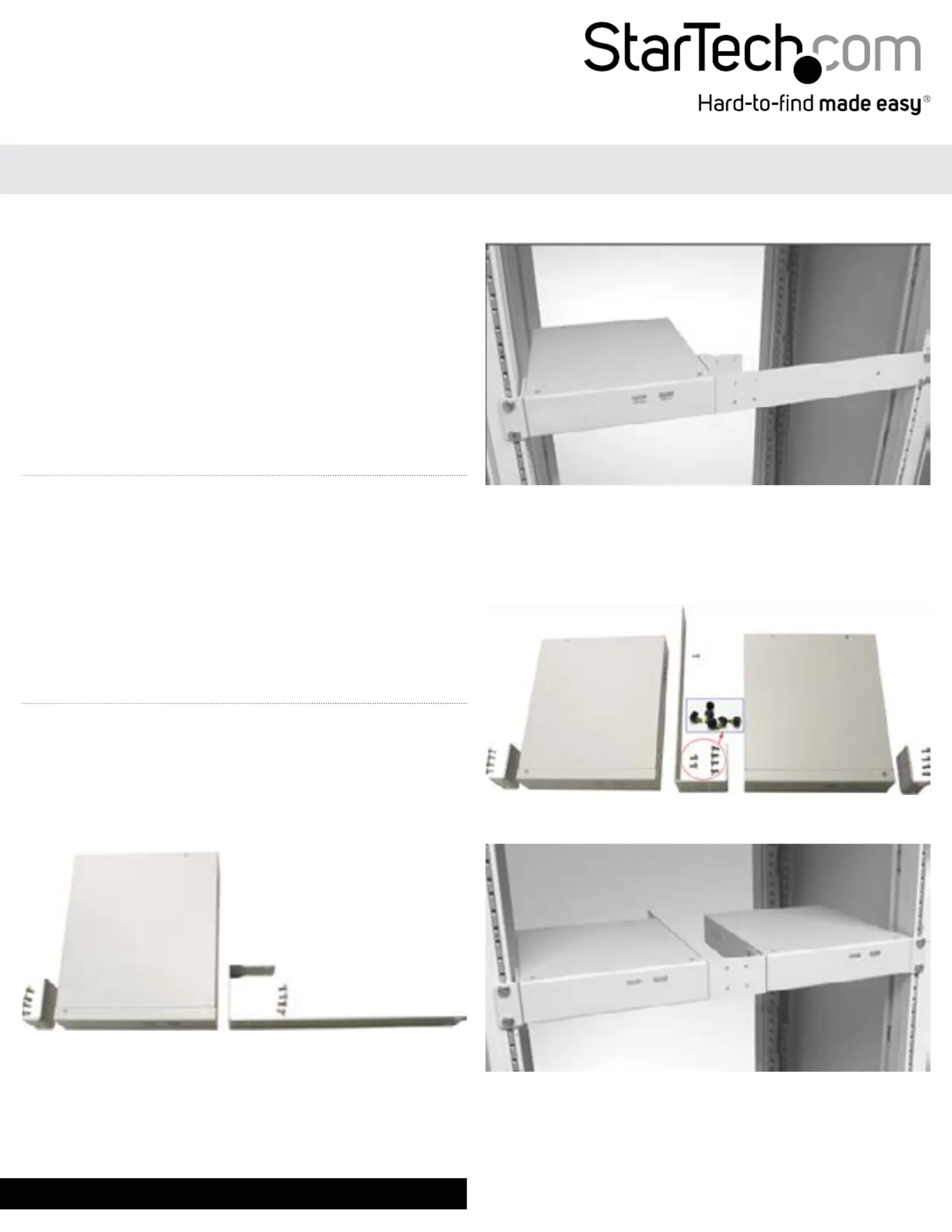
Single Unit Installation
1. Attach a Short Bracket to one side of the switch and the Long
Bracket to the opposite side as shown, using the included M4
Screws.
Note: The short bracket can be installed on either side to suit your
preference.
841RACKBRKT
1U Rack Mount Brackets for the SV841DUSBI KVM Switch
2. Attach the assembly to your rack using the M5 Rack Screws.
Two-Across Installation
1. Attach a Short Bracket to the far side of each switch and the
Long Bracket in between as shown, using the included M4
Thumb Screws and Regular Screws.
2. Attach the assembly to your rack using the M5 Rack Screws.
Specyfikacje produktu
| Marka: | StarTech.com |
| Kategoria: | przełącznik |
| Model: | 841RACKBRKT |
Potrzebujesz pomocy?
Jeśli potrzebujesz pomocy z StarTech.com 841RACKBRKT, zadaj pytanie poniżej, a inni użytkownicy Ci odpowiedzą
Instrukcje przełącznik StarTech.com

29 Grudnia 2024
29 Grudnia 2024
29 Grudnia 2024
15 Grudnia 2024
15 Grudnia 2024
15 Grudnia 2024
15 Grudnia 2024
15 Grudnia 2024
15 Grudnia 2024
15 Grudnia 2024
Instrukcje przełącznik
Najnowsze instrukcje dla przełącznik
9 Kwietnia 2025
9 Kwietnia 2025
7 Kwietnia 2025
5 Kwietnia 2025
4 Kwietnia 2025
4 Kwietnia 2025
4 Kwietnia 2025
3 Kwietnia 2025
3 Kwietnia 2025
2 Kwietnia 2025