Instrukcja obsługi StarTech.com CPUMOBILESTND
StarTech.com Wsparcie dla płaskich paneli CPUMOBILESTND
Przeczytaj poniżej 📖 instrukcję obsługi w języku polskim dla StarTech.com CPUMOBILESTND (4 stron) w kategorii Wsparcie dla płaskich paneli. Ta instrukcja była pomocna dla 34 osób i została oceniona przez 2 użytkowników na średnio 4.0 gwiazdek
Strona 1/4
Quick-Start Guide
Manual Revision: February 22, 2024
For additional self-service support options and community forums, please visit: www.StarTech.com/support
Product ID
CPUMOBILESTND
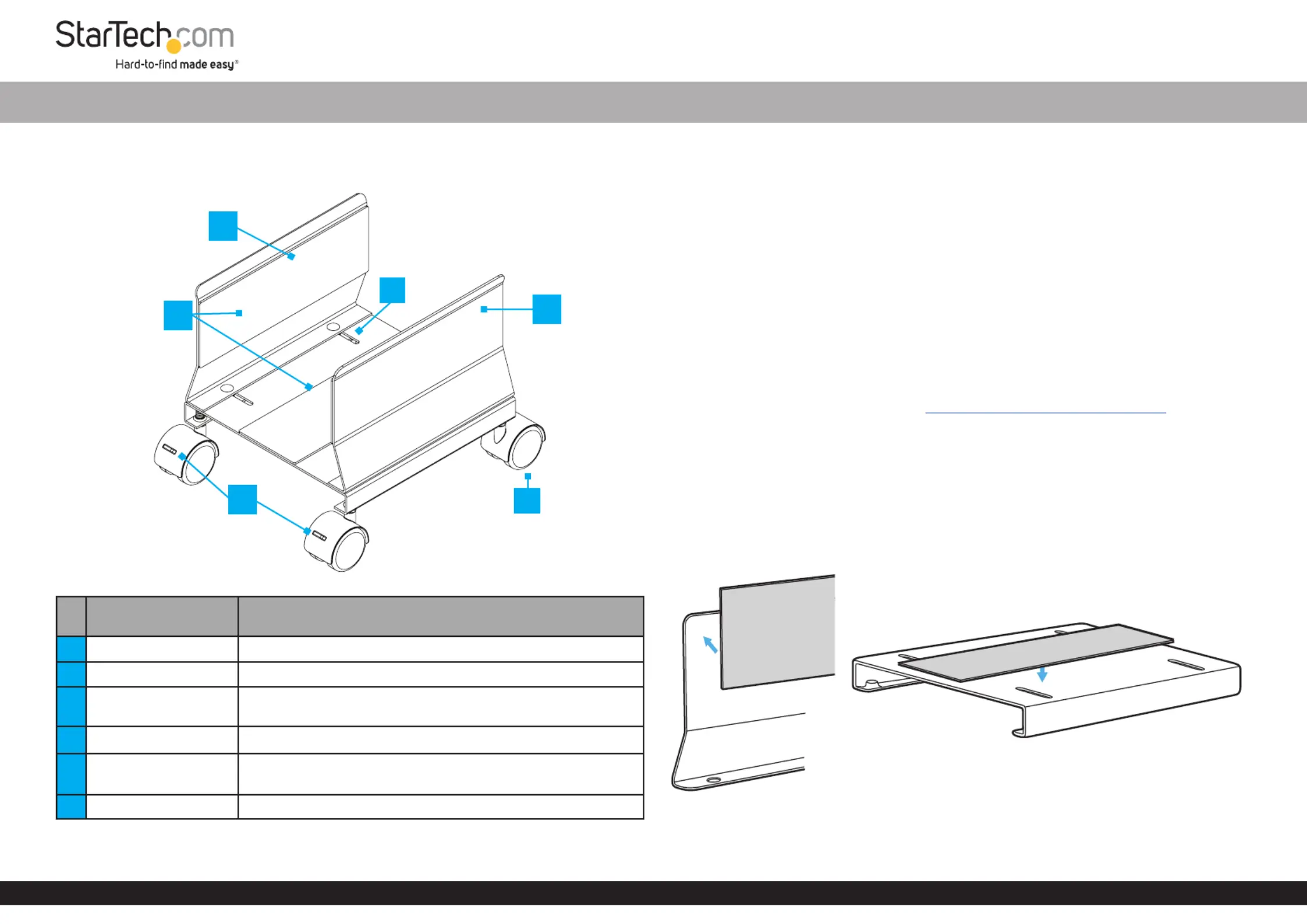
ComponentFunction
1Left Side Wall• Keeps the in placeComputer Case
2Adhesive Foam Pads• Helps prevent the from slippingComputer Case
3
Width Adjustment
Slots
• Allow to adjust the width to accommodate dierent
Computer Case sizes
4Right Side Wall• Keeps the in placeComputer Case
5Front Casters
• Allow for exible placement of the Mobile CPU Stand
• Brakes prevent unintended movement
6Rear Casters• Allow for exible placement of the Mobile CPU Stand
Package Contents
• Casters x 4
• Side Walls x 2
• Base x 1
• Adhesive Foam Pads x 3
• Assembly Screws x 4
• Wing Nuts x 4
• Washers x 4
• Wrench x 1
• Quick-Start Guide x 1
Requirements
For the latest requirements, please visit www.startech.com/CPUMOBILESTND
• Computer case width of 5.2 to 8.6 in (132 to 220mm)
Installation
Assemble the Mobile CPU Stand
1. Carefully remove the adhesive backing of the (x 3). Attach the Anti-Slip Pads
Anti-Slip Pads LeftRight Side WallsBaseto the and , and the top of the . (Figure 1)
Note: All Adhesive Foam Pads are the same size.
Figure 1
2
6
3
1
4
*Product may vary from image
Mobile CPU Stand - Adjustable Width
5
Specyfikacje produktu
| Marka: | StarTech.com |
| Kategoria: | Wsparcie dla płaskich paneli |
| Model: | CPUMOBILESTND |
Potrzebujesz pomocy?
Jeśli potrzebujesz pomocy z StarTech.com CPUMOBILESTND, zadaj pytanie poniżej, a inni użytkownicy Ci odpowiedzą
Instrukcje Wsparcie dla płaskich paneli StarTech.com

16 Stycznia 2025
16 Stycznia 2025
16 Stycznia 2025
16 Stycznia 2025
15 Stycznia 2025
15 Stycznia 2025
14 Stycznia 2025
14 Stycznia 2025
14 Stycznia 2025
14 Stycznia 2025
Instrukcje Wsparcie dla płaskich paneli
Najnowsze instrukcje dla Wsparcie dla płaskich paneli
29 Stycznia 2025
29 Stycznia 2025
29 Stycznia 2025
29 Stycznia 2025
28 Stycznia 2025
28 Stycznia 2025
16 Stycznia 2025
16 Stycznia 2025
16 Stycznia 2025
16 Stycznia 2025