Instrukcja obsługi StarTech.com DK31C3HDPDUE
StarTech.com Inne akcesoria komputerowe DK31C3HDPDUE
Przeczytaj poniżej 📖 instrukcję obsługi w języku polskim dla StarTech.com DK31C3HDPDUE (2 stron) w kategorii Inne akcesoria komputerowe. Ta instrukcja była pomocna dla 18 osób i została oceniona przez 9 użytkowników na średnio 4.9 gwiazdek
Strona 1/2
Quick-Start Guide
To view manuals, FAQs, videos, drivers, downloads, technical drawings, and more, visit www.startech.com/support.
Manual Revision: June 3, 2020
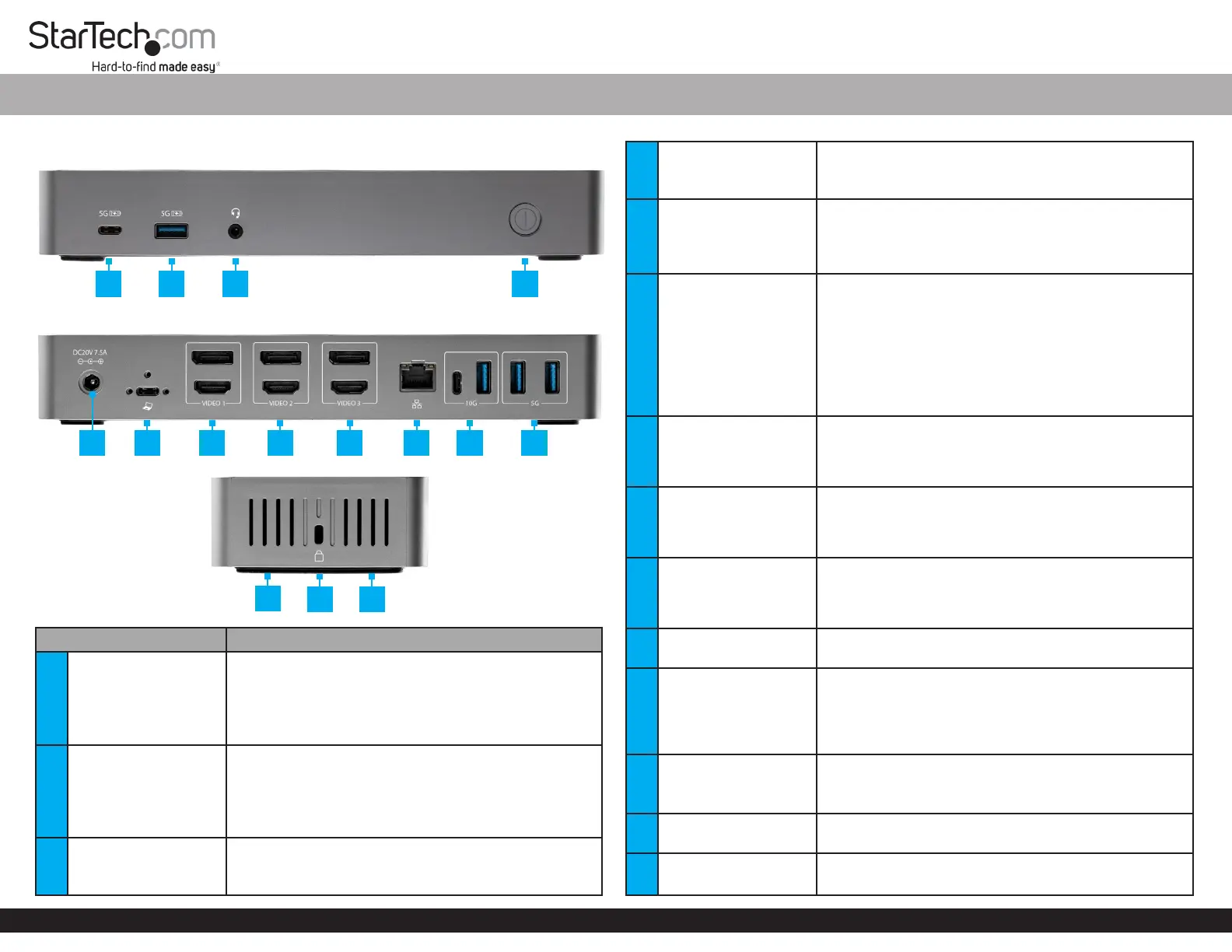
Product Diagram (DK31C3HDPD and DK31C3HDPDUE)
Front View
Rear View
Side View
PortFunction
1USB-C Charge Port
• Connect a USB-C Peripheral or charge a Mobile
Device
• USB 3.1 Gen 1
• Transmits power and/or data
• Supports BC1.2 9V/2A (18W) charging
2USB-A Charge Port
• Connect a USB-A Peripheral or charge a Mobile
Device
• USB 3.1 Gen 1
• Transmits power and/or data
• Supports BC1.2 5V/1.5A (7.5W) charging
3
Audio Input/Output
Port
• Connect a Headset or Speakers for audio
input/output
• 3.5 mm 4-position headset audio jack
USB-C™ 10Gbps & USB-A Triple 4K Monitor Hybrid Dock - DP and/or HDMI - 85W PD
4Power Button
• Power the Docking Station on and o
• Integrated LED Indicator is illuminated white when
the Docking Station is powered on
5DC Power Input Port
• Connect the Universal Power Adapter to supply
power to the Docking Station
• Type-M barrel connector
• 20V 7.5A
6USB-C Host Port
• Connect to a USB-A or USB-C Port on a Host Laptop
using the USB-C Cable (with Attached USB-C to
USB-A Adapter)
• USB 3.1 Gen 2
• Power Delivery 3.0 Specication
• Charge Host USB-C Laptop with up to 85W
• (Optional) Connect a Screw Locking USB-C Cable
(sold separately)
7
Video 1 DisplayPort
Port
--Or--
Video 1 HDMI Port
• Connect a DisplayPort Enabled Display Device
--Or--
• Connect an HDMI Enabled Display Device
8
Video 2 DisplayPort
Port
--Or--
Video 2 HDMI Port
• Connect a DisplayPort Enabled Display Device
--Or--
• Connect an HDMI Enabled Display Device
9
Video 3 DisplayPort
Port
--Or--
Video 3 HDMI Port
• Connect a DisplayPort Enabled Display Device
--Or--
• Connect an HDMI Enabled Display Device
10RJ45 Port
• Connect a CAT5e/6 Cable to a Network Device to
establish a network connection
11
10G USB-C Peripheral
Port
--And--
10G USB-A Peripheral
Port
• Connect a USB-C and/or USB-A Peripheral
• USB 3.1 Gen 2
• Bandwidth is shared between the two Ports
12
5G USB-A Peripheral
Ports
• Connect up to two USB-A Peripherals
• USB 3.1 Gen 1
• Bandwidth is shared between the two Ports
13Mounting Holes
• Mount the Docking Station to the underside of a
Desk or to a Wall
14Lock Slot
• Connect a K-Slot Style Locking Device
• Deter the theft of your Docking Station
2134
56789
10
11
12
14
13
13
Specyfikacje produktu
| Marka: | StarTech.com |
| Kategoria: | Inne akcesoria komputerowe |
| Model: | DK31C3HDPDUE |
Potrzebujesz pomocy?
Jeśli potrzebujesz pomocy z StarTech.com DK31C3HDPDUE, zadaj pytanie poniżej, a inni użytkownicy Ci odpowiedzą
Instrukcje Inne akcesoria komputerowe StarTech.com

28 Grudnia 2024
28 Grudnia 2024
28 Grudnia 2024
7 Grudnia 2024
7 Grudnia 2024
9 Października 2024
9 Października 2024
7 Października 2024
5 Października 2024
2 Października 2024
Instrukcje Inne akcesoria komputerowe
Najnowsze instrukcje dla Inne akcesoria komputerowe
3 Kwietnia 2025
3 Kwietnia 2025
1 Kwietnia 2025
12 Marca 2025
22 Lutego 2025
20 Lutego 2025
20 Lutego 2025
20 Lutego 2025
20 Lutego 2025
20 Lutego 2025