Instrukcja obsługi StarTech.com DKT30CHVCM
StarTech.com Inne akcesoria komputerowe DKT30CHVCM
Przeczytaj poniżej 📖 instrukcję obsługi w języku polskim dla StarTech.com DKT30CHVCM (2 stron) w kategorii Inne akcesoria komputerowe. Ta instrukcja była pomocna dla 21 osób i została oceniona przez 9 użytkowników na średnio 4.0 gwiazdek
Strona 1/2
Quick-Start Guide
To view manuals, FAQs, videos, drivers, downloads, technical drawings, and more, visit www.startech.com/support.
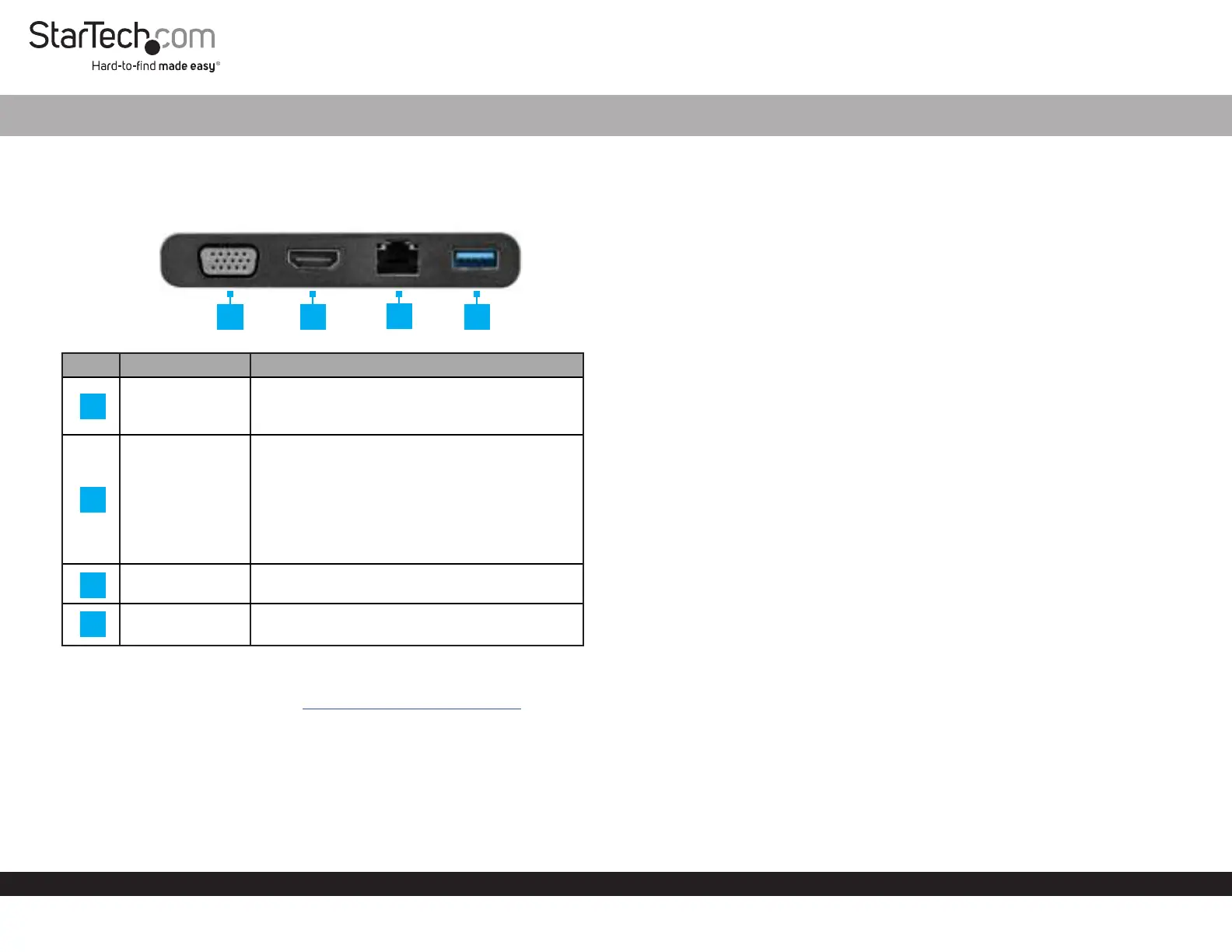
Product Diagram (DKT30CHVCM)
Front View
PortFunction
VGA Port
• Connect a VGA Video Display Device to the
Host Computer.
• Max resolution 1920x1200@60Hz.
HDMI Port
• Connect an HDMI Video Display Device to
the Host Computer.
• Max resolution 4096 x 2160p @ 24Hz or 3860 x
2160p @ 30Hz.
Note: The Multiport Adapter is a single video
display adapter. You can connect either an
HDMI Display or a VGA Display.
RJ45 Port
• Connect a Network Device to the Host
Computer.
USB-A Port
• Connect a USB Device to the Multiport
Adapter (Flash Drive, Mouse, etc.).
Requirements
For the latest requirements, please visit
www.startech.com/DKT30CHVCM.
USB-C Multiport Adapter with HDMI | VGA
1
Connecting the Multiport Adapter
Note:The Multiport Adapter is a single video display adapter. You can connect
either an HDMI Display or a VGA Display. If you connect a Display to both the
HDMI Port and VGA Port only the Display connected to the HDMI Port will function
correctly.
VGA Port
The VGA Port is used to connect the Multiport Adapter to a VGA Device.
1. Connect a VGA Cable to the VGA Port on the Multiport Adapter.
2. Connect the other end of the VGA Cable to the VGA Port on a Video Display
Device and (if applicable) tighten the two screws on either side on the VGA
Connector.
HDMI Port
The HDMI Port is used to connect the Multiport Adapter to an HDMI Device.
1. Connect an HDMI Cable to the HDMI Port on the Multiport Adapter.
2. Connect the other end of the HDMI Cable to an HDMI In Port on a Video Display
Device.
RJ45 Port
The RJ45 Port is used to connect a Network Device to the Multiport Adapter.
1. Connect a CAT5e/CAT6 Cable to the RJ45 Port on the Multiport Adapter.
2. Connect the other end of the CAT5e/CAT6 cable to an RJ45 Port on a compatible
Network Device.
USB-A Port
The USB-A Port can be used to connect a USB storage device (e.g. Flash Drive) or other
USB peripheral device (e.g. Keyboard, Mouse, etc.).
• Connect a USB-A Connector/Device to the USB-A Port on the Multiport Adapter.
2
4
3
1
2
4
3
Specyfikacje produktu
| Marka: | StarTech.com |
| Kategoria: | Inne akcesoria komputerowe |
| Model: | DKT30CHVCM |
Potrzebujesz pomocy?
Jeśli potrzebujesz pomocy z StarTech.com DKT30CHVCM, zadaj pytanie poniżej, a inni użytkownicy Ci odpowiedzą
Instrukcje Inne akcesoria komputerowe StarTech.com

28 Grudnia 2024
28 Grudnia 2024
28 Grudnia 2024
7 Grudnia 2024
7 Grudnia 2024
9 Października 2024
9 Października 2024
7 Października 2024
5 Października 2024
2 Października 2024
Instrukcje Inne akcesoria komputerowe
Najnowsze instrukcje dla Inne akcesoria komputerowe
3 Kwietnia 2025
3 Kwietnia 2025
1 Kwietnia 2025
12 Marca 2025
22 Lutego 2025
20 Lutego 2025
20 Lutego 2025
20 Lutego 2025
20 Lutego 2025
20 Lutego 2025