Instrukcja obsługi StarTech.com DKT30CHVGPD
StarTech.com Inne akcesoria komputerowe DKT30CHVGPD
Przeczytaj poniżej 📖 instrukcję obsługi w języku polskim dla StarTech.com DKT30CHVGPD (3 stron) w kategorii Inne akcesoria komputerowe. Ta instrukcja była pomocna dla 15 osób i została oceniona przez 8 użytkowników na średnio 4.8 gwiazdek
Strona 1/3
Quick-Start Guide
To view manuals, FAQs, videos, drivers, downloads, technical drawings, and more, visit www.startech.com/support.
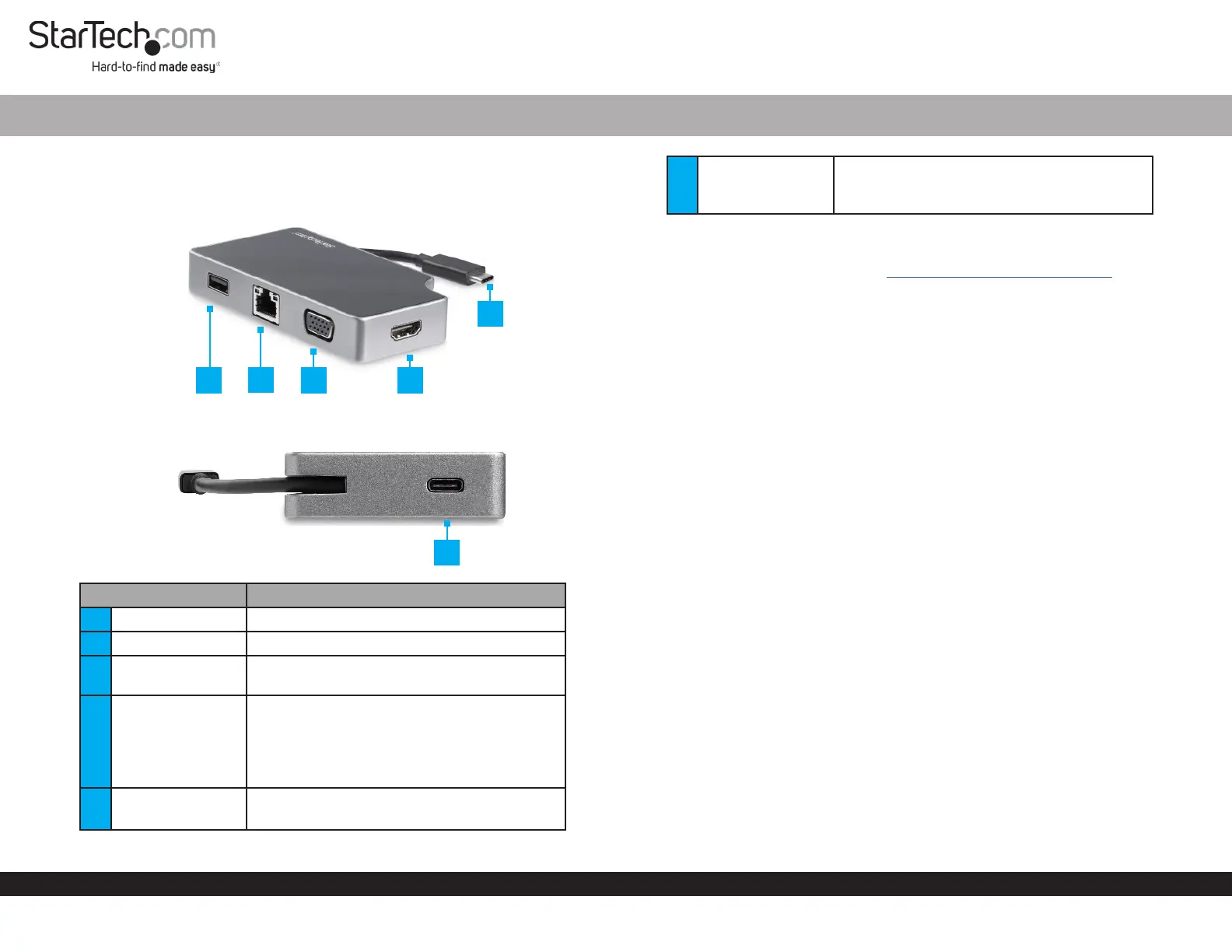
Product Diagram (DKT30CHVGPD)
Front View:
Side View:
Port/ConnectionFunction
1USB-A Port• Connect a USB Device to the Host
2RJ45 Port• Connect a Network Device to the Host
3VGA Port• Connect a VGA Video Display Device to the
Host
4HDMI Port• Connect an HDMI Video Display Device to
the Host
Note: The Multiport Adapter is a single
video display adapter. You can connect either
an HDMI Display or a VGA Display.
5USB-C Host
Connector
• Connect the Multiport Adapter to the Host
• Power Delivery 3.0 (charging/power)
USB-C Multiport Adapter | HDMI | VGA | PD
1
6USB-C Power Port• Connect a USB-C Power Adapter to the
Host Computer
• Power Delivery 3.0 (charging/power)
Requirements
For the latest requirements, please visit www.startech.com/DKT30CHVGPD.
Powering the Multiport Adapter
USB Power Delivery 3.0
Fast Role Swap:
A Fast Role Swap function is available when using Power Delivery 3.0. This function
prevents USB data disruption when switching power sources (bus power to USB-C
power adapter or USB-C power adapter to bus power). For this function to work, the
host laptop must also support Power Delivery 3.0.
Bus Power:
The Multiport Adapter is powered by the Host Computer’s USB-C Port and does not
require a separate power adapter.
1. Connect the USB-C Connector on the Multiport Adapter to a USB-C Port on the
Host Computer.
2. The Host Computer’s operating system will automatically detect and install the
required driver.
Note: Host Computers that have a USB-C port that supports a maximum of 4.5W of
Bus Power will only get RJ45 Port functionality. All other ports on the Multiport Adapter
will be disabled due to insucient Bus Power.
USB-C Power Adapter:
The Multiport Adapter is powered using the Host Computer’s USB-C Power
Adapter. The maximum power delivery input is 95W. The Multiport Adapter requires
10W of Power Delivery capacity to power the Multiport Adapter and its connected
devices leaving a maximum power delivery of 85W for laptop charging.
Note: The Multiport Adapter’s Maximum Power Delivery is based on the limitations
of the Host Computer’s USB-C Power Adapter.
1. Connect the Multiport Adapter’s USB-C Connector to a USB-C Port on the Host
Computer.
2. Connect the USB-C Connector on the Host Computer’s Power Adapter to the
USB-C Power Port on the Multiport Adapter. The Universal Adapter will power
the Multiport Adapter and pass power through to the Host Computer.
2
4
3
5
6
Specyfikacje produktu
| Marka: | StarTech.com |
| Kategoria: | Inne akcesoria komputerowe |
| Model: | DKT30CHVGPD |
Potrzebujesz pomocy?
Jeśli potrzebujesz pomocy z StarTech.com DKT30CHVGPD, zadaj pytanie poniżej, a inni użytkownicy Ci odpowiedzą
Instrukcje Inne akcesoria komputerowe StarTech.com

28 Grudnia 2024
28 Grudnia 2024
28 Grudnia 2024
7 Grudnia 2024
7 Grudnia 2024
9 Października 2024
9 Października 2024
7 Października 2024
5 Października 2024
2 Października 2024
Instrukcje Inne akcesoria komputerowe
Najnowsze instrukcje dla Inne akcesoria komputerowe
3 Kwietnia 2025
3 Kwietnia 2025
1 Kwietnia 2025
12 Marca 2025
22 Lutego 2025
20 Lutego 2025
20 Lutego 2025
20 Lutego 2025
20 Lutego 2025
20 Lutego 2025