Instrukcja obsługi StarTech.com DKT30CHVSDPD
StarTech.com Inne akcesoria komputerowe DKT30CHVSDPD
Przeczytaj poniżej 📖 instrukcję obsługi w języku polskim dla StarTech.com DKT30CHVSDPD (2 stron) w kategorii Inne akcesoria komputerowe. Ta instrukcja była pomocna dla 32 osób i została oceniona przez 7 użytkowników na średnio 4.2 gwiazdek
Strona 1/2
Quick-Start Guide
To view manuals, FAQs, videos, drivers, downloads, technical drawings, and more, visit www.startech.com/support.
Manual Revision: September 14, 2021 2:56 PM
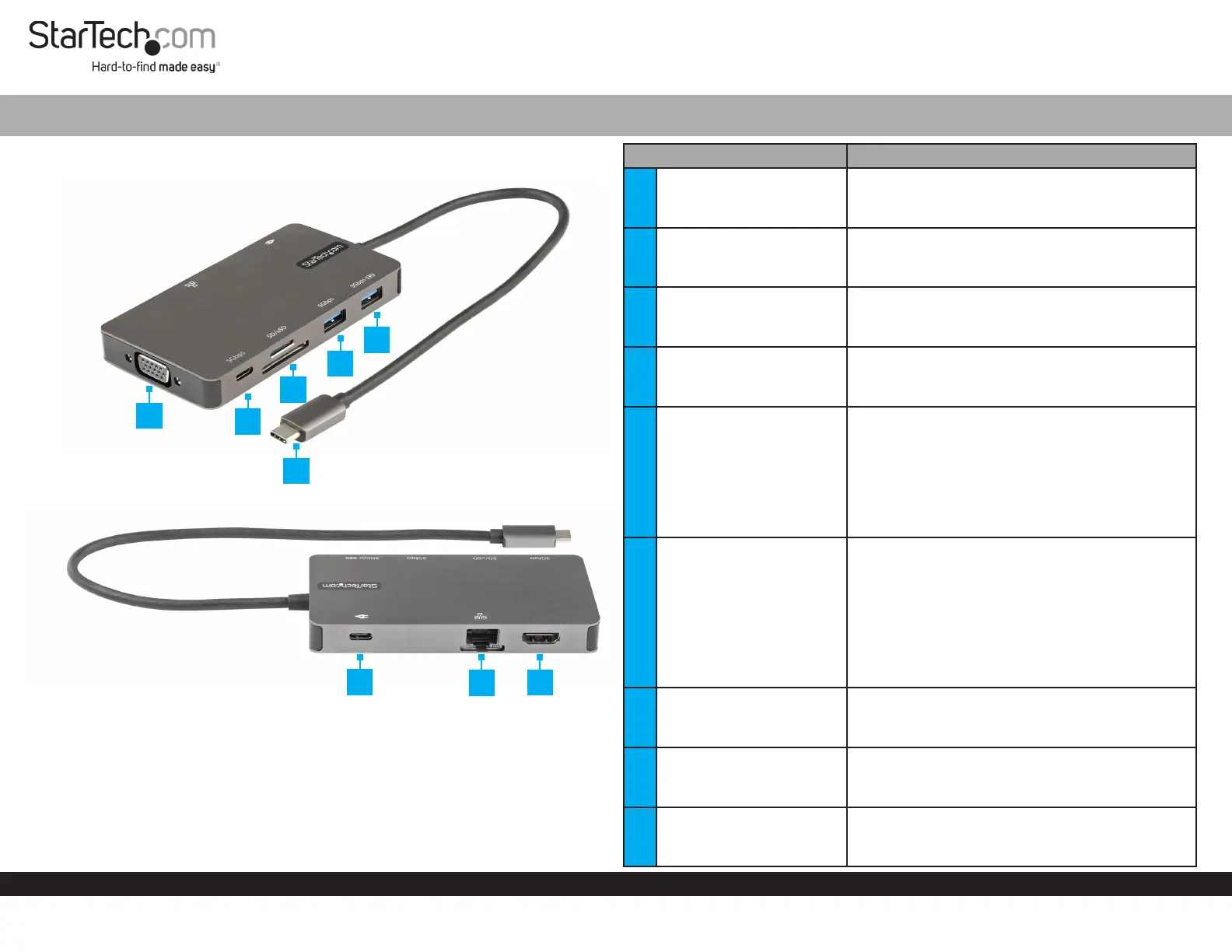
Product Diagram (DKT30CHVSDPD)
USB-C Multiport Adapter - HDMI & VGA - 3 x USB - SD/uSD - GbE- 100W
PortFunction
1VGA Output Port
• Resolution of up to 1920x1080 60Hz
• Connect the Multiport Adapter to a VGA
Display Device, using a VGA Cable
2USB-C Data Port
• SuperSpeed USB 5Gbps (USB 3.2 Gen 1)
• Connect a USB-C Peripheral Device to the
USB-C Multiport Adapter
3
Micro SD-Card Slot (Top)
SD-Card Slot (Bottom)
• Supports Secure Digital (SD) v3.0 UHS-I
• SD and Micro SD cards can transfer data
simultaneously
4USB-A Device Port
• SuperSpeed USB 5Gbps (USB 3.2 Gen 1)
• Connect a USB Peripheral Device to the USB-C
Multiport Adapter
5USB-A Charging Port
• SuperSpeed USB 5Gbps (USB 3.2 Gen 1)
• Connect a USB-A Peripheral Device to the
USB-C Multiport Adapter
• Fast-charge USB Peripheral Devices that
comply with USB Battery Charging specication
Revision 1.2
• Supports up to 5V at 1.5A, 7.5W charging
6USB-C Host Connector
• SuperSpeed USB 5Gbps (USB 3.2 Gen 1)
• USB Power Delivery (PD) 3.0
• DP 1.2 Alt Mode
• Charge the Host Device while using the USB-C
Multiport Adapter (Max 85W Available to the
Host)
• Connect the Multiport Adapter to a Laptop,
using the SuperSpeed USB-C Host Connector
7
USB-C Power Delivery
Passthrough Port
• USB Power Delivery (PD) 3.0
• Connect a USB-C Charger of up to 100W to
charge the Host Laptop
8RJ45 Port
• 10/100/1000 Mbps
• Connect the Multiport Adapter to a Network
Device, using a Network Cable
9HDMI
• Resolutions of up to 4K 30hz
• Connect the Multiport Adapter to an HDMI
Enabled Display Device, using an HDMI Cable
2
3
4
5
6
7
8
9
1
Specyfikacje produktu
| Marka: | StarTech.com |
| Kategoria: | Inne akcesoria komputerowe |
| Model: | DKT30CHVSDPD |
Potrzebujesz pomocy?
Jeśli potrzebujesz pomocy z StarTech.com DKT30CHVSDPD, zadaj pytanie poniżej, a inni użytkownicy Ci odpowiedzą
Instrukcje Inne akcesoria komputerowe StarTech.com

28 Grudnia 2024
28 Grudnia 2024
28 Grudnia 2024
7 Grudnia 2024
7 Grudnia 2024
9 Października 2024
9 Października 2024
7 Października 2024
5 Października 2024
2 Października 2024
Instrukcje Inne akcesoria komputerowe
Najnowsze instrukcje dla Inne akcesoria komputerowe
3 Kwietnia 2025
3 Kwietnia 2025
1 Kwietnia 2025
12 Marca 2025
22 Lutego 2025
20 Lutego 2025
20 Lutego 2025
20 Lutego 2025
20 Lutego 2025
20 Lutego 2025