Instrukcja obsługi StarTech.com HB30C3AGEPD
StarTech.com Inne akcesoria komputerowe HB30C3AGEPD
Przeczytaj poniżej 📖 instrukcję obsługi w języku polskim dla StarTech.com HB30C3AGEPD (2 stron) w kategorii Inne akcesoria komputerowe. Ta instrukcja była pomocna dla 16 osób i została oceniona przez 8 użytkowników na średnio 4.5 gwiazdek
Strona 1/2
Quick-start guide
FR: Guide de l’utilisateur - fr.startech.com
DE: Bedienungsanleitung - de.startech.com
ES: Guía del usuario - es.startech.com
NL: Gebruiksaanwijzing - nl.startech.com
PT: Guia do usuário - pt.startech.com
IT: Guida per l’uso - it.startech.com
For the latest information, technical specications, and support for
this product, please visit www.startech.com/HB30C3AGEPD
Package Contents
1 x USB hub
1 x quick-start guide
Requirements
• A laptop computer equipped with USB-C.
• A USB-C power adapter such as your laptop’s USB-C based power
adapter.
• Up to three USB peripheral devices with cabling.
• A network gateway such as a router or switch.
HB30C3AGEPD
3-Port USB 3.0 Hub plus Gigabit Ethernet and Power Delivery - USB-C
*actual product may vary from photos
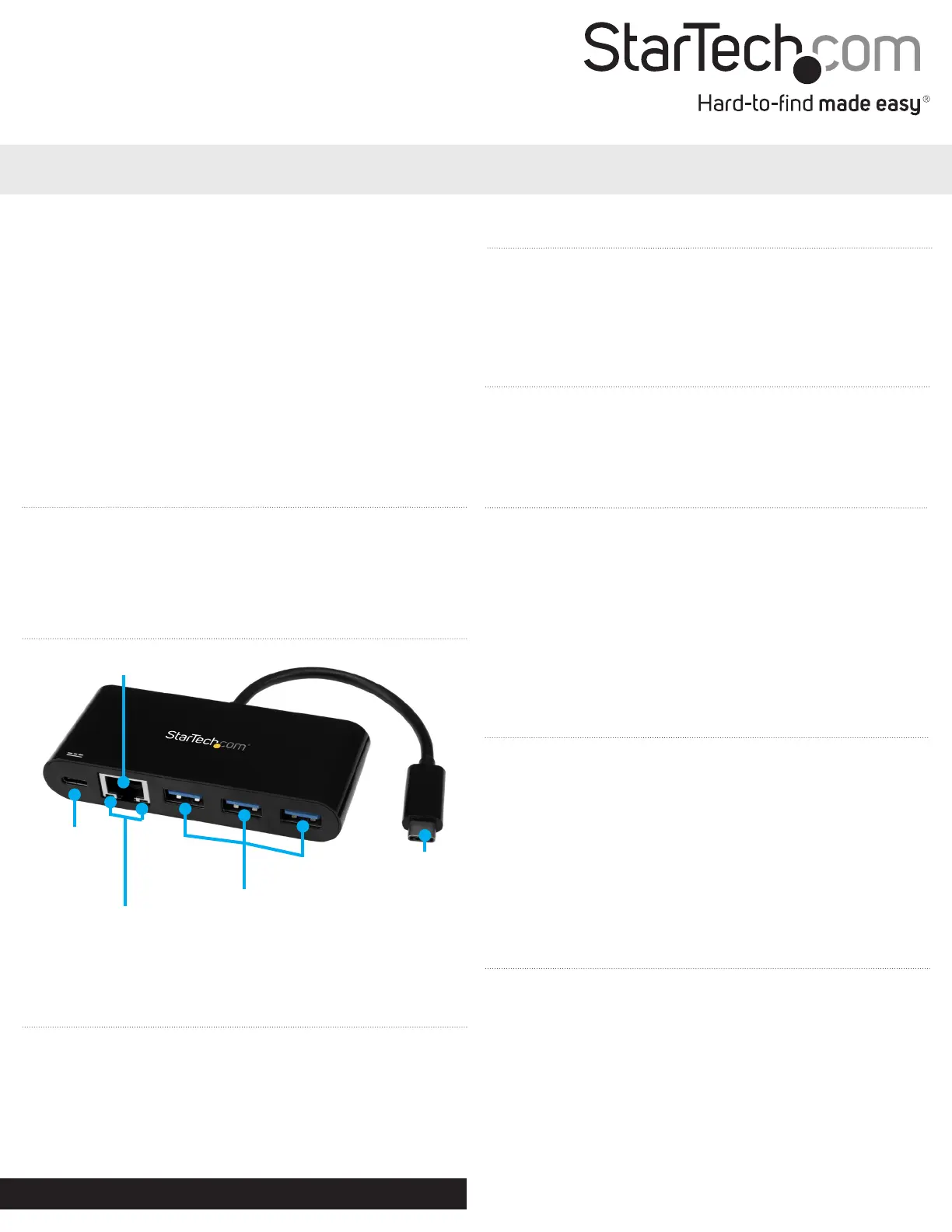
USB Type-A hub ports
Integrated
USB Type-C host cable
USB Type-C
charge port
10/100/1000 Ethernet port
Introduction
This USB 3.0 hub with built-in Gigabit Ethernet turns your laptop’s
USB-C™ port into three USB-A ports and one GbE port. Unlike some
USB-C™ hubs that occupy your laptop’s only USB-C port, this USB
hub features USB Power Delivery, enabling you to power and charge
your laptop while you’re using the hub.
Product diagram
About USB 3.0 and USB 3.1 Gen 1
USB 3.0 is also known as USB 3.1 Gen 1. This connectivity standard
oers speeds up to 5Gbps. Any mention of USB 3.0 in this manual
or on the StarTech.com website refers to the 5Gbps USB 3.1 Gen 1
standard.
About USB Power Delivery 2.0
• USB Power Delivery 2.0 is a specication that allows power (up to
100 watts) to be sent over a USB-C or Thunderbolt™ 3 cable that
supports the specication.
• This hub supports USB Power Delivery 2.0 and will deliver up to 60
watts of power through the USB-C or Thunderbolt 3 port on your
laptop.
• The adapter can connect to a host laptop’s USB-C port that doesn’t
support USB Power Delivery 2.0. However, in this conguration if
a power adapter is connected to the multifunction adapter, it will
not pass power through to your host laptop.
Manual Revision: 03/14/2017
About USB-C
• Not all USB-C ports support the full functionality of the USB
Type-C standard. Some ports might only provide data transfers,
and might not support USB Power Delivery 2.0.
• To power and charge your laptop through its USB-C host port,
ensure that your host laptop supports USB Power Delivery 2.0.
• If your laptop does not support USB Power Delivery, then the hub
will be powered by your laptop’s host USB-C port.
• Thunderbolt 3 also uses the USB-C connector, so you can connect
the adapter to a Thunderbolt 3 port. The adapter will connect to
the Thunderbolt 3 port at the USB speed of 5Gbps.
About the hub’s USB Type-C charge port
• The hub’s USB Type-C charge port only supports USB Power
Delivery 2.0.
• The USB Type-C charge port cannot be used for data or video
throughput.
• You can only connect a USB-C power adapter to the USB Type-C
charge port.
Connection and
activity LEDs
Specyfikacje produktu
| Marka: | StarTech.com |
| Kategoria: | Inne akcesoria komputerowe |
| Model: | HB30C3AGEPD |
Potrzebujesz pomocy?
Jeśli potrzebujesz pomocy z StarTech.com HB30C3AGEPD, zadaj pytanie poniżej, a inni użytkownicy Ci odpowiedzą
Instrukcje Inne akcesoria komputerowe StarTech.com

28 Grudnia 2024
28 Grudnia 2024
28 Grudnia 2024
7 Grudnia 2024
7 Grudnia 2024
9 Października 2024
9 Października 2024
7 Października 2024
5 Października 2024
2 Października 2024
Instrukcje Inne akcesoria komputerowe
Najnowsze instrukcje dla Inne akcesoria komputerowe
3 Kwietnia 2025
3 Kwietnia 2025
1 Kwietnia 2025
12 Marca 2025
22 Lutego 2025
20 Lutego 2025
20 Lutego 2025
20 Lutego 2025
20 Lutego 2025
20 Lutego 2025