Instrukcja obsługi StarTech.com PRIVACY-SCREEN-22MB
StarTech.com filtr ekranowy PRIVACY-SCREEN-22MB
Przeczytaj poniżej 📖 instrukcję obsługi w języku polskim dla StarTech.com PRIVACY-SCREEN-22MB (2 stron) w kategorii filtr ekranowy. Ta instrukcja była pomocna dla 43 osób i została oceniona przez 7 użytkowników na średnio 4.4 gwiazdek
Strona 1/2
Quick-Start Guide
To view manuals, FAQs, videos, drivers, downloads, technical drawings, and more, visit www.startech.com/support.
Manual Revision: June 10, 2021 10:08 AM
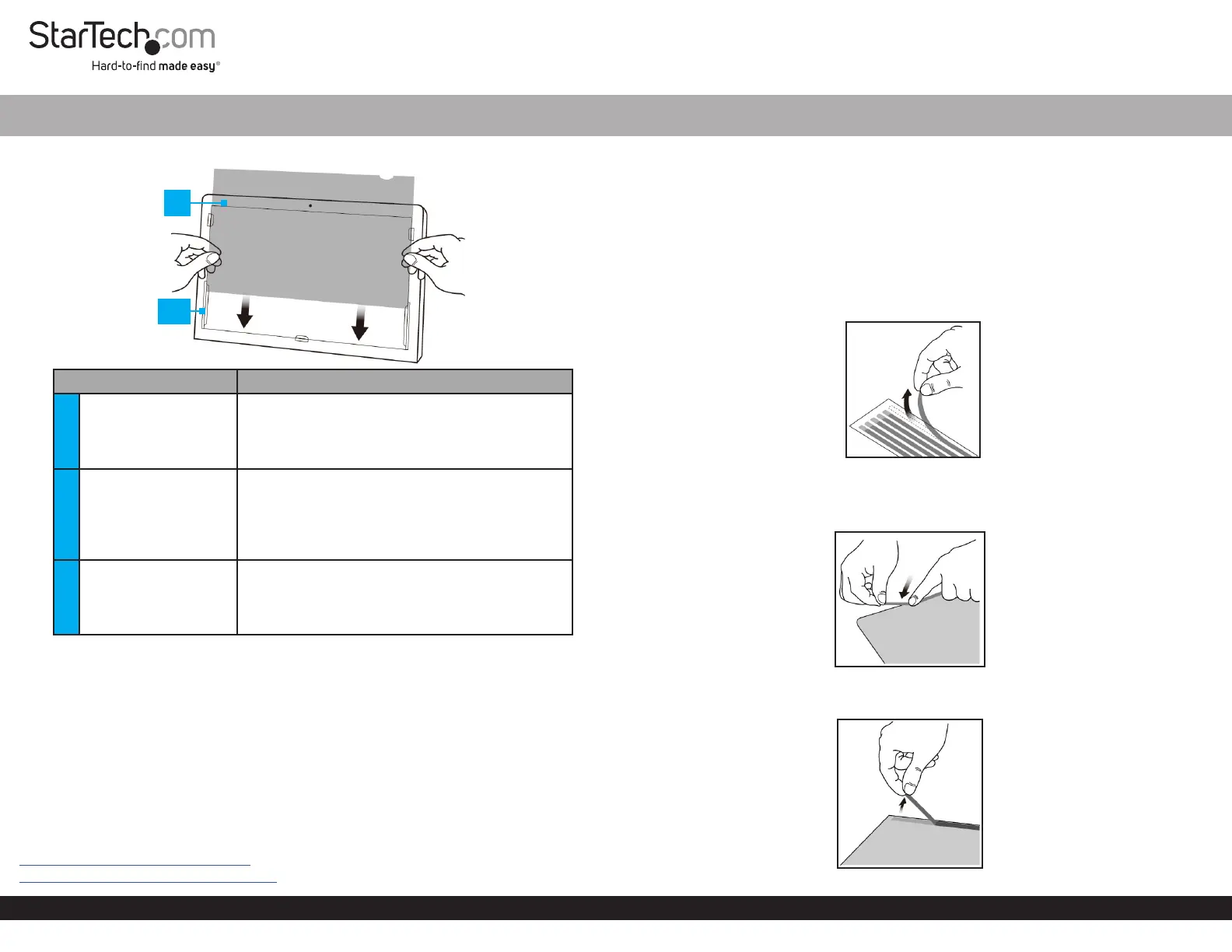
Product Diagram (PRIVSCNMONxx and PRIVACY-SCREEN-xx)
ComponentFunction
1Privacy Filter
• Privacy comes into eect when viewing
anywhere past 30 degrees from the left and
right of center
• Total eld of view of 60 degrees
2Mounting Tabs (x 5)
• Secure the Privacy Filter to the Monitor’s
surface
• The adhesive on the Mounting Tabs
becomes less eective with frequent removal/
reapplication
3
Adhesive Strips (not
displayed)
• Secure the Privacy Filter to the Monitor’s
surface
• The Adhesive Strips become less eective
with frequent removal/reapplication
Package Contents
• Privacy Screen x 1
• Set of Adhesive Strips x 1 (screens up to 27”) or x 2 (screens larger than 27”)
• Set of Mounting Tabs x 1
• Wiping Cloth x 1
• Quick Start Guide x 1
Requirements
For the latest requirements, please visit the following link and replace “xx” with the desired
privacy lter size / SKU:
www.startech.com/PRIVSCNMONxx
www.startech.com/PRIVACY-SCREEN-xx
Universal Privacy Filter
Install the Privacy Filter -- Adhesive Strips
For installations that are intended to be permanent, or if the Monitor does not feature
large Bezels, please use the Adhesive Strips.
1. Clean the Laptop Display and Bezels, using the Wiping Cloth.
2. Select the side of the Privacy Filter that is intended to face outward (i.e. matte or
glossy side) and place the Privacy Filter on a clean and at surface with the selected
side facing down.
3. Remove all the Adhesive Strips from the Transparent Lining.
Removing the Adhesive Strips
4. Carefully align the Adhesive Strips along the edges (top, bottom, left, and right) of
the Privacy Filter and ax to the Privacy Filter by applying rm pressure to all the
Adhesive Strips.
Applying the Adhesive Strips
5. Carefully remove the Protective Backing from the Adhesive Strips, exposing the
screen side adhesive.
Remove the Protective Backing from the Adhesive Strips
1
2/3
Specyfikacje produktu
| Marka: | StarTech.com |
| Kategoria: | filtr ekranowy |
| Model: | PRIVACY-SCREEN-22MB |
Potrzebujesz pomocy?
Jeśli potrzebujesz pomocy z StarTech.com PRIVACY-SCREEN-22MB, zadaj pytanie poniżej, a inni użytkownicy Ci odpowiedzą
Instrukcje filtr ekranowy StarTech.com

23 Września 2024
21 Września 2024
21 Września 2024
21 Września 2024
21 Września 2024
20 Września 2024
20 Września 2024
19 Września 2024
18 Września 2024
18 Września 2024
Instrukcje filtr ekranowy
Najnowsze instrukcje dla filtr ekranowy
9 Października 2024
9 Października 2024
9 Października 2024
Origin Storage Origin Alt 17in Privacy Filter 2-way 17.0in (5:4) Instrukcja
9 Października 2024 9 Października 2024
9 Października 2024
9 Października 2024
9 Października 2024