Instrukcja obsługi StarTech.com SV211DPUA4K
StarTech.com przełącznik SV211DPUA4K
Przeczytaj poniżej 📖 instrukcję obsługi w języku polskim dla StarTech.com SV211DPUA4K (2 stron) w kategorii przełącznik. Ta instrukcja była pomocna dla 37 osób i została oceniona przez 7 użytkowników na średnio 4.6 gwiazdek
Strona 1/2
Quick-Start Guide
To view manuals, FAQs, videos, drivers, downloads, technical drawings, and more, visit www.startech.com/support.
Manual Revision: December 9, 2019 12:12 PM
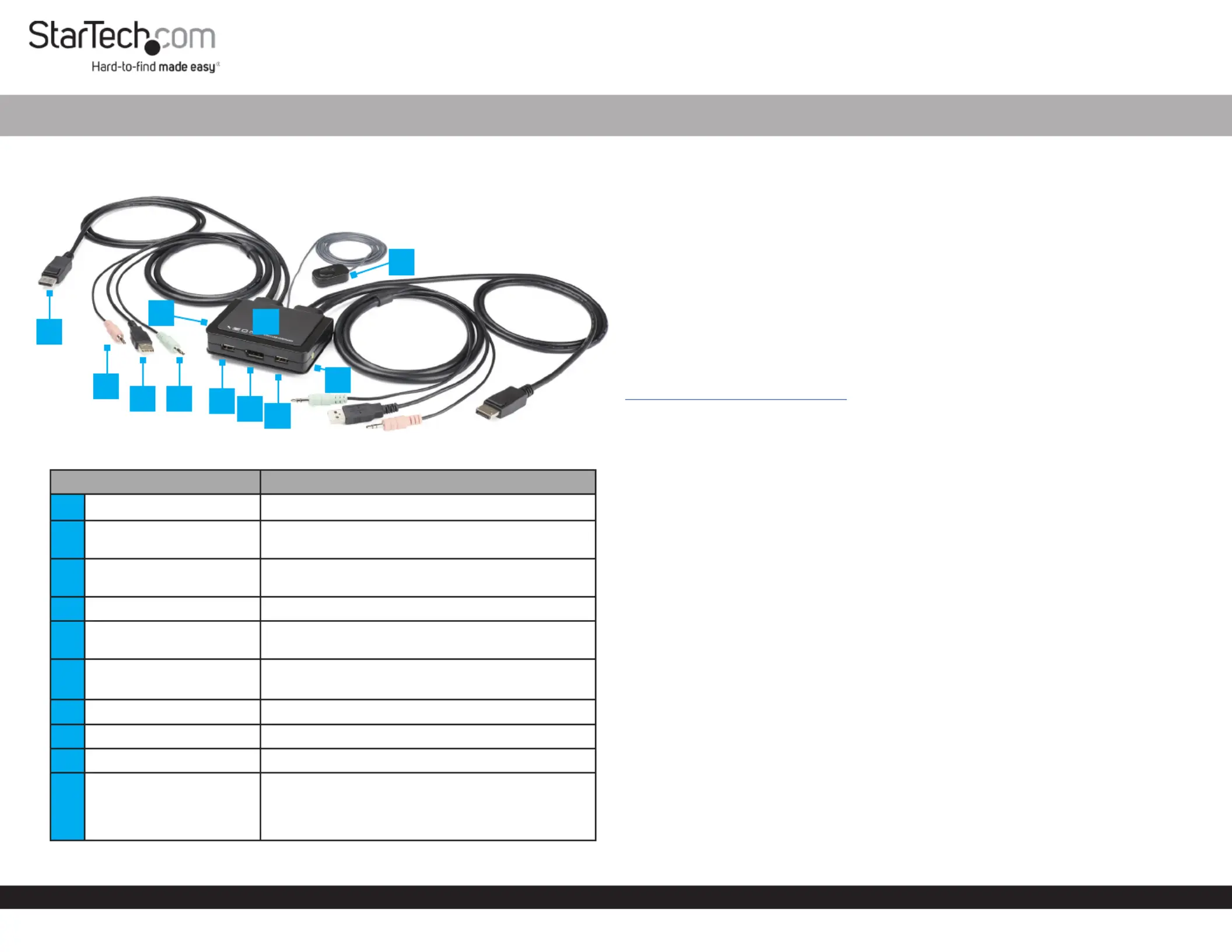
Product Diagram (SV211DPUA4K)
ComponentFunction
1DisplayPort Connector• Connect a DisplayPort Enabled Computer
2
Microphone Audio
Connector
• Connect the to the Microphone Audio
Computer
3USB-A Connector
• Transmit the signal of a and KeyboardMouse
from the to the KVM SwitchComputer
4Microphone Audio Port• Connect a Microphone
5Stereo Audio Connector
• Connect the from the Speaker Audio
Computer
6USB HID Ports
• Connect a and KeyboardMouse
• (Optional) Connect USB Peripherals
7DisplayPort Port • Connect a DisplayPort Display
8LED Indicators• Indicates selection and activityComputer
9Stereo Audio Port• Connect Stereo Speakers
10Remote Switch
• A wired button used to switch between
Computer 12 and
• PressReleaseRemote Switch and the to
switch between and Computer 12
2-Port USB DisplayPort™ Cable KVM Switch w/ Audio and Remote Switch - 4K 60Hz
Requirements
• DisplayPort Enabled Computers x 2
• DisplayPort Display x 1
• USB HID Devices (Keyboard and Mouse) x 2
• (Optional) USB Peripherals x 2
• (Optional) Microphone x 1
• (Optional) Stereo Speakers or Headphones x1
• (Optional) Headset x 1
Note: A Headset may require the use of a Headset Adapter. Check with the
manufacturer of the Headset for more details.
• (Optional) 3.5 mm Audio Cables x 2
For the latest requirements and to view the full User Manual, please visit
www.startech.com/SV211DPUA4K.
Installation
Connect the Computers
1. Connect the built-in to the Computer 1 DisplayPort ConnectorDisplayPort Port
on .Computer 1
2. Connect the built-in to the on Computer 1 USB-A ConnectorUSB-A Port
Computer 1.
3. (Optional) Connect the built-in (green) to the Computer 1 Stereo Audio Connector
3.5 mm Stereo Audio PortComputer 1 on .
4. (Optional) Connect the built-in (pink) Computer 1 Microphone Audio Connector
to the on .3.5 mm Microphone Audio PortComputer 1
5. Repeat steps 1-4 to install .Computer 2
Connect the Console
1. Connect the to the USB-A Devices (Keyboard, Mouse, or USB Peripherals)USB-A
PortsKVM SwitchKeyboardMouse USB Cables on the using the built-in and or
USB-A Cables (sold separately).
2. (Optional) Connect a from the or 3.5 mm Audio CableStereo Speakers
HeadphonesSpeaker Audio PortKVM Switch to the (pink) on the .
3. (Optional) Connect a from the to the 3.5 mm Audio CableMicrophone
Microphone Audio PortKVM Switch (pink) on the .
1
2
35
6
7
6
4
9
10
8
Specyfikacje produktu
| Marka: | StarTech.com |
| Kategoria: | przełącznik |
| Model: | SV211DPUA4K |
Potrzebujesz pomocy?
Jeśli potrzebujesz pomocy z StarTech.com SV211DPUA4K, zadaj pytanie poniżej, a inni użytkownicy Ci odpowiedzą
Instrukcje przełącznik StarTech.com

29 Grudnia 2024
29 Grudnia 2024
29 Grudnia 2024
15 Grudnia 2024
15 Grudnia 2024
15 Grudnia 2024
15 Grudnia 2024
15 Grudnia 2024
15 Grudnia 2024
15 Grudnia 2024
Instrukcje przełącznik
Najnowsze instrukcje dla przełącznik
9 Kwietnia 2025
9 Kwietnia 2025
7 Kwietnia 2025
5 Kwietnia 2025
4 Kwietnia 2025
4 Kwietnia 2025
4 Kwietnia 2025
3 Kwietnia 2025
3 Kwietnia 2025
2 Kwietnia 2025