Instrukcja obsługi StarTech.com SV211HDUC
StarTech.com przełącznik SV211HDUC
Przeczytaj poniżej 📖 instrukcję obsługi w języku polskim dla StarTech.com SV211HDUC (2 stron) w kategorii przełącznik. Ta instrukcja była pomocna dla 18 osób i została oceniona przez 7 użytkowników na średnio 4.2 gwiazdek
Strona 1/2
Quick-Start Guide
To view manuals, FAQs, videos, drivers, downloads, technical drawings, and more, visit www.startech.com/support.
Manual Revision: March 1, 2022 1:28 PM
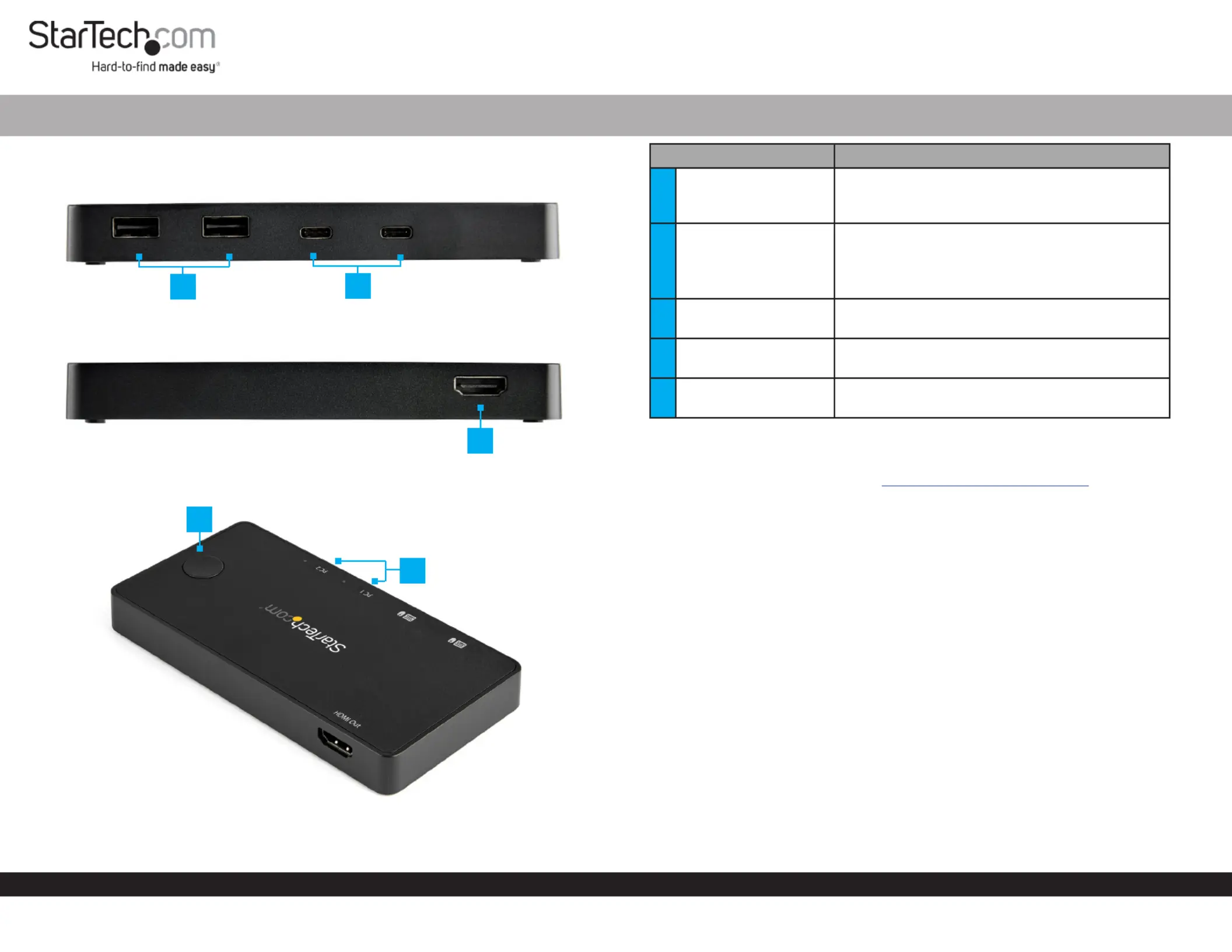
Product Diagram (SV211HDUC)
Front
Back
Top
2 Port USB-C Alt-Mode Compact KVM Switch
ComponentFunction
1USB-A Ports (x 2)
• Used to connect either a and/or Mouse
KeyboardCompact KVM Switch. to the For
use with the connected .Computers
2USB-C Ports (x 2)
• Used to connect up to two to the Computers
Compact KVM Switch.
• Compatible with Thunderbolt™ 3 or USB-C with
DP-Alt Mode.
3HDMI Port
• Used to connect a to the Display Device
Compact KVM Switch.
4Input Switch Button
• Used to switch between the two connected
Computers.
5LED Indicators (x 2)
• Solid Blue: Indicates which connected
computer is currently selected.
Requirements
For the latest requirements, please visit www.startech.com/SV211HDUC
• Keyboard x 1
• Mouse x 1
• Monitor x 1
• Computers (requires compatibility with either Thunderbolt 3 or USB-C with DP-Alt
Mode) x 2
Installation
1. Connect a and/or to the on the MouseKeyboardUSB-A PortsCompact KVM
Switch.
2. Connect an to the on the and HDMI CableHDMI OutputCompact KVM Switch
the other end to the on the .HDMI portDisplay Device
3. Connect a (included) to the on the USB-C CableUSB-C PortCompact KVM Switch
and to a on one of the .USB-C PortHost Computers
4. Repeat step 3 to connect the second to the .Host ComputerCompact KVM Switch
Note: The connected Host ComputersCompact KVM Switch will power the .
Input Switch Button
Press the located on the top of the , to Input Switch Button Compact KVM Switch
switch between the two connected . Computers
1
2
3
4
5
Specyfikacje produktu
| Marka: | StarTech.com |
| Kategoria: | przełącznik |
| Model: | SV211HDUC |
Potrzebujesz pomocy?
Jeśli potrzebujesz pomocy z StarTech.com SV211HDUC, zadaj pytanie poniżej, a inni użytkownicy Ci odpowiedzą
Instrukcje przełącznik StarTech.com

29 Grudnia 2024
29 Grudnia 2024
29 Grudnia 2024
15 Grudnia 2024
15 Grudnia 2024
15 Grudnia 2024
15 Grudnia 2024
15 Grudnia 2024
15 Grudnia 2024
15 Grudnia 2024
Instrukcje przełącznik
Najnowsze instrukcje dla przełącznik
9 Kwietnia 2025
9 Kwietnia 2025
7 Kwietnia 2025
5 Kwietnia 2025
4 Kwietnia 2025
4 Kwietnia 2025
4 Kwietnia 2025
3 Kwietnia 2025
3 Kwietnia 2025
2 Kwietnia 2025