Instrukcja obsługi StarTech.com SV221HUC4K
StarTech.com przełącznik SV221HUC4K
Przeczytaj poniżej 📖 instrukcję obsługi w języku polskim dla StarTech.com SV221HUC4K (2 stron) w kategorii przełącznik. Ta instrukcja była pomocna dla 28 osób i została oceniona przez 7 użytkowników na średnio 4.9 gwiazdek
Strona 1/2
Quick-Start Guide
To view manuals, FAQs, videos, drivers, downloads, technical drawings, and more, visit www.startech.com/support.
Manual Revision: May 31, 2022 2:55 PM
Product ID
SV221HUC4K
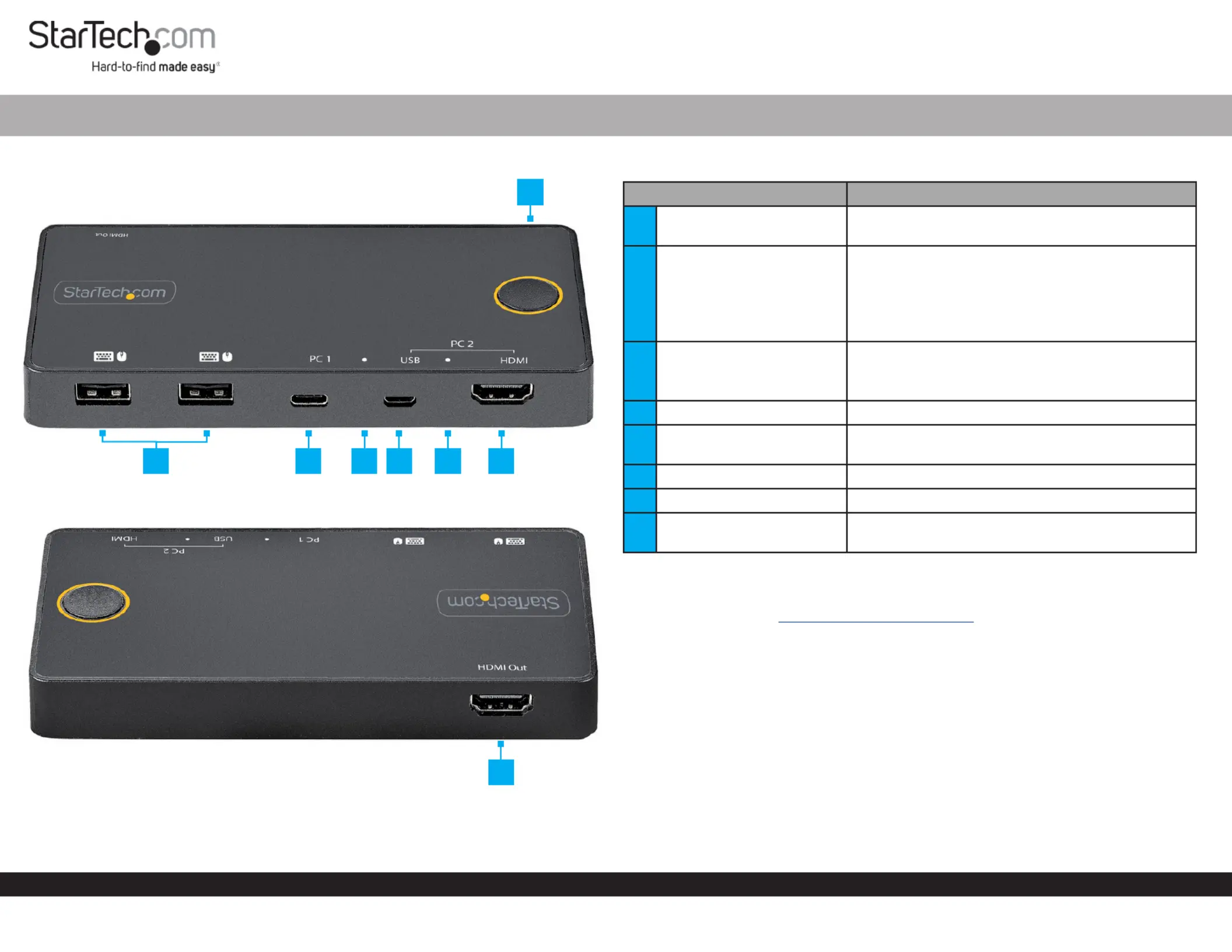
Front
Rear
2 Port 4K 60Hz HDMI KVM Switch with one USB-C Host Port
ComponentFunction
1Port Selection Button
• Press the to switch Port Selection Button
between or PC 1PC 2
2Console USB HID Ports
• Connect a (e.g. Human Interface Device (HID)
Keyboard, Mouse, Trackpad, Number Keypad, or
Drawing Tablet)
• Front (x2)
• USB 2.0 (480Mbps)
3PC 1 USB-C Host Port
• Connect to a with a ComputerUSB-C Port
• For full functionality USB-C Port Host Computer
must support DP-Alt Mode
4PC 1 Selection Indicator• Solid Blue: PC 1 is selected
5
PC 2 USB Micro-B Host
Port
• Connect to a or higher port on USB 2.0 PC 2
6PC 2 Selection Indicator• Solid Blue: PC 2 is selected
7PC 2 HDMI Input Port• Connect to an on HDMI PortPC 2
8
Console HDMI Output
Port
• Connect to an on a HDMI InputDisplay
Product Information
For the latest manuals, product information, technical specications, and declarations of
conformance, please visit: www.StarTech.com/SV221HUC4K
Package Contents
• KVM Switch x 1
• USB-C Cable (1 m) x 1
• USB-A to Micro USB-B Cable (1 m) x 1
• HDMI Cable (1 m) x 1
• Quick-Start Guide x 1
3
57
2
1
8
46
Specyfikacje produktu
| Marka: | StarTech.com |
| Kategoria: | przełącznik |
| Model: | SV221HUC4K |
Potrzebujesz pomocy?
Jeśli potrzebujesz pomocy z StarTech.com SV221HUC4K, zadaj pytanie poniżej, a inni użytkownicy Ci odpowiedzą
Instrukcje przełącznik StarTech.com

29 Grudnia 2024
29 Grudnia 2024
29 Grudnia 2024
15 Grudnia 2024
15 Grudnia 2024
15 Grudnia 2024
15 Grudnia 2024
15 Grudnia 2024
15 Grudnia 2024
15 Grudnia 2024
Instrukcje przełącznik
Najnowsze instrukcje dla przełącznik
9 Kwietnia 2025
9 Kwietnia 2025
7 Kwietnia 2025
5 Kwietnia 2025
4 Kwietnia 2025
4 Kwietnia 2025
4 Kwietnia 2025
3 Kwietnia 2025
3 Kwietnia 2025
2 Kwietnia 2025