Instrukcja obsługi Crestron TSR-302-BTP
Crestron Niesklasyfikowane TSR-302-BTP
Przeczytaj poniżej 📖 instrukcję obsługi w języku polskim dla Crestron TSR-302-BTP (2 stron) w kategorii Niesklasyfikowane. Ta instrukcja była pomocna dla 12 osób i została oceniona przez 7 użytkowników na średnio 4.5 gwiazdek
Strona 1/2
DOGUIDE
DO Check the Box
QTYPRODUCTPART NUM.
1TSR-302-BTP Battery Pack for TSR-3022039523
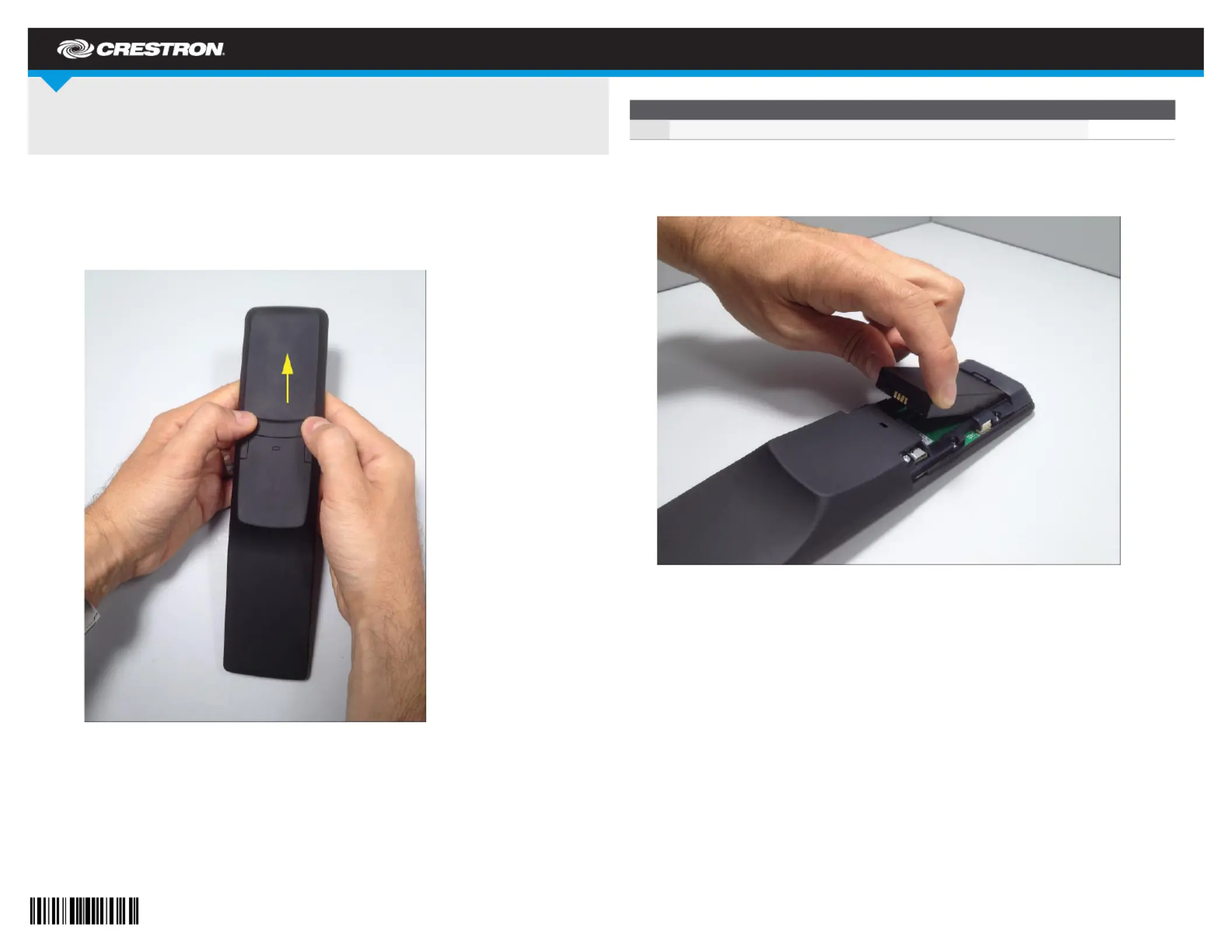
3. Lift the old TSR-302-BTP out of the battery compartment, as shown in the following
photograph.
DO Install the New Battery
After completing the removal of the old TSR-302-BTP from the touch screen remote, perform
the following procedure to install the TSR302-BTP in a TSR-302:
1. Place the TSR-302-BTP in the battery compartment, oriented as in the previous
photograph.
2. Reattach the battery compartment cover by pressing down lightly on the locking tab while
sliding the cover into place.
DO Charge the Battery
Install the TSR-302-BTP in the TSR-302 touch screen remote and mount it in an ac-powered
TSR-302-DS Table Dock.
TSR-302-BTP
Battery Pack for TSR-302
DO Remove the Battery
To remove the existing TSR-302-BTP from a TSR-302, perform the following procedure:
1. Remove the battery compartment cover on the rear of the TSR-302 by using two thumbs
and gently pressing in the direction of the arrow shown in the following photograph.
2. Place the touch screen remote on a clean, soft surface, with the screen side down.
Specyfikacje produktu
| Marka: | Crestron |
| Kategoria: | Niesklasyfikowane |
| Model: | TSR-302-BTP |
Potrzebujesz pomocy?
Jeśli potrzebujesz pomocy z Crestron TSR-302-BTP, zadaj pytanie poniżej, a inni użytkownicy Ci odpowiedzą
Instrukcje Niesklasyfikowane Crestron

15 Stycznia 2025
15 Stycznia 2025
9 Stycznia 2025
9 Stycznia 2025
9 Stycznia 2025
9 Stycznia 2025
9 Stycznia 2025
9 Stycznia 2025
9 Stycznia 2025
9 Stycznia 2025
Instrukcje Niesklasyfikowane
Najnowsze instrukcje dla Niesklasyfikowane
29 Stycznia 2025
29 Stycznia 2025
29 Stycznia 2025
29 Stycznia 2025
29 Stycznia 2025
29 Stycznia 2025
29 Stycznia 2025
29 Stycznia 2025
29 Stycznia 2025
29 Stycznia 2025