Instrukcja obsługi Geemarc SOS-PRO 295
Geemarc Bezpieczeństwo SOS-PRO 295
Przeczytaj poniżej 📖 instrukcję obsługi w języku polskim dla Geemarc SOS-PRO 295 (2 stron) w kategorii Bezpieczeństwo. Ta instrukcja była pomocna dla 61 osób i została oceniona przez 7 użytkowników na średnio 4.5 gwiazdek
Strona 1/2
0123
USER GUIDE
!!! Please refer to our website: www.geemarc.com for an up to
date user guide, as there may be important updates and
changes you need to be aware of !!!
CAUTION: Use only the battery provided. There may be a risk of
explosion if a wrong type of battery is used for the parent unit. The
battery cannot be subjected to high or low extreme temperature
and low air pressure at high altitude during use, storage or
transportation. Disposal of battery into fire or a hot oven, or
mechanically crushing or cutting or the battery can result in an
explosion. Leaving the battery in an extremely high temperature
surrounding environment can result in an explosion or the leakage
of flammable liquid of gas. Battery subjected to extremely low air
pressure may result in an explosion or the leakage of flammable
liquid or gas. Dispose of used battery according to the instructions.
Normal operating temperature for the product (e.g. 0
o
C ~ 40
o
C).
Use only the adapters and battery listed below.
Power adapter information: Parent unit and baby unit
output: 5V DC 1A. Vtech Telecommunications Limited
Model: VT05EEU06045 (EU), VT05EUK06045 (UK)
Rechargeable Li-ion Battery: Model: GSP042535
3.7V, 320mAh, 1.184 Wh. Guangzhou Great Power Energy &
Technology CO., Ltd
Alarm Pendant
Connection
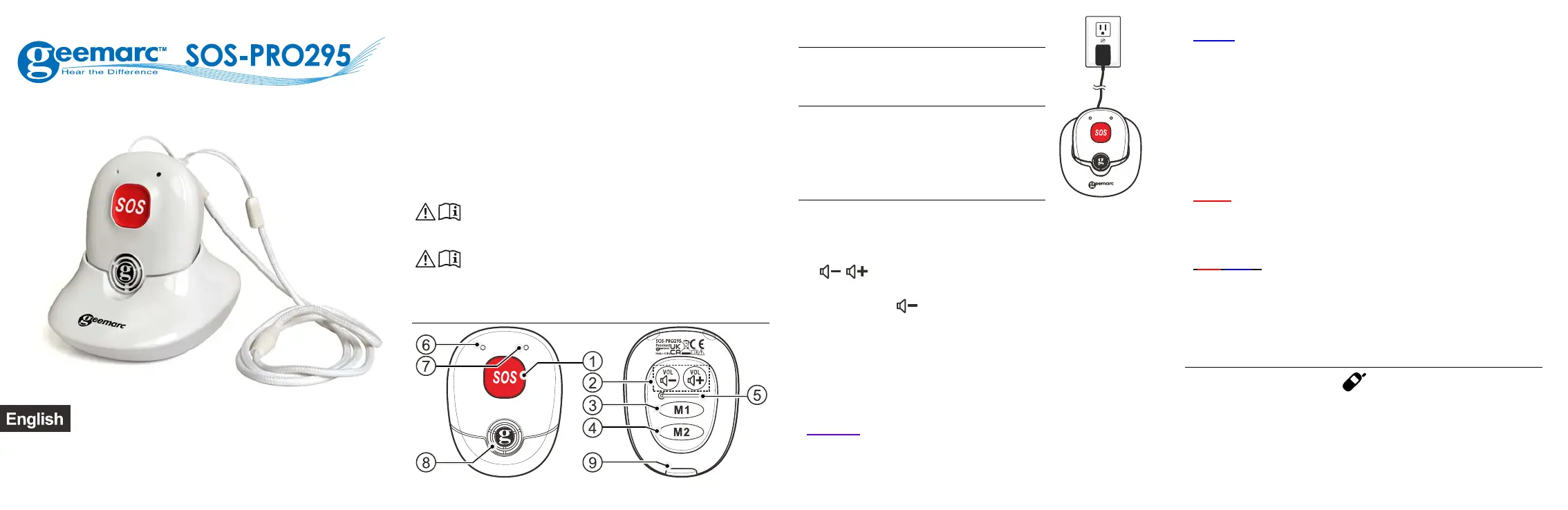
Charger: Connect the power adaptor of the
pendant in main power.
PACKAGE CONTENTS
1 cordless pendant SOS-PRO295,
1 pendant charger,
1 lanyard with breakout clip,
1 user guide.
ALARM PENDANT
1. SOS: In idle mode, press to enter the emergency calling
sequence set on your handset.
In call mode: press and hold for 2 seconds to stop the emergency
call.
2.
/
: During a call: increase or increase thereceiving
volume level, during ringing: increase or decrease the ringer level.
Press and hold
for 2 sec to do a flash ® to answer a
second incoming call ringing.
3. M1dial the direct memory 1
4. M2dial the direct memory 2
5. RESET
6. Microphone
7. Led indicator
(Purple)
- Steady On: Un-register.
- Slow Flash: registered but the base is not available.
Searching or out of range.
(Blue)
- Steady On: Seated in the base and fully charged.
- Steady on 3s and emit a long beep: Successfully registered.
- Double flashing: Off hook.
- Double flashing and on for 2s when just off hook: Off hook
but the signal is weak. Hear 3 rapid beeps in every 10s.
- Short flashing: idle mode and off the charger, the pendant is
in Standby mode.
- Long flashing: idle mode and off the charger. Continuously
flashing: ringing and can be heard.
(Red)
- In continue on the charger: The pendant charges.
- Long flashing: The battery is low in using and we hear a
short double beeps.
(Red/Bleu)
- Pairing mode after to hold and press the leys Vol(+) and
Vol(-) during 10sec.
8. LOUDSPEAKER
9. CHARGER CONTACTS
Registration the Alarm pendant
On Base: press and hold /HANDSET LOCATOR on the
base to enter the registration mode until to hear a beep.
On Alarm pendant: Press and hold VOL+ together with Vol
-
until the LED on pendant toggling between red and blue. Place
the pendant unit close to the charger.
A long beep tone is generated and the LED is blue for a while if
the registration is a success.
Specyfikacje produktu
| Marka: | Geemarc |
| Kategoria: | Bezpieczeństwo |
| Model: | SOS-PRO 295 |
Potrzebujesz pomocy?
Jeśli potrzebujesz pomocy z Geemarc SOS-PRO 295, zadaj pytanie poniżej, a inni użytkownicy Ci odpowiedzą
Instrukcje Bezpieczeństwo Geemarc

2 Października 2024
2 Września 2024
Instrukcje Bezpieczeństwo
Najnowsze instrukcje dla Bezpieczeństwo
19 Lutego 2025
15 Stycznia 2025
15 Stycznia 2025
15 Stycznia 2025
11 Stycznia 2025
11 Stycznia 2025
5 Października 2024
28 Września 2024
28 Września 2024
28 Września 2024