Instrukcja obsługi Huawei E2010
Huawei Klucz sprzętowy E2010
Przeczytaj poniżej 📖 instrukcję obsługi w języku polskim dla Huawei E2010 (2 stron) w kategorii Klucz sprzętowy. Ta instrukcja była pomocna dla 23 osób i została oceniona przez 6 użytkowników na średnio 4.7 gwiazdek
Strona 1/2
Thank you for choosing the Mobile Broadband USB
Modem. With your USB Modem, you can access a
wireless network at high speed.
Note:
This manual describes the appearance of the USB Modem, as well as the procedures for
preparation, installation, and removal. For operation details about the management
program, see the online help included in the management program.
Getting to Know Your USB Modem
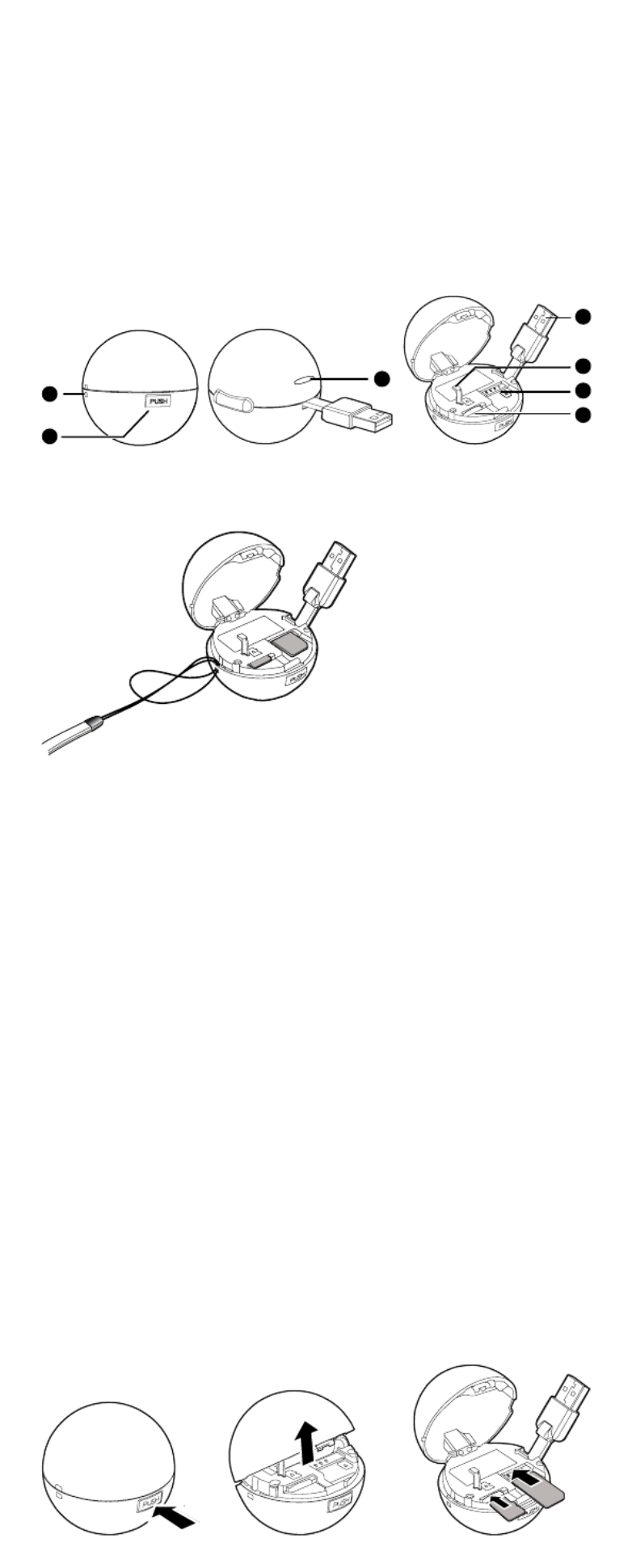
The following figure shows the appearance of the USB Modem. It is provided only for your
reference. The actual product may be different.
1
2
3
4
5
6
7
nStrap Hole
You can tie a strap to the USB Modem through the strap hole.
oPush Button
You can press the push button to open the USB Modem Cover.
pIndicator
It indicates the status of the USB Modem.
zGreen, blinking twice every 3s: The USB Modem is powered on.
zGreen, blinking once every 3s: The USB Modem is registering with a 2G network.
zBlue, blinking once every 3s: The USB Modem is registering with a 3G/3G+ network.
zGreen, solid: The USB Modem is connected to a 2G network.
zBlue, solid: The USB Modem is connected to a 3G network.
zCyan, solid: The USB Modem is connected to a 3G+ network.
zOff: The USB Modem is removed.
qUSB Connector
It connects the USB Modem to a PC.
rBolt
It holds the USB Connector when the USB Modem Cover is closed.
sSIM/USIM Card Slot
It holds a Subscriber Identity Module (SIM)/Universal Subscriber Identity Module (USIM)
card.
tMicroSD Card Slot
It holds a microSD card.
Getting Your USB Modem Ready
1.
1.
1.
1. 1. Press the push button and then open the USB Modem Cover.
2.
2.
2.
2. 2. Insert the SIM/USIM card and the microSD card into the corresponding card slots, as
shown in the following figure.
3.
3.
3.
3. 3. Close the USB Modem Cover.
Specyfikacje produktu
| Marka: | Huawei |
| Kategoria: | Klucz sprzętowy |
| Model: | E2010 |
Potrzebujesz pomocy?
Jeśli potrzebujesz pomocy z Huawei E2010, zadaj pytanie poniżej, a inni użytkownicy Ci odpowiedzą
Instrukcje Klucz sprzętowy Huawei

15 Sierpnia 2024
5 Lipca 2024
5 Lipca 2024
4 Lipca 2024
4 Lipca 2024
4 Lipca 2024
2 Lipca 2024
28 Czerwca 2024
28 Czerwca 2024
28 Czerwca 2024
Instrukcje Klucz sprzętowy
Najnowsze instrukcje dla Klucz sprzętowy
13 Grudnia 2024
9 Grudnia 2024
9 Grudnia 2024
3 Października 2024
1 Października 2024
1 Października 2024
1 Października 2024
30 Września 2024
29 Września 2024
29 Września 2024