Instrukcja obsługi Intermatic T21000R
Intermatic Niesklasyfikowane T21000R
Przeczytaj poniżej 📖 instrukcję obsługi w języku polskim dla Intermatic T21000R (2 stron) w kategorii Niesklasyfikowane. Ta instrukcja była pomocna dla 22 osób i została oceniona przez 6 użytkowników na średnio 4.2 gwiazdek
Strona 1/2
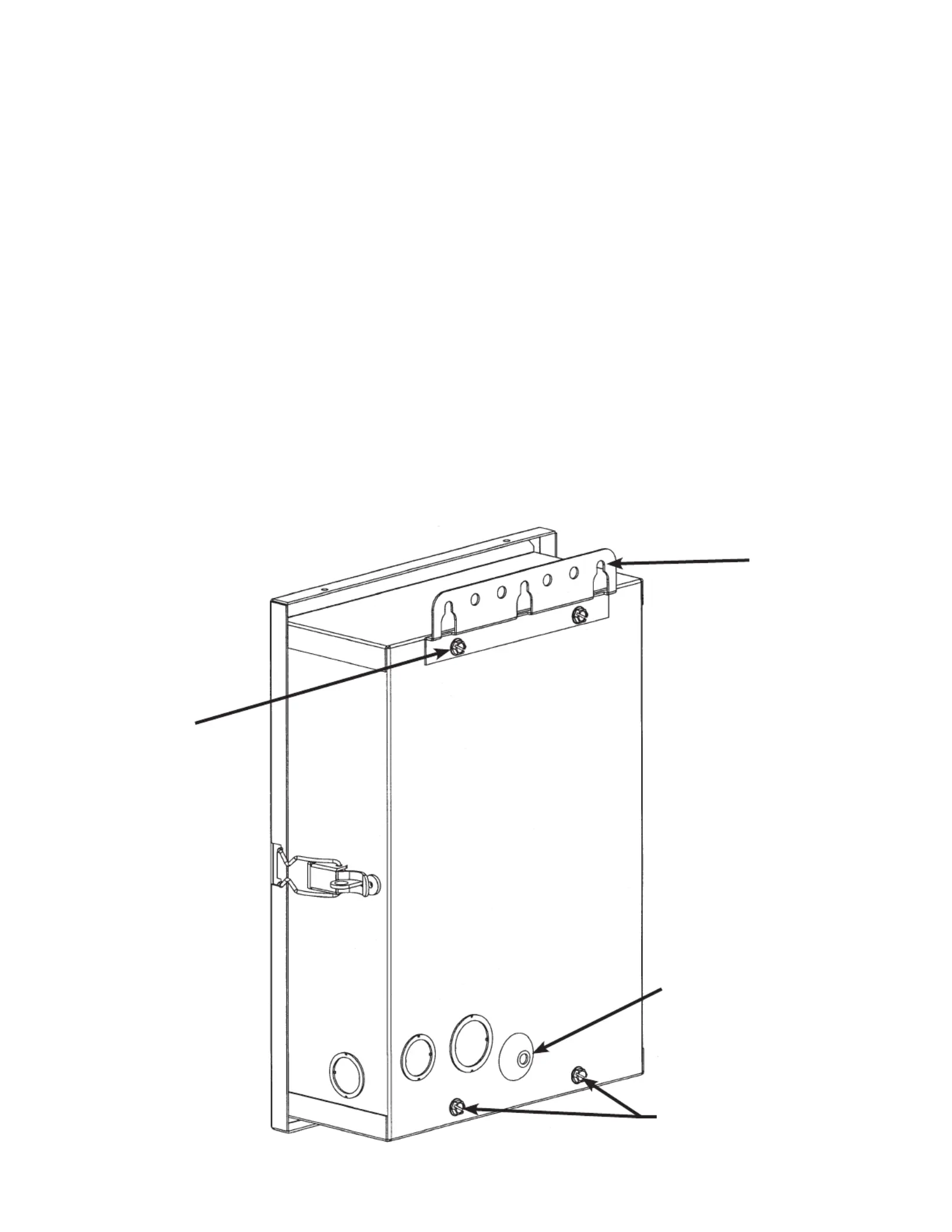
BRACKET
MOUNTING
SCREWS (2)
158TP11043
PLEASE HELP US TO HELP YOU
This new control panel comes with one heavy duty mounting bracket, unassem-
bled.
To install bracket, simply remove the two screws, outside back of can, top (only),
and install bracket as shown below. What we offer you and your customers
in return are:
No Damage to Bracket and Packaging Due to Shipping and Handling.
Protruding bracket, if bent or broken off are hard to repair and rust prematurely.
Flexibility at Construction Site.
The control panel with external bracket will mount easily on any semi-smooth surface, post or con-
duits using power tools and standard mounting hardware.
Improved Rust Protection.
Both the bracket and the enclosure are covered with the most effective, electrostatically separately
applied and baked-on rust preventive coating. No bare metal between the contacting surfaces to rust
prematurely.
MOUNTING
BRACKET
MOUNTING
HOLE
THESE (2) SCREWS
ARE SUPPLIED FOR
ALTERNATE MOUNTING
SYSTEMS
Specyfikacje produktu
| Marka: | Intermatic |
| Kategoria: | Niesklasyfikowane |
| Model: | T21000R |
Potrzebujesz pomocy?
Jeśli potrzebujesz pomocy z Intermatic T21000R, zadaj pytanie poniżej, a inni użytkownicy Ci odpowiedzą
Instrukcje Niesklasyfikowane Intermatic

17 Grudnia 2024
17 Grudnia 2024
17 Grudnia 2024
17 Grudnia 2024
17 Grudnia 2024
17 Grudnia 2024
17 Grudnia 2024
17 Grudnia 2024
17 Grudnia 2024
17 Grudnia 2024
Instrukcje Niesklasyfikowane
Najnowsze instrukcje dla Niesklasyfikowane
29 Stycznia 2025
29 Stycznia 2025
29 Stycznia 2025
29 Stycznia 2025
29 Stycznia 2025
29 Stycznia 2025
29 Stycznia 2025
29 Stycznia 2025
29 Stycznia 2025
29 Stycznia 2025