Instrukcja obsługi Klark Teknik DN100
Przeczytaj poniżej 📖 instrukcję obsługi w języku polskim dla Klark Teknik DN100 (5 stron) w kategorii Niesklasyfikowane. Ta instrukcja była pomocna dla 23 osób i została oceniona przez 2 użytkowników na średnio 4.2 gwiazdek
Strona 1/5
Quick Start Guide
DN100
Active DI Box with Extended Dynamic Range
V 1.0
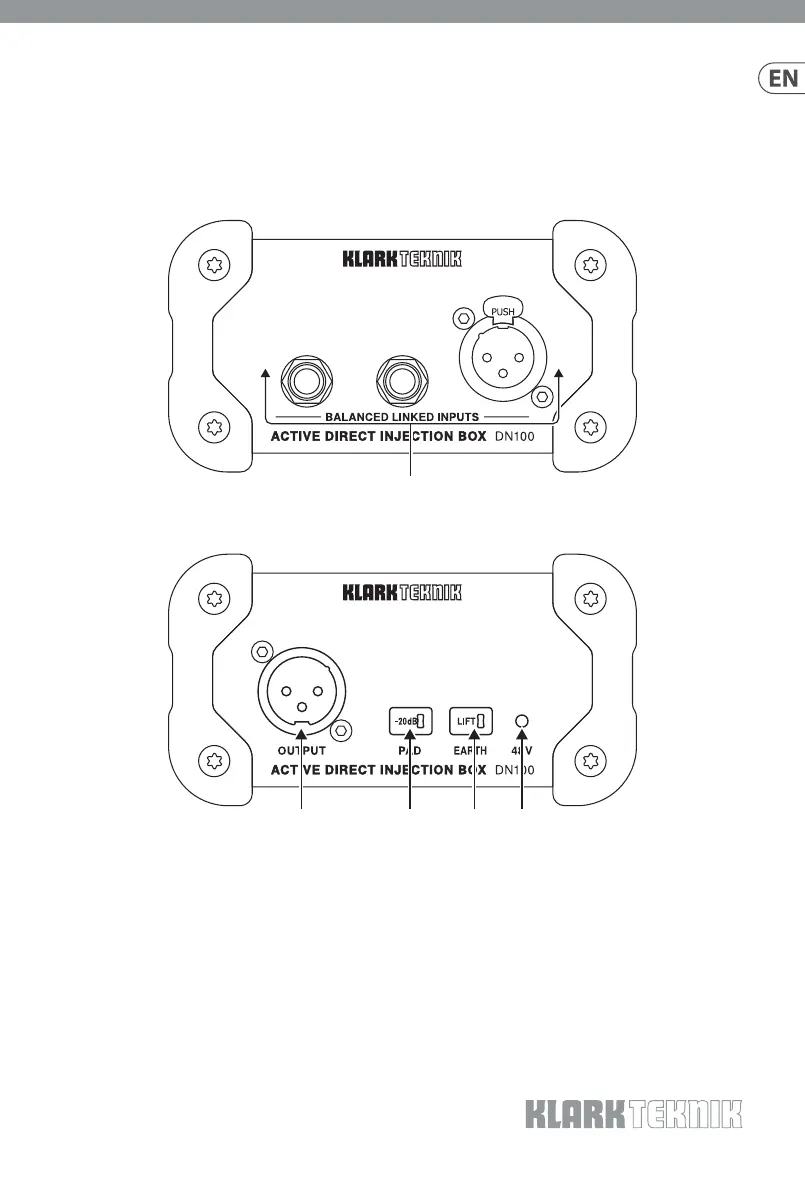
(EN)Controls
(1) BALANCED LINKED INPUTS – Connect instruments or
line-level equipment to either the ¼" TRS or XLR inputs.
The other ¼" connector can be used as a link-through to
pass the signal to an amplier. When only the XLR input is
used, an impedance of 20 kΩ optimizes use with line-level
sources, otherwise a nominal impedance of 1 MΩ is ideal for
instrument pickups.
(2) OUTPUT – Send the signal to a mixer or recording interface
via balanced XLR cable.
(3) PAD – Press to reduce the input signal by 20 dB for use with
hot signals.
(4) EARTH – Press to separate the input and output grounds,
potentially eliminating earth/ground loops between
equipment on dierent mains supplies.
(5) 48 V LED – Lights when the unit receives sucient phantom
power. Note that the DN100 must be powered to operate
correctly.
(1)
(2)(3)(4)(5)
Specyfikacje produktu
| Marka: | Klark Teknik |
| Kategoria: | Niesklasyfikowane |
| Model: | DN100 |
Potrzebujesz pomocy?
Jeśli potrzebujesz pomocy z Klark Teknik DN100, zadaj pytanie poniżej, a inni użytkownicy Ci odpowiedzą
Instrukcje Niesklasyfikowane Klark Teknik

7 Grudnia 2024
24 Września 2024
24 Września 2024
24 Września 2024
24 Września 2024
24 Września 2024
24 Września 2024
24 Września 2024
24 Września 2024
24 Września 2024
Instrukcje Niesklasyfikowane
Najnowsze instrukcje dla Niesklasyfikowane
29 Stycznia 2025
29 Stycznia 2025
29 Stycznia 2025
29 Stycznia 2025
29 Stycznia 2025
29 Stycznia 2025
29 Stycznia 2025
29 Stycznia 2025
29 Stycznia 2025
29 Stycznia 2025