Instrukcja obsługi Kramer RK-4U-HKS-10
Kramer Niesklasyfikowane RK-4U-HKS-10
Przeczytaj poniżej 📖 instrukcję obsługi w języku polskim dla Kramer RK-4U-HKS-10 (1 stron) w kategorii Niesklasyfikowane. Ta instrukcja była pomocna dla 9 osób i została oceniona przez 4 użytkowników na średnio 5.0 gwiazdek
Strona 1/1
RK--HKS- Quick Start (P/N: -300877QS REV 1)4U102900
P/N:
2900-300877QS
Rev:
1
Scan for full manual
RK--HKS- Quick Start Guide 4U10
This guide helps you install and use your RK--HKS-4U10for the rst time.
Go to www.kramerav.com/downloads/RK-4U-HKS-10to download the latest user manual.
Step 1: Check what’s in the b ox
1RK--HKS-4U10HighSecLabs rack mounting bracket chassis
with 10 support mounts
Screws
1 Quick start guide
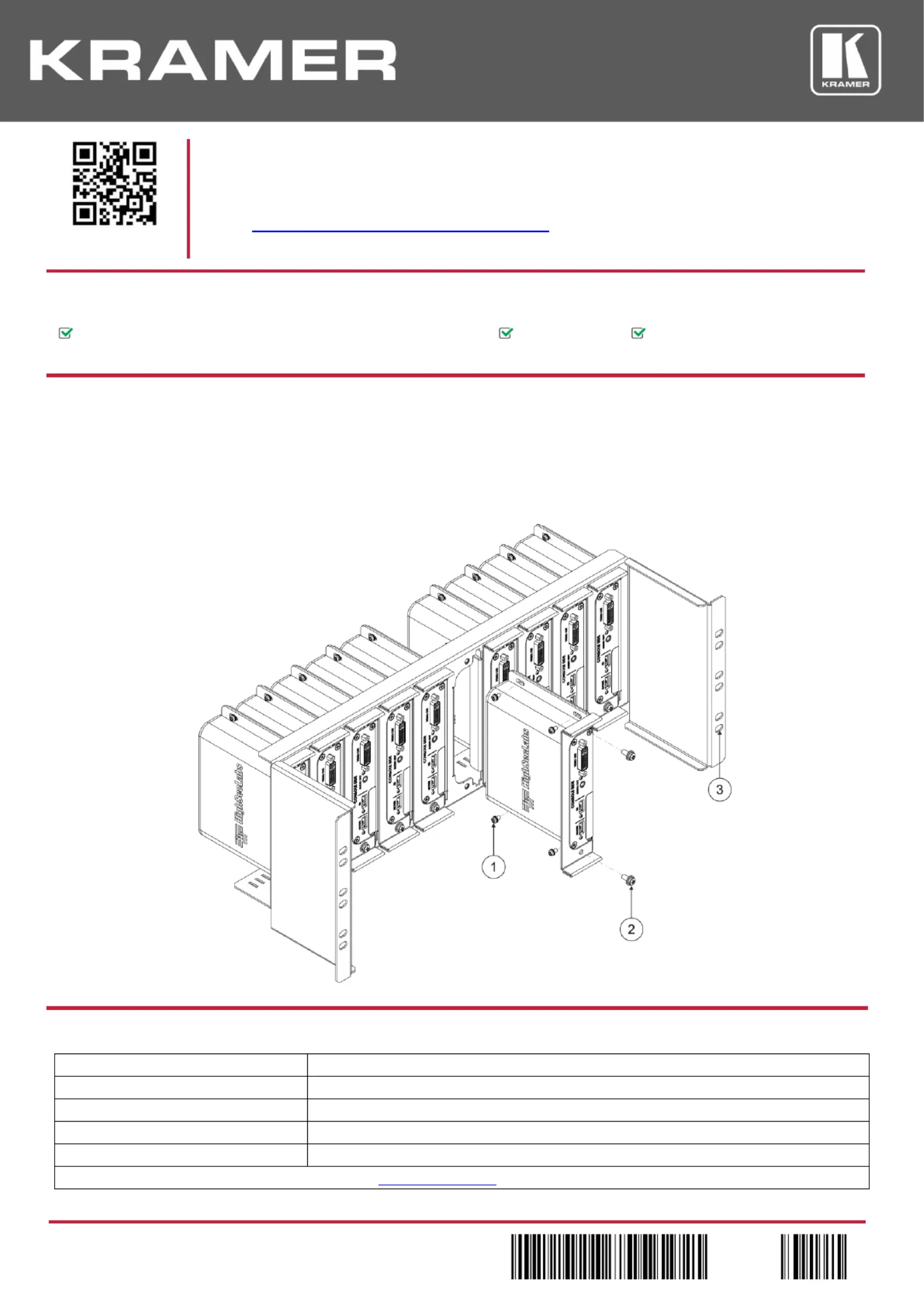
Step 2: Install --- RK4UHKS10
To rack mount up to 10 units using the bracket:
1. Attach the chassis (main bracket) to the rack with 4 screws (3) (not included).
2. Insert each unit in a support mount and tighten the support mount with 4 M3-0.5x6mm screws (1). to
3. Insert the support mount with the unit into the main bracket and tighten it with the 2 M4x10mm screws (2). .
Technical Specifications
Product Dimensions:
48.6 cm x 17.7 cm x 10.2 cm (19“ x 7.0” x 4U) W, D, H
Product Weight:
3.4kg (7.5lb)
Shipping Dimensions:
51 cm x 19 cm x 17 cm (20“ x 7.5” x 6.7”) W, D, H
Shipping W: eight
3.8kg (8.4lb)
Accessories:
40 M3-0.5x6mm screws, 20 M4x10mm screws
Specifications are subject to change without notice at www.kramerav.com
Specyfikacje produktu
| Marka: | Kramer |
| Kategoria: | Niesklasyfikowane |
| Model: | RK-4U-HKS-10 |
Potrzebujesz pomocy?
Jeśli potrzebujesz pomocy z Kramer RK-4U-HKS-10, zadaj pytanie poniżej, a inni użytkownicy Ci odpowiedzą
Instrukcje Niesklasyfikowane Kramer

3 Stycznia 2025
20 Grudnia 2024
19 Grudnia 2024
19 Grudnia 2024
19 Grudnia 2024
19 Grudnia 2024
19 Grudnia 2024
19 Grudnia 2024
19 Grudnia 2024
19 Grudnia 2024
Instrukcje Niesklasyfikowane
Najnowsze instrukcje dla Niesklasyfikowane
29 Stycznia 2025
29 Stycznia 2025
29 Stycznia 2025
29 Stycznia 2025
29 Stycznia 2025
29 Stycznia 2025
29 Stycznia 2025
29 Stycznia 2025
29 Stycznia 2025
29 Stycznia 2025