Instrukcja obsługi Primera PTLink
Przeczytaj poniżej 📖 instrukcję obsługi w języku polskim dla Primera PTLink (6 stron) w kategorii drukarka. Ta instrukcja była pomocna dla 24 osób i została oceniona przez 2 użytkowników na średnio 4.4 gwiazdek
Strona 1/6
1
Secon 1: Overview
The PTLink IP60 wireless print module is a print server that allows the Primera IP60 Photo
Printer to receive prints from IPhone/IPad devices. It features two separate network modes:
1.Hotspot network mode (default) allows the iPhone/iPad to connect and print directly to
the IP60 with no other network present. This is great for events where you will not
necessarily have access to a wi network.
2.Wi network mode allows users to connect the IP60 to their own wireless network,
making it accessible throughout their personal network infrastructure.This is ideal for
an oce where you want easy access to print to the IP60 just by connecng your device
to the same wi network.
Secon 2: First Time Setup
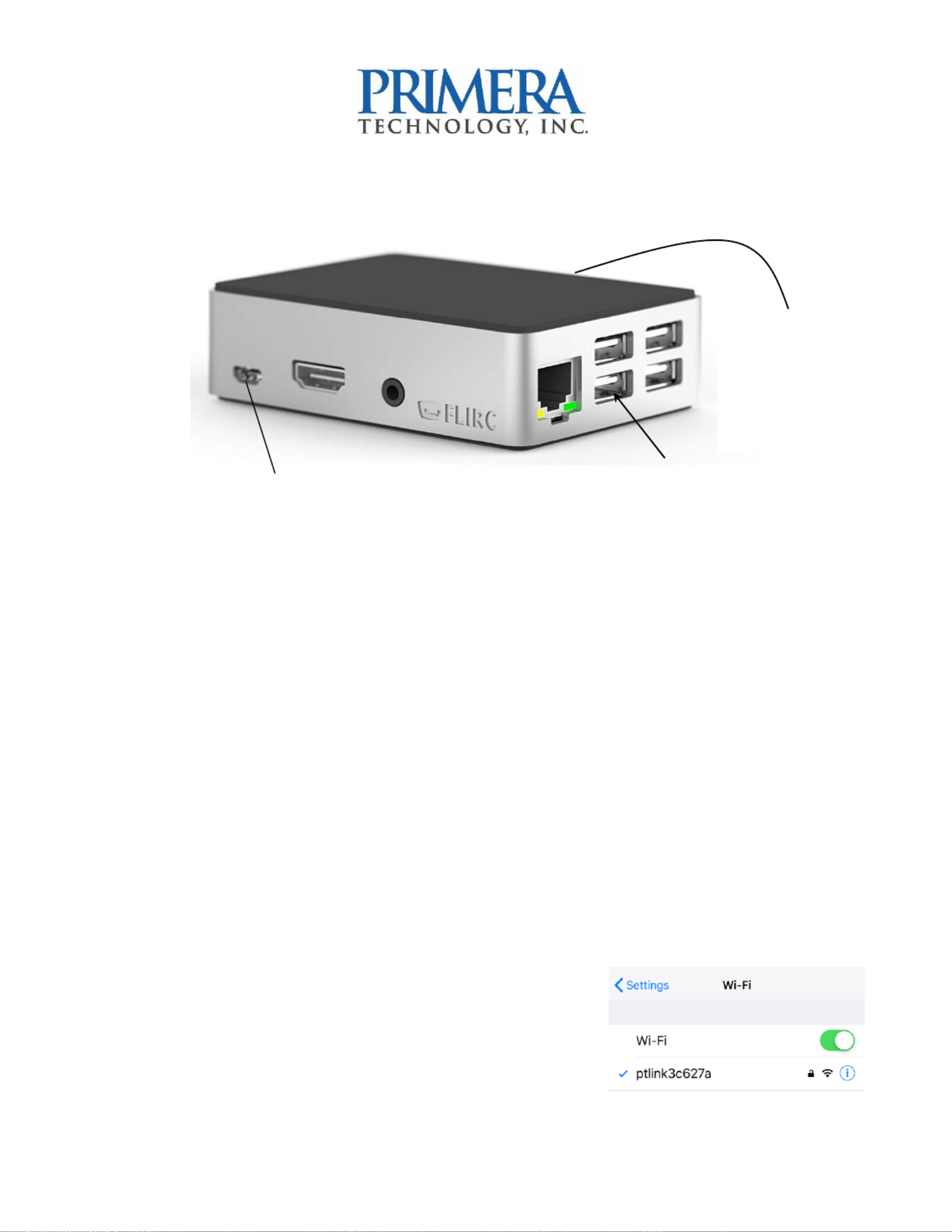
1.Connect PTLink to power using the included micro USB power supply.
2.Connect the IP60 printer to the PTLink module using the included USB cable - (ab).
3.The hotspot network will be acvated and PTLink will
create its own - network. WiFi
4.Go to Sengs Wi on your iPhone/iPad. Choose the –
new network name that appears in the following
format: (The Network Name = ptlink-xxxxxx
Micro USB Power
Quick Start: PTLink for IP60 Print Server –
USB (Connect cable from
Primera IP60 here)
Network Name is
printed on a label
found on the back
Specyfikacje produktu
| Marka: | Primera |
| Kategoria: | drukarka |
| Model: | PTLink |
Potrzebujesz pomocy?
Jeśli potrzebujesz pomocy z Primera PTLink, zadaj pytanie poniżej, a inni użytkownicy Ci odpowiedzą
Instrukcje drukarka Primera

17 Września 2024
16 Września 2024
16 Września 2024
16 Września 2024
15 Września 2024
15 Września 2024
15 Września 2024
13 Września 2024
13 Września 2024
12 Września 2024
Instrukcje drukarka
Najnowsze instrukcje dla drukarka
9 Kwietnia 2025
9 Kwietnia 2025
9 Kwietnia 2025
9 Kwietnia 2025
9 Kwietnia 2025
4 Kwietnia 2025
3 Kwietnia 2025
3 Kwietnia 2025
3 Kwietnia 2025
2 Kwietnia 2025