Instrukcja obsługi StarTech.com 3M4-DESK-LOCKING-KIT
StarTech.com szczelina 3M4-DESK-LOCKING-KIT
Przeczytaj poniżej 📖 instrukcję obsługi w języku polskim dla StarTech.com 3M4-DESK-LOCKING-KIT (2 stron) w kategorii szczelina. Ta instrukcja była pomocna dla 57 osób i została oceniona przez 9 użytkowników na średnio 5.0 gwiazdek
Strona 1/2
Quick-Start Guide
To view manuals, FAQs, videos, drivers, downloads, technical drawings, and more, visit www.startech.com/support.
Manual Revision: January 4, 2024
Product ID: 3M4-DESK-LOCKING-KIT
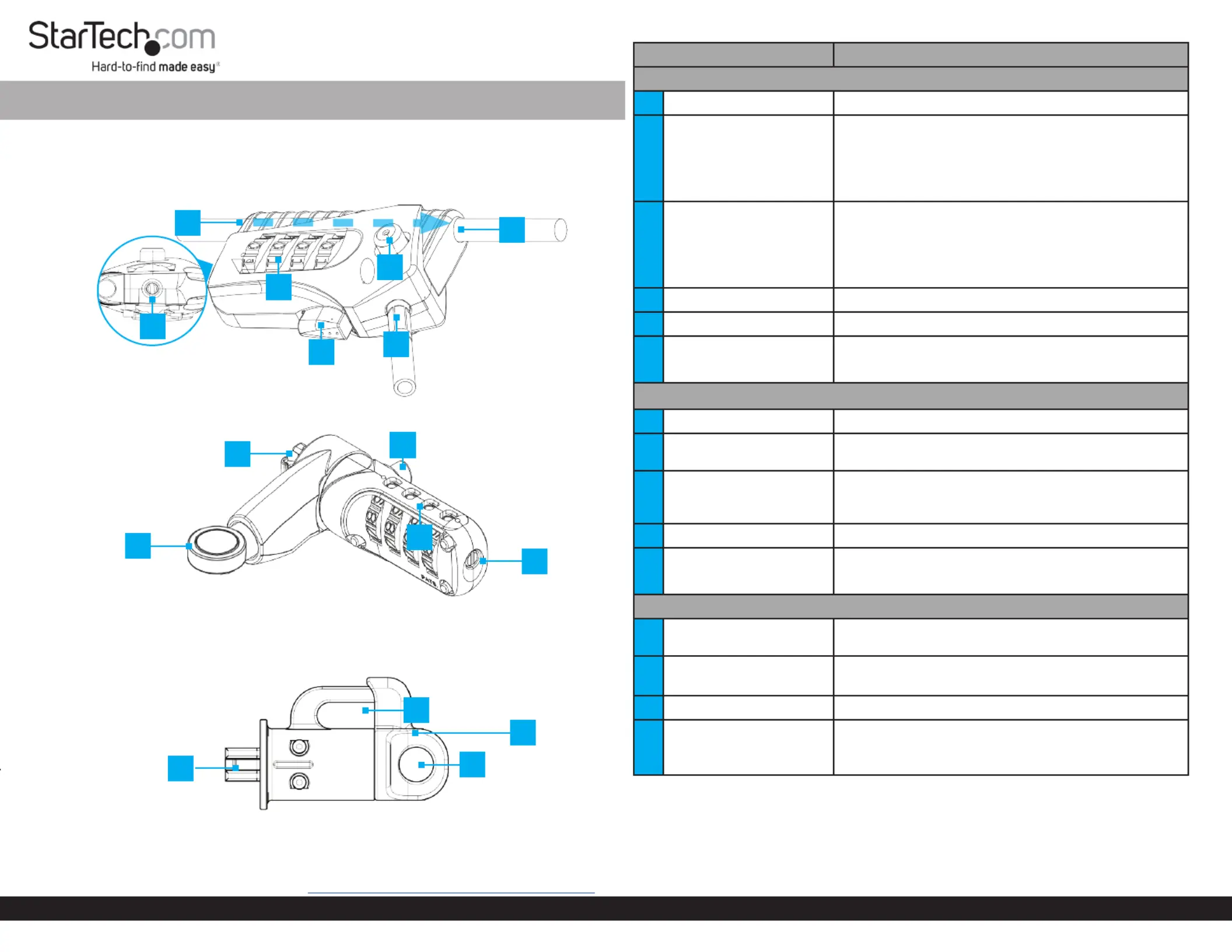
Product Diagrams:
4-Digit Tether Cable Combination Lock
Peripherals Security Locking Kit - 10ft (3m) - K-Slot
Permanent K-Slot Lock Head(s)
ComponentFunction
4-Digit Tether Cable Combination Lock
1Cable Channel
• Routes the Tether Cable (Tether Cable pre-installed)
2Combination Dial
• Rotate each row of numbers until the desired combination is
aligned with the indicator located on the side of the Lock that
features the Release Button
• The can only be turned when the Combination Dial Lock
Button is engaged
3Release Button
• Press when the correct combination has been rotated into the
Combination DialLock Button to disengage the
• Press and hold, when the correct combination has been
rotated into the , to remove the Combination DialTether
CableCable Locking Port from the
4Lock Button
• Press to engage the locking mechanism
5Cable Locking Port
• Insert the end of the Tether Cable
6Reset Screw
• Set a new combination
Note: Once the combination is changed, if you lose the new
combination you will not be able to reset the combination
4-Digit Combination K-Slot Lock Head
7Cable Channel
• Route the Tether Cable
8Combination Dial
• Rotate each row of numbers until the desired combination is
selected within the square openings
9Release Button
• Press when the correct combination has been rotated into
the to depress the to insert/Combination DialK-Slot Hook
remove the from the Lock Slot on the Host DeviceK-Slot Hook
10K-Slot Hook
• Connect the Lock to a Lock Slot on the Host Device
11Reset Screw
• Set a new combination
Note: Once the combination is changed, if you lose the new
combination you will not be able to reset the combination
Permanent Standard-K Lock Heads
12Cable Channel
• Route the Tether Cable after the K-Slot Hook has been inserted
into the Lock Slot on the Host Device
13Locking Mechanism
• Pullout to release the K-Slot Hook
• Push-in to engage the K-Slot Hook
14K-Slot Hook
• Connect the Lock to a Lock Slot on the Host Device
15Cable Management Slot
• Route cables to aid with cable management/routing
• Can only be opened when the Tether Cable is removed from
the Cable Channel
Package Contents
4-Digit Tether Cable Combination Lock (Attached) x 110ft. (3m) Tether Cable x 1
4-Digit Combination K-Slot Lock Head x 1Permanent K-Slot Lock Heads x 3
Spacers for Permanent K-Slot Locks Heads x 9Spacers for 4-Digit Combination K-Slot Lock Head x 3
Velcro Strap x 1Quick-Start Guide x 1
1
4-Digit Combination K-Slot Lock Head
1
2
3
4
5
7
8
9
10
11
12
13
14
6
Default Combination: 0 - 0 - 0 - 0
Default Combination: 0 - 0 - 0 - 0
Requirements
For the latest drivers, manuals, product information, technical specications, and
declarations of conformance, please visit: www.StarTech.com/3M4-DESK-LOCKING-KIT
15
Specyfikacje produktu
| Marka: | StarTech.com |
| Kategoria: | szczelina |
| Model: | 3M4-DESK-LOCKING-KIT |
Potrzebujesz pomocy?
Jeśli potrzebujesz pomocy z StarTech.com 3M4-DESK-LOCKING-KIT, zadaj pytanie poniżej, a inni użytkownicy Ci odpowiedzą
Instrukcje szczelina StarTech.com

9 Października 2024
8 Października 2024
8 Października 2024
8 Października 2024
8 Października 2024
8 Października 2024
8 Października 2024
2 Października 2024
2 Października 2024
2 Października 2024
Instrukcje szczelina
Najnowsze instrukcje dla szczelina
8 Kwietnia 2025
29 Marca 2025
29 Marca 2025
29 Marca 2025
29 Marca 2025
29 Marca 2025
27 Marca 2025
13 Marca 2025
11 Marca 2025
10 Marca 2025