Instrukcja obsługi StarTech.com UNIVKMKO-LAPTOP-LOCK
StarTech.com szczelina UNIVKMKO-LAPTOP-LOCK
Przeczytaj poniżej 📖 instrukcję obsługi w języku polskim dla StarTech.com UNIVKMKO-LAPTOP-LOCK (2 stron) w kategorii szczelina. Ta instrukcja była pomocna dla 31 osób i została oceniona przez 8 użytkowników na średnio 4.4 gwiazdek
Strona 1/2
Quick-Start Guide
To view manuals, FAQs, videos, drivers, downloads, technical drawings, and more, visit www.startech.com/support
Manual Revision: March 18, 2024
Product ID
UNIVKMKO-LAPTOP-LOCK
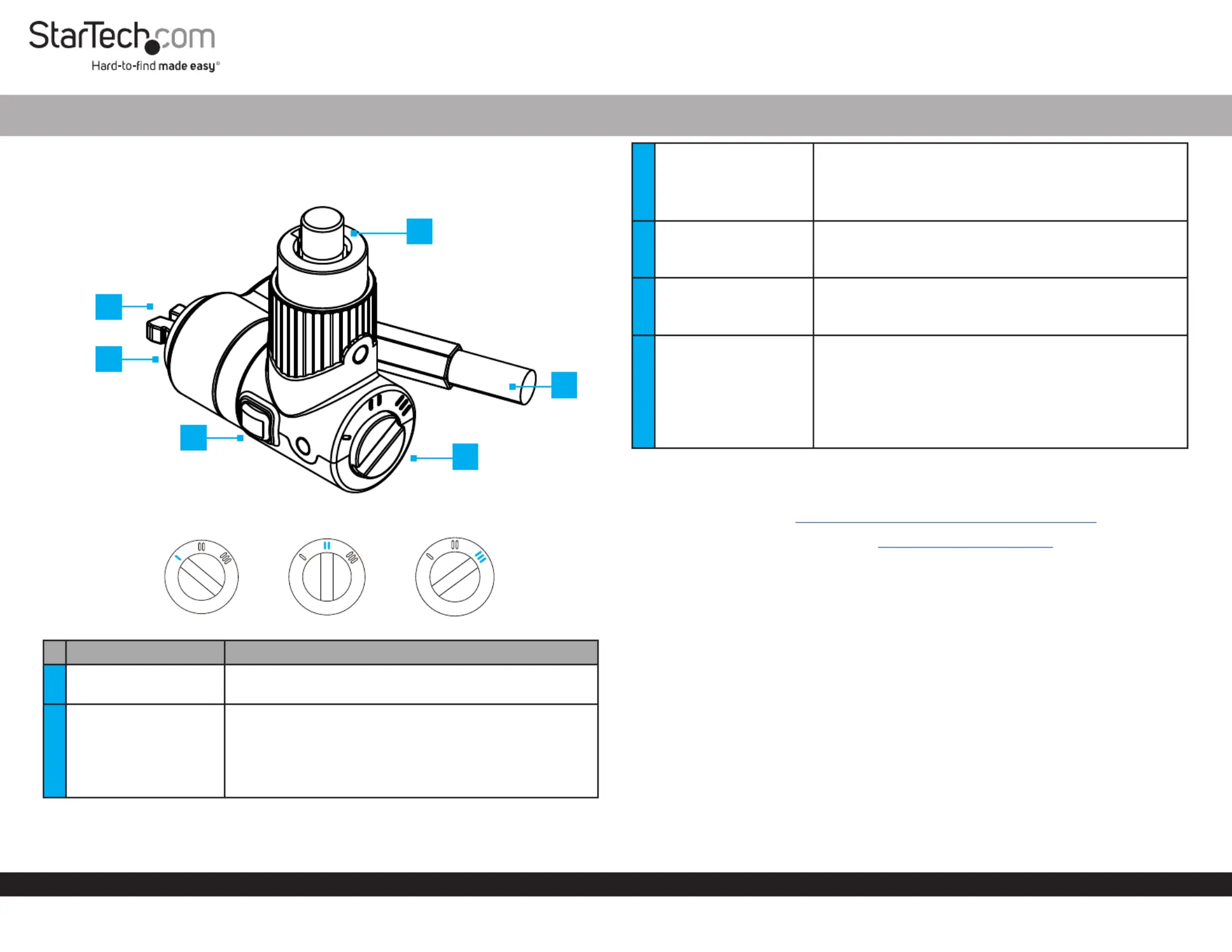
Lock Selection Dial
ComponentsFunction
1Lock Tip
• Used to connect the to a compatible LaptopLock
Security Slot
2Lock Spacer
• Prevents the from scratching the secured Lock Head
Device
Note: Attach one of the three Lock Spacers based on
Security Slot requirements or it can be removed if the
t is too tight.
3-in-1 Universal Laptop Cable Lock - 6.6ft (2m) - Master Key On Demand
3Release Button
• and to insert or remove from a PressHoldSecurity
Slot
Note: The locking mechanism must be disengaged
before pressing the button
4
Lock and
Push-to-Lock Button
• Press the to engage the Push-to-Lock Button
locking mechanism without a Key
• Insert a and rotate to KeyUnlock
5Security Cable
• Used to secure a to a stationary objectDevice
• Pivots 90° and allows to rotate the 360 Lock Head °
around the ball-joint
6Lock Selection Dial
• Use to change the shape of the for dierent Lock Tip
Security Slots
Note: The appropriate Lock Tip must be selected
before inserting the Lock Tip into a Security Slot
• Use a or a similar object to Flat-Head Screwdriver
rotate the Lock Selection Dial
Requirements
For the latest manuals, product information, technical specications, and declarations of
conformance, please visit: www.StarTech.com/UNIVKMKO-LAPTOP-LOCK
Note: To request a Master Key visit and contact us with a www.StarTech.com/support
copy of the Proof of Purchase.
• Compatible device with Noble Wedge®, Nano, or K-slot security slots
• Flat-head screwdriver
Package Contents
• Laptop Security Lock x 1
• Keys x 2
• Spacers x 3
• Hook-and-Loop Strap x 1
• Quick-Start Guide x 1
Securing a Device
Note The Key is required to unlock the Laptop Lock. The availability of the Key(s)
should be known before using the Push-To-Lock Button.
1. Wrap the around a secure stationary object (i.e., a desk leg or table Security Cable
frame) and pull the through the loop on the . (Figure 1)LaptopLockSecurity Cable
*Product may vary from image
4
1
6
2
5
3
Noble Wedge® Slot
Nano SlotK-Slot
Specyfikacje produktu
| Marka: | StarTech.com |
| Kategoria: | szczelina |
| Model: | UNIVKMKO-LAPTOP-LOCK |
Potrzebujesz pomocy?
Jeśli potrzebujesz pomocy z StarTech.com UNIVKMKO-LAPTOP-LOCK, zadaj pytanie poniżej, a inni użytkownicy Ci odpowiedzą
Instrukcje szczelina StarTech.com

9 Października 2024
8 Października 2024
8 Października 2024
8 Października 2024
8 Października 2024
8 Października 2024
8 Października 2024
2 Października 2024
2 Października 2024
2 Października 2024
Instrukcje szczelina
Najnowsze instrukcje dla szczelina
8 Kwietnia 2025
29 Marca 2025
29 Marca 2025
29 Marca 2025
29 Marca 2025
29 Marca 2025
27 Marca 2025
13 Marca 2025
11 Marca 2025
10 Marca 2025