Instrukcja obsługi StarTech.com LTLOCK3DCOIL
StarTech.com szczelina LTLOCK3DCOIL
Przeczytaj poniżej 📖 instrukcję obsługi w języku polskim dla StarTech.com LTLOCK3DCOIL (2 stron) w kategorii szczelina. Ta instrukcja była pomocna dla 13 osób i została oceniona przez 2 użytkowników na średnio 4.7 gwiazdek
Strona 1/2
Quick-Start Guide
To view manuals, FAQs, videos, drivers, downloads, technical drawings, and more, visit www.startech.com/support.
November 22, 2018 12:04 PM
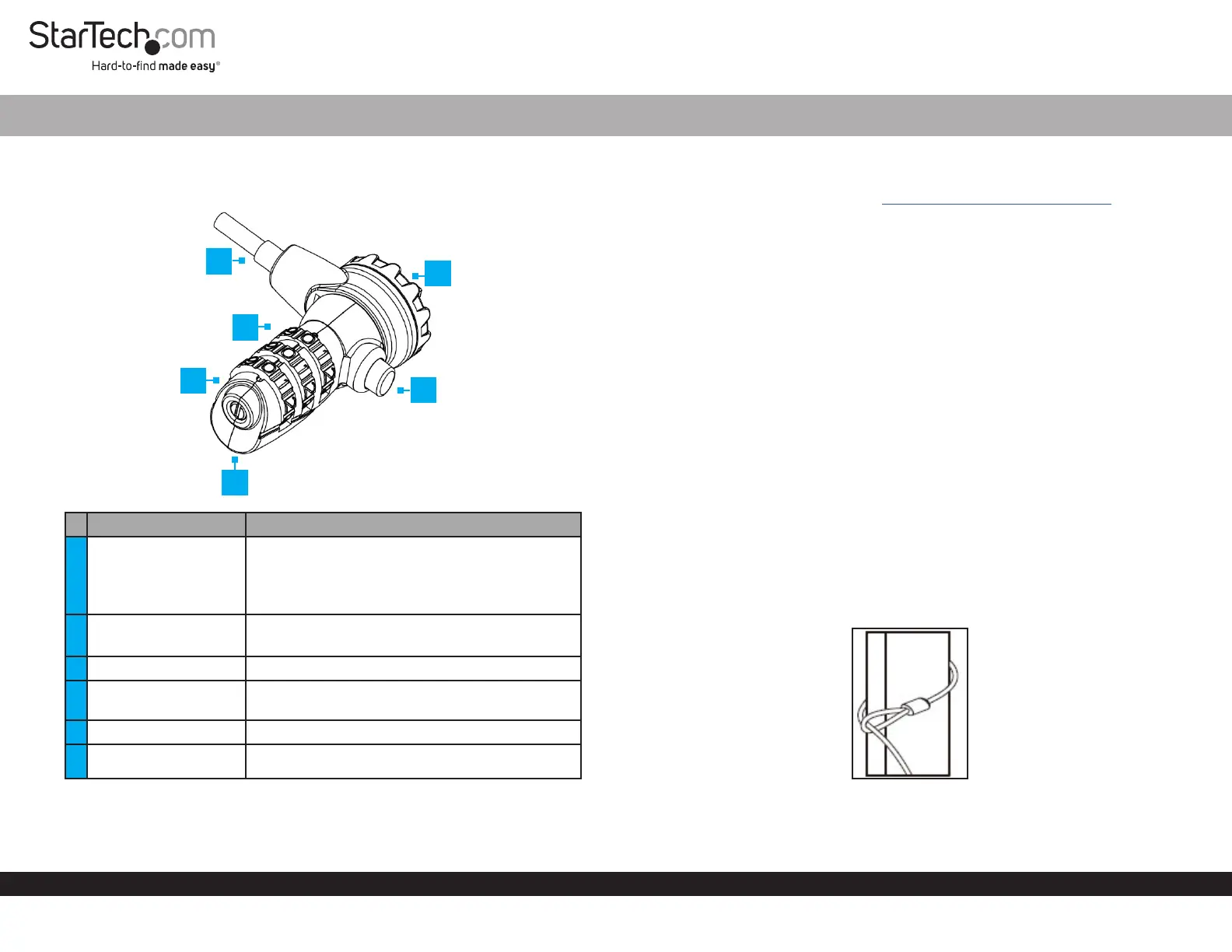
Product Diagram (LTLOCK3DCOIL)
ComponentFunction
1Reset Screw
• Used to set a new combination..
Note: Once the combination is changed, if you
lose the new combination you will not be able to
reset the combination.
2Guide Line
• Used to enter a combination on the Dials.
• Align the combination with the Guide Line.
3Dials• Used to enter the Lock’s combination.
4Security Cable
• Used to secure a Device to a secure stationary
object.
5Locking Hook• Used to connect the Lock to a Lock Slot.
6Release Button• Used to release the Lock from a Lock Slot.
3-Digit Combination Laptop Lock
1
Requirements
For the latest requirements, please visit www.startech.com/LTLOCK3DCOIL.
• Default Combination = 0-0-0
Setting a New Combination
1. Align the numbers on the Dial with the Guide Line using the default combination
0-0-0.
2. Insert a Flathead Screwdriver (sold separately) into the Reset Screw and push the
Reset Screw in toward the Lock.
3. With the Reset Screw pushed in, turn the Reset Screw clockwise 90 degrees.
4. Rotate each of the Dials to the desired numbers.
5. Insert the Flathead Screwdriver into the Reset Screw and turn the Reset Screw
counter-clockwise 90 degrees moving the Reset Screw, back to its original position.
The Reset Screw will pop back out once it is in the original position.
Note: Be sure to write down the new combination and keep it in a secure location
away from the lock.
6. To set a new combination follow steps 1 - 5 using the new combination set up in
Step 4 instead of the default combination.
Locking a Device
1. Wrap the Security Cable around a secure stationary object and pull the Lock
through the loop on the Security Cable.
Security Cable
2. Press and hold the Release Button and insert the Locking Hook into the Lock Slot
on a Laptop, Docking Station or any other compatible Device.
4
5
3
6
2
Specyfikacje produktu
| Marka: | StarTech.com |
| Kategoria: | szczelina |
| Model: | LTLOCK3DCOIL |
Potrzebujesz pomocy?
Jeśli potrzebujesz pomocy z StarTech.com LTLOCK3DCOIL, zadaj pytanie poniżej, a inni użytkownicy Ci odpowiedzą
Instrukcje szczelina StarTech.com

9 Października 2024
8 Października 2024
8 Października 2024
8 Października 2024
8 Października 2024
8 Października 2024
8 Października 2024
2 Października 2024
2 Października 2024
2 Października 2024
Instrukcje szczelina
Najnowsze instrukcje dla szczelina
8 Kwietnia 2025
29 Marca 2025
29 Marca 2025
29 Marca 2025
29 Marca 2025
29 Marca 2025
27 Marca 2025
13 Marca 2025
11 Marca 2025
10 Marca 2025