Instrukcja obsługi StarTech.com OR41GI-NETWORK-CARD
StarTech.com karta/adapter sieciowy OR41GI-NETWORK-CARD
Przeczytaj poniżej 📖 instrukcję obsługi w języku polskim dla StarTech.com OR41GI-NETWORK-CARD (2 stron) w kategorii karta/adapter sieciowy. Ta instrukcja była pomocna dla 37 osób i została oceniona przez 5 użytkowników na średnio 4.0 gwiazdek
Strona 1/2
Quick-Start Guide
To view manuals, FAQs, videos, drivers, downloads, technical drawings, and more, visit www.startech.com/support
Manual Revision: May 9, 2024
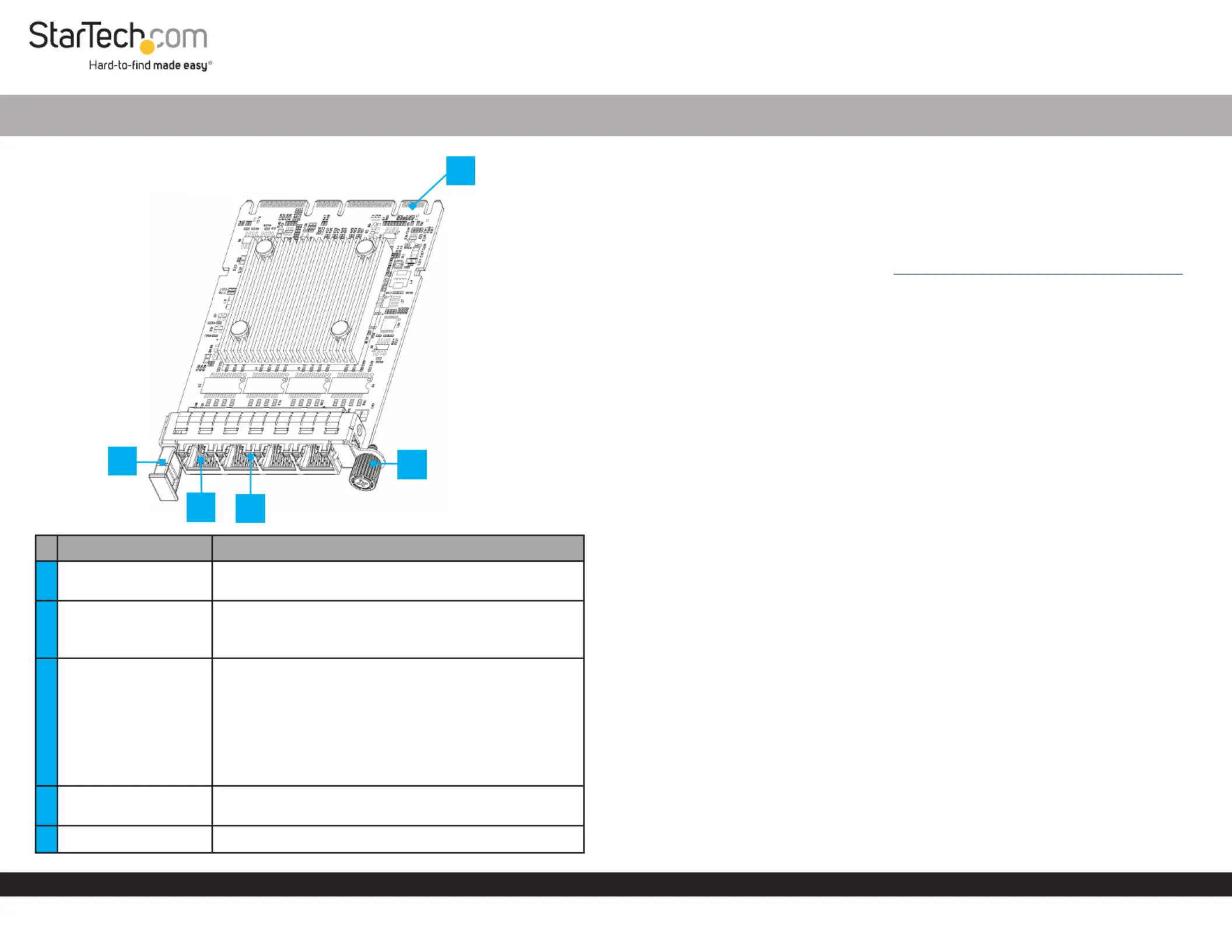
Product Diagram
OR41GI-NETWORK-CARD
Port/LED/ConnectorFunction
1Pull Tab
• Pull to remove the from the Server Network Card
OCP NIC 3.0 Slot
2RJ45 Port x 4
• Connect a to theNetwork Cable Server Network
Card
• Supports 1 Gbps, 100 Mbps, and 10 Mbps
3LED Indicators
• LeftLED Indicator Link Speedis
• Solid Green: 1 Gbps
• Solid Amber: 10/100 Mbps
• RightLED Indicator Link Statusis
• Solid Green: Active link
• Flashing Green: Activity
4
4C+ Connector
(OCP NIC 3.0)
• Insert into an on the OCP NIC 3.0 SlotHost Server
5Locking Screw• Secure the card to the Host Server Case
4-Port RJ45 Gigabit OCP 3.0 Server Network Card
Package Contents
• OCP NIC 3.0 Network Card x 1
• Quick-Start Guide x 1
Requirements
For the latest requirements, please visit www.startech.com/OR41GI-NETWORK-CARD
• Host server with an available OCP NIC 3.0 slot
Installation
Install the Server Network Card
WARNING!
Static Electricity can severely damage. Ensure that you are adequately Network Cards
groundedHost Server CaseServer Network Card before you open your or touch the .
You should wear an oruseanwhen installing any Anti-Static Strap Anti-Static Mat
computer component. If an isn’t available, discharge any built-up Anti-Static Strap
static electricity by touching a large for several seconds. Only Grounded Metal Surface
handle the by its edges and do not touch the gold connectors.Server Network Card
1. Turn o the and any that are connected to it (e.g. Host Server Peripheral Devices
printers, external hard drives, etc.).
2. Unplug the from the back of the , and disconnect any Power Cable Host Server
Peripheral Devices that are connected.
3. Remove the from the . Consult the documentation that came with Cover Server Case
the for details about doing this safely.Host Server
4. Locate an open and remove the corresponding OCP NIC 3.0 Slot Slot Cover Plate
from the back of the .Host Server
5. Gently insert the into the. Turn the Server Network Card OCP NIC 3.0 SlotLocking
Screw Server Network CardServer Case/Chassisto attach the to the back of the .
6. Return the onto the .CoverHost Server
7. Connect one or more to the on the Network Cable/sRJ45 Ports Server Network
Card.
8. Reconnect all of the disconnected in .Peripheral DevicesStep 2
9. Reconnect the to the back of the .Power CableHost Server
10. Turn on the and .Host ServerPeripheral Devices
3
4
2
5
1
*Product may vary from image
Specyfikacje produktu
| Marka: | StarTech.com |
| Kategoria: | karta/adapter sieciowy |
| Model: | OR41GI-NETWORK-CARD |
Potrzebujesz pomocy?
Jeśli potrzebujesz pomocy z StarTech.com OR41GI-NETWORK-CARD, zadaj pytanie poniżej, a inni użytkownicy Ci odpowiedzą
Instrukcje karta/adapter sieciowy StarTech.com

14 Stycznia 2025
29 Grudnia 2024
29 Grudnia 2024
28 Grudnia 2024
28 Grudnia 2024
15 Grudnia 2024
28 Lipca 2024
28 Lipca 2024
31 Maja 2024
31 Maja 2024
Instrukcje karta/adapter sieciowy
Najnowsze instrukcje dla karta/adapter sieciowy
29 Stycznia 2025
28 Stycznia 2025
28 Stycznia 2025
28 Stycznia 2025
28 Stycznia 2025
28 Stycznia 2025
28 Stycznia 2025
28 Stycznia 2025
27 Stycznia 2025
24 Stycznia 2025