Instrukcja obsługi StarTech.com PEXUSB3S3GE
StarTech.com karta/adapter sieciowy PEXUSB3S3GE
Przeczytaj poniżej 📖 instrukcję obsługi w języku polskim dla StarTech.com PEXUSB3S3GE (2 stron) w kategorii karta/adapter sieciowy. Ta instrukcja była pomocna dla 12 osób i została oceniona przez 9 użytkowników na średnio 4.3 gwiazdek
Strona 1/2
ユーザマニュアル
DE: Bedienungsanleitung - de.startech.com
FR: Guide de l'utilisateur - fr.startech.com
ES: Guía del usuario - es.startech.com
IT: Guida per l'uso - it.startech.com
NL: Gebruiksaanwijzing - nl.startech.com
PT: Guia do usuário - pt.startech.com
マニュアル改訂日: 08/09/2016
最新の情報は www.startech.comでご確認ください
パッケージの内容
•1xGigabitEthernet対応3ポートPCIExpressUSB3.0カード
•1xロープロファイルブラケット
•1xドライバCD
•1xユーザマニュアル
動作環境
•空きPCIExpressスロットを1ポート以上(x4、x8、x16)搭載した
PCIExpress対応コンピュータ
•SATA電源コネクタ(推奨していますが、任意です)
•Windows®8/8.1(32/64ビット)、7(32/64)、Vista(32/64)、
XP(32/64)、WindowsServer®2012、2008R2、Linux2.6.31以降
(3.5までテスト済み)
PEXUSB3S3GE
Gigabit Ethernet対応3ポートPCI Express USB 3.0 カード - SATA電源付き
インストール手順
ハードウェアインストール手順
警告!
他のすべてのパソコン周辺機器同様、PCIExpressカードも静電気
により深刻なダメージを受ける場合があります。コンピュータケー
スを開ける前や、PCIExpressカードに触れる前には、必ず適切に接
地するようにしてください。StarTech.comでは、お客様がコンピュー
タコンポーネントを実装する際には、帯電防止ストラップを着用す
ることを推奨しています。帯電防止ストラップが手に入らない場合、
接地済みの大型金属面(コンピュータケースなど)に数秒触れ、お
客様の体に蓄積した静電気を放電してください。また、PCIExpress
カードは端を持つようにし、ゴールドコネクタ部に触れないように
してください。
1. コンピュータと、コンピュータに接続されているすべての周辺機
器(プリンタや外付けHDDなど)の電源を切ります。コンピュータ
の背面にある電源プラグから電源ケーブルを外し、すべての周
辺機器との接続を外します。
2. コンピュータケースのカバーを外します。(詳細は、コンピュータ
購入時に同梱されてきたユーザマニュアルでご確認ください。)
3. 空いているPCIExpressx1スロットを探し、コンピュータケース
の裏にある金属製カバープレートを外します。(詳細は、コンピュ
ータ購入時に同梱されてきたユーザマニュアルでご確認くださ
い。)
注意:このカードは追加レーンのPCIExpressスロット(x4、x8、x16
スロット)に挿入し、お使いになれます。
4. カードを空いているPCIExpressスロットに慎重に挿入し、コンピ
ュータケース背面のブラケットを固定します。
注意:小型フォームファクタやロープロファイルデスクトップシステ
ムにカードを取り付けする場合は、工場で取り付けられた標準プロ
ファイルブラケットを同梱のロープロファイル(ハーフハイト)取り
付け用ブラケットに取り替える必要があるかもしれません。
5. コンピュータ電源の空いているSATA電源コネクタに別売の
SATA電源ケーブルを接続することをお勧めします。
注意:各USB3.0ポートに十分給電されるよう、SATA電源ケーブル
をカードに接続することをお勧めします。
6. コンピュータケースのカバーを元通りに取り付けます。
7. コンピュータの電源のソケットに電源コードを挿入し、手順1で
外したすべてのコネクタを再度接続してください。
ドライバインストール手順
Windows® 8.1 / 8
USBコントローラーはWindows8.1&8オペレーティングシステム
にネイティブ対応されています。そのため、本カードのUSB3.0機能
はカードをコンピューターにインストールすると自動的に利用可能
になります。
USB3.0に対応するには、利用可能ならばドライバの自動インスト
ール機能を使います。
本カードのGigabitEthernetLAN機能を利用するには別途ドライ
バをインストール必要があります。
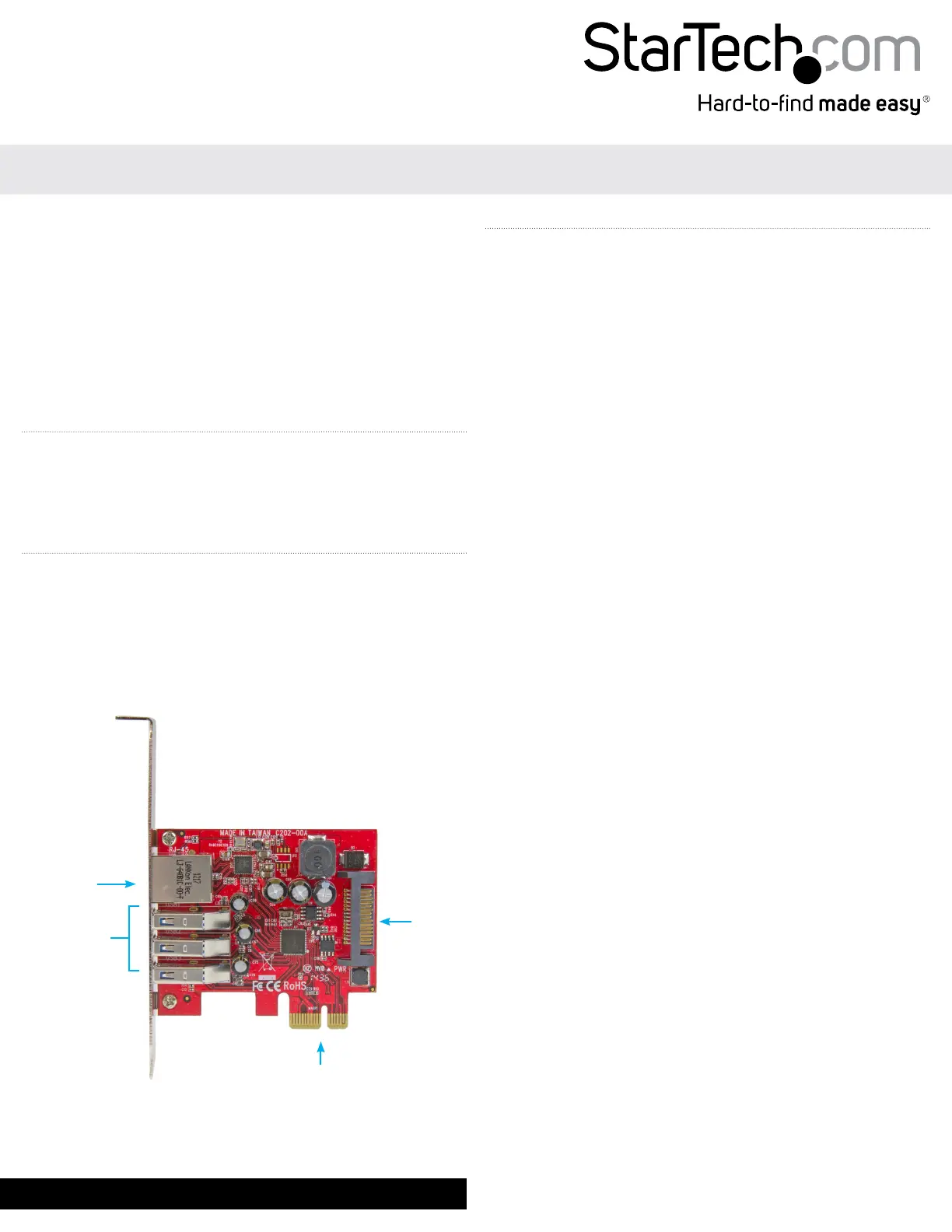
GigabitRJ45
ポート
SATA
電源
PCIExpressx1
USB3.0
ポート「A」
(メス)
x3
Specyfikacje produktu
| Marka: | StarTech.com |
| Kategoria: | karta/adapter sieciowy |
| Model: | PEXUSB3S3GE |
| Kolor produktu: | Metallic, Red |
| Wysokość produktu: | 120 mm |
| Szerokość produktu: | 18 mm |
| Głębokość produktu: | 77 mm |
| Waga produktu: | 60 g |
| Podręcznik użytkownika: | Tak |
| Szerokość opakowania: | 144 mm |
| Wysokość opakowania: | 33 mm |
| Głębokość opakowania: | 176 mm |
| Certyfikat środowiskowy (zrównoważonego rozwoju): | RoHS |
| Technologia łączności: | Przewodowa |
| Ilość: | 1 |
| Certyfikaty: | CE, FCC |
| Standardy komunikacyjne: | IEEE 802.1p, IEEE 802.1Q, IEEE 802.3, IEEE 802.3ab, IEEE 802.3az, IEEE 802.3u, IEEE 802.3x |
| Maksymalna szybkość przesyłania danych: | 5000 Mbit/s |
| Pełny dupleks: | Tak |
| Prędkość transferu danych przez Ethernet LAN: | 10,100,1000 Mbit/s |
| Ilość portów Ethernet LAN (RJ-45): | 1 |
| Wewnętrzny: | Tak |
| Zakres temperatur (eksploatacja): | 5 - 50 °C |
| Zakres wilgotności względnej: | 20 - 80 % |
| Kod zharmonizowanego systemu (HS): | 85176990 |
| Przewodowa sieć LAN: | Tak |
| Waga wraz z opakowaniem: | 150 g |
| Obsługiwany systemy operacyjne Linux: | Tak |
| Diody LED: | Activity, Link |
| Zakres temperatur (przechowywanie): | -25 - 70 °C |
| Zawiera sterowniki: | Tak |
| Technologia okablowania: | 10/100/1000BaseT(X) |
| Standardowe rozwiązania komunikacyjne: | Ethernet |
| Funkcja Wake-On-LAN: | Tak |
| Obsługiwane systemy operacyjne serwera: | Windows Server 2008 R2, Windows Server 2012 |
| Wersja USB: | 3.2 Gen 1 (3.1 Gen 1) |
| Podpora kontroli przepływu: | Tak |
| Uchwyty mocowania dołączone: | Tak |
| Zgodny z Jumbo Frames: | Tak |
| Rozszerzenie Jumbo Frames: | 9000 |
| MTBF (Średni okres międzyawaryjny): | 1920042 h |
| Interfejs hosta: | PCI Express |
| Prędkość przesyły danych przez USB: | 5000 Mbit/s |
| Auto-Negocjacja: | Tak |
| Automatyczne MDIX IEEE: | Tak |
| wersja PCI: | 2.0 |
| Zestaw układów: | Renesas / NEC - µPD720201, Realtek - RTL8153 |
| Tagowanie VLAN: | Tak |
| Obsługa UASP: | Tak |
| Liczba portów USB 3.2 Gen 1 (3.1 Gen 1): | 3 |
| Rozmiar karty PCI: | Pełna wysokość (nisko profilowy) |
Potrzebujesz pomocy?
Jeśli potrzebujesz pomocy z StarTech.com PEXUSB3S3GE, zadaj pytanie poniżej, a inni użytkownicy Ci odpowiedzą
Instrukcje karta/adapter sieciowy StarTech.com

14 Stycznia 2025
29 Grudnia 2024
29 Grudnia 2024
28 Grudnia 2024
28 Grudnia 2024
15 Grudnia 2024
28 Lipca 2024
28 Lipca 2024
31 Maja 2024
31 Maja 2024
Instrukcje karta/adapter sieciowy
Najnowsze instrukcje dla karta/adapter sieciowy
29 Stycznia 2025
28 Stycznia 2025
28 Stycznia 2025
28 Stycznia 2025
28 Stycznia 2025
28 Stycznia 2025
28 Stycznia 2025
28 Stycznia 2025
27 Stycznia 2025
24 Stycznia 2025