Instrukcja obsługi StarTech.com US2GA30
StarTech.com Karta sieciowa/adapter US2GA30
Przeczytaj poniżej 📖 instrukcję obsługi w języku polskim dla StarTech.com US2GA30 (2 stron) w kategorii Karta sieciowa/adapter. Ta instrukcja była pomocna dla 19 osób i została oceniona przez 4 użytkowników na średnio 4.4 gwiazdek
Strona 1/2
Quick-Start Guide
To view manuals, FAQs, videos, drivers, downloads, technical drawings, and more, visit www.startech.com/support.
Manual Revision: March 19, 2020 2:10 PM
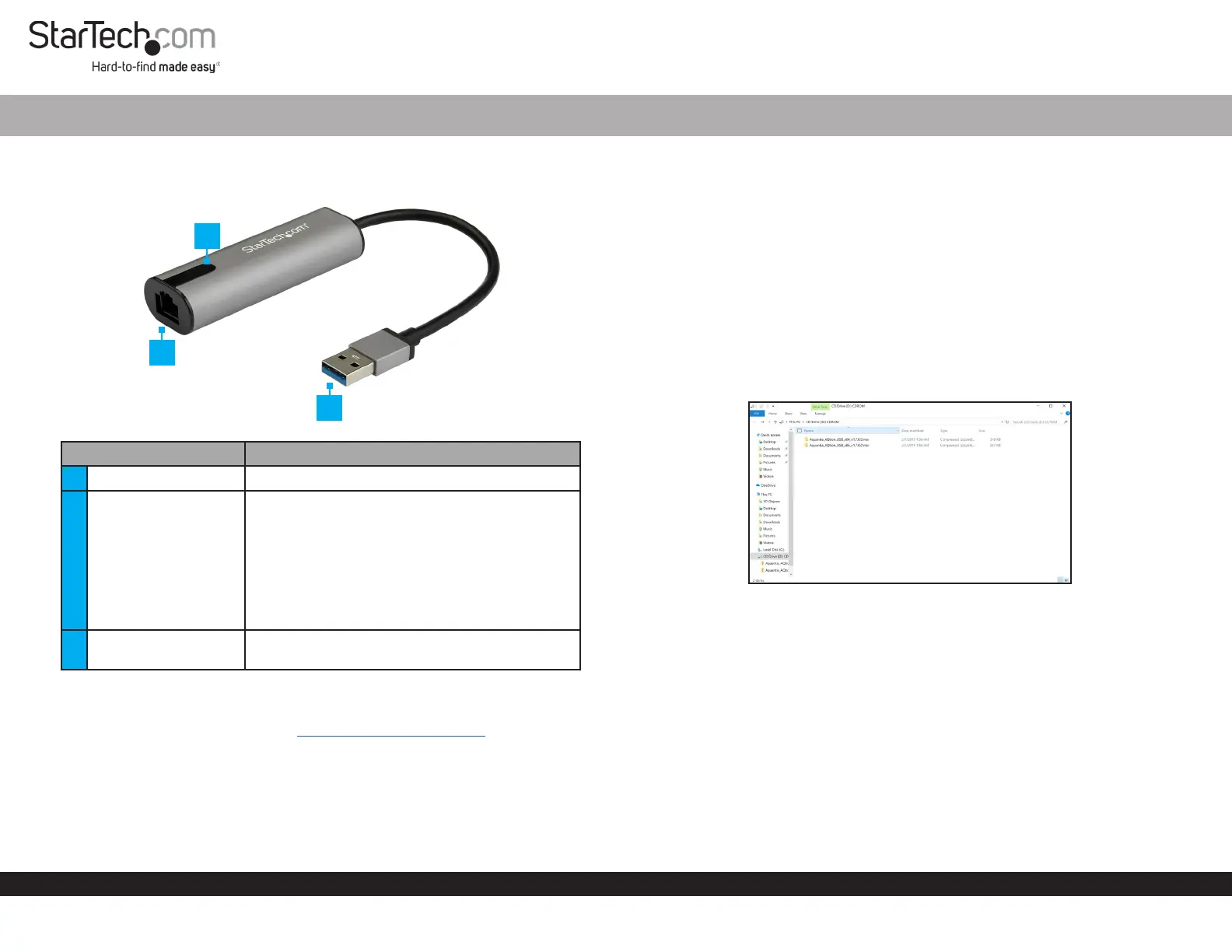
Product Diagram (US2GA30)
Port/LEDFunction
1RJ45 Port• Used to connect to a Network Device.
2LED
• Solid Blue: Indicates that the CAT5/6/6a Cable
is connected to the RJ45 Port with a link speed
of 2.5Gbps.
• Solid Green: Indicates that the CAT5/6/6a
Cable is linked to the RJ45 Port with a link
speed of 1Gbps/100Mbps/10Mbps.
• Flashing LED: Indicates network activity.
• O: Indicates no connection.
3USB-A Connector
• Used to connect the Network Adapter to the
Host Computer.
Requirements
For the latest requirements, please visit www.startech.com/US2GA30.
USB-A™ 2.5Gb NBase-T Network Adapter
Installation
Hardware Installation
1. Connect a CAT5/6/6a Cable to the RJ45 Port on the Network Adapter and to a
Network Device.
2. Connect the USB-A Connector on the Network Adapter to a USB-A port on the
Host Computer.
Driver Installation
1. If the Drivers do not automatically download when you connect the Network
Adapter to the Host Computer, a message that a Virtual CD is loaded will appear.
2. Click on the message, the CD Drive screen will open.
CD Drive screen
3. Click on the folder that is compatible with your Host Computer and run the RTK_
NIC_DRIVER_INSTALLER le to begin the background installation.
1
3
2
Specyfikacje produktu
| Marka: | StarTech.com |
| Kategoria: | Karta sieciowa/adapter |
| Model: | US2GA30 |
Potrzebujesz pomocy?
Jeśli potrzebujesz pomocy z StarTech.com US2GA30, zadaj pytanie poniżej, a inni użytkownicy Ci odpowiedzą
Instrukcje Karta sieciowa/adapter StarTech.com

14 Stycznia 2025
8 Stycznia 2025
28 Grudnia 2024
9 Października 2024
9 Października 2024
9 Października 2024
9 Października 2024
9 Października 2024
9 Października 2024
9 Października 2024
Instrukcje Karta sieciowa/adapter
Najnowsze instrukcje dla Karta sieciowa/adapter
8 Kwietnia 2025
3 Kwietnia 2025
3 Kwietnia 2025
2 Kwietnia 2025
2 Kwietnia 2025
1 Kwietnia 2025
30 Marca 2025
29 Marca 2025
14 Marca 2025
14 Marca 2025