Instrukcja obsługi Wireless Solution WiFi upgrade for G6
Wireless Solution antena telewizyjna WiFi upgrade for G6
Przeczytaj poniżej 📖 instrukcję obsługi w języku polskim dla Wireless Solution WiFi upgrade for G6 (1 stron) w kategorii antena telewizyjna. Ta instrukcja była pomocna dla 27 osób i została oceniona przez 2 użytkowników na średnio 4.1 gwiazdek
Strona 1/1
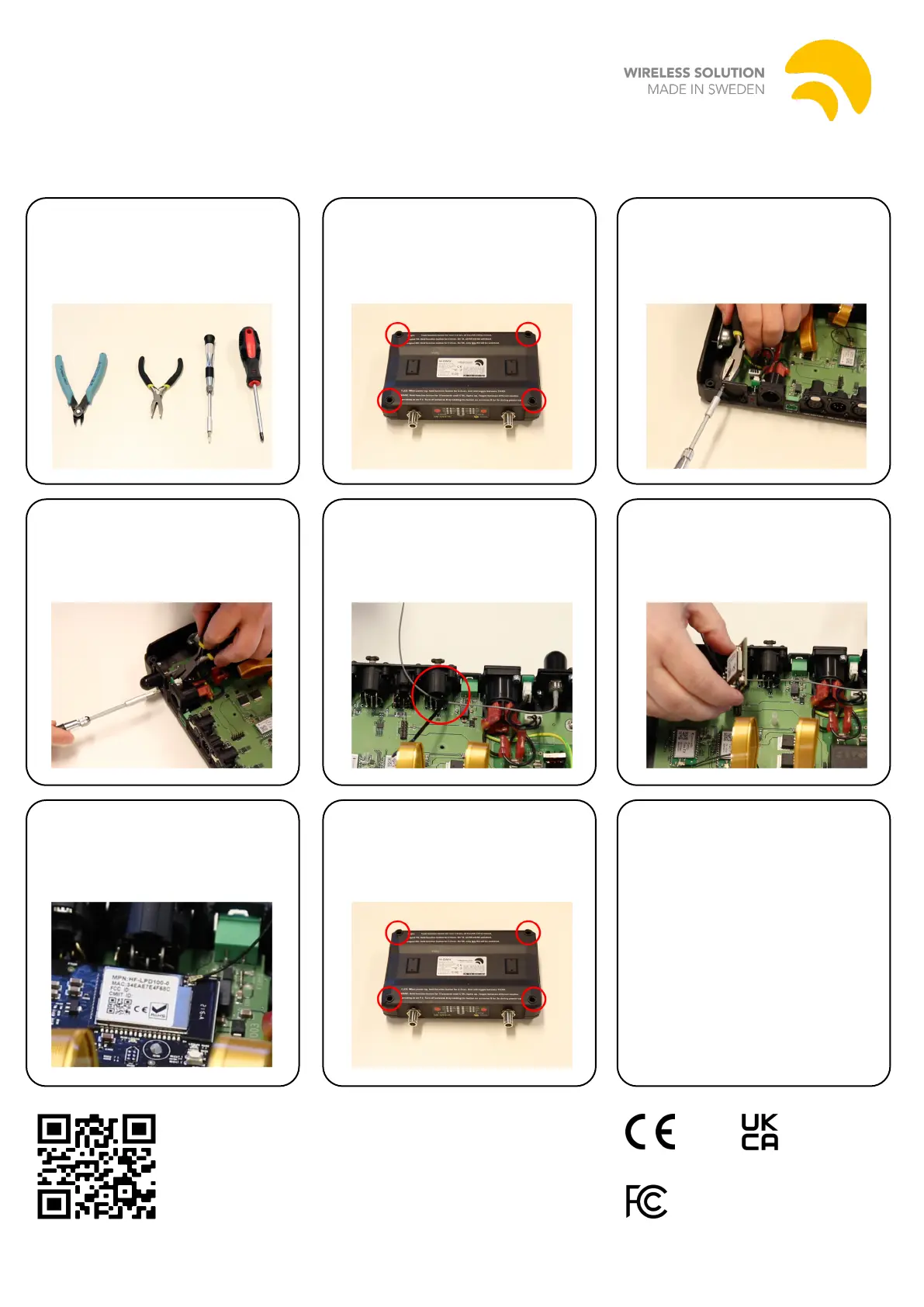
WiFiinstallationinstructions
1.Neededtools:side-cutter,
plier,TorxT10screwdriver,
Philipsscrewdriver.
4.Placetheantennafromthe
insideandfastenitwiththe
screwsandnuts.Usetheplier
andT10screwdrivertotighten.
5.Usethecable-tietofasten
theantennacabletotheXLRto
avoidtheantennatouchingthe
high-voltageparts.
6.Pushthenylonstandoffinto
themountinghole.
MounttheWiFimoduleand
makesureitsnapsintoplace.
2.Unscrewallfourscrews.
Warning:Neveropentheunit
withpowerpluggedin.
3.Removethecoverplate
usingtheT10screwdriverand
theplier.Savethescrewsand
nuts.
7.Connecttheantennacable
totheWiFimodule.
8.Putthetopbackonand
fastenallfourscrews.
ScantheQRcodeforan
installationvideoguide.
FCCID:2ACSVHF-LPD100
WirelessSolutionSwedenAB,Majorebergsvägen2
45175Uddevalla,Swedem
9.Powertheunitupandstart
theW-DMXConguratorapp.
Makesureyourappisof
version1.2.0orlater.
Connecttothedeviceand
chosetoupdatermware.
Iftheapptellsyouthereisno
newrmware,choosetoinstall
anyway.
Aftertheupdateisnished,
yourdeviceisreadytouse.
Specyfikacje produktu
| Marka: | Wireless Solution |
| Kategoria: | antena telewizyjna |
| Model: | WiFi upgrade for G6 |
Potrzebujesz pomocy?
Jeśli potrzebujesz pomocy z Wireless Solution WiFi upgrade for G6, zadaj pytanie poniżej, a inni użytkownicy Ci odpowiedzą
Instrukcje antena telewizyjna Wireless Solution

21 Września 2024
Instrukcje antena telewizyjna
Najnowsze instrukcje dla antena telewizyjna
30 Marca 2025
28 Marca 2025
28 Marca 2025
27 Marca 2025
27 Marca 2025
27 Marca 2025
26 Marca 2025
27 Lutego 2025
27 Lutego 2025
19 Lutego 2025